
Course
Understanding Prompt Engineering
1 hr
232.4K
Most LLM features get tested the same way: try a few inputs, eyeball the outputs, ship it.
You did this with an email writer. Five inputs in a chat window, outputs looked fine. A week later, half your casual-tone emails sound like they were written by a corporate attorney. Nobody caught it because there was no way to catch it. The prompts changed, but those five manual tests didn't come with you.
Promptfoo is an open-source CLI that replaces that process with structured, repeatable evaluations. You define what good output looks like, pick your models, and run every combination automatically.
OpenAI acquired the project in March 2026, and it remains MIT-licensed with support for dozens of providers. Over 350,000 developers use it, including teams at over 25% of Fortune 500 companies.
This tutorial walks you through setting up Promptfoo and building your first eval suite from scratch. We'll use an email writer as the running example, testing it across GPT-5 and Claude Sonnet 4.6, and wiring everything into GitHub Actions by the end.
Before getting into the tool, you need to know how LLM testing works. It's different from testing regular code.
If you've tested a function before, you know the pattern: give it an input, check that the output matches what you expect. LLM outputs don't work that way. The same prompt can produce different text every time you run it, so you can't check for an exact match.
Instead, you check for properties of the output:
That's what an LLM eval does. It runs your prompt against a set of inputs and checks each output against rules you define. Think of it as a test suite for your prompts instead of your code.
Four terms will come up throughout this article:
Without assertions, you're back to "looks good to me." With them, you have a definition of "correct" that runs the same way every time.
Now that you know what an eval is, here's what Promptfoo does with it.
You give Promptfoo three things:
It runs every prompt against every model for every test case and scores the results. One command, promptfoo eval, runs the whole thing.
Say you have one email writing prompt, two models (GPT-5 and Claude Sonnet 4), and three test cases (casual, formal, urgent). Promptfoo runs all six combinations and tells you which ones passed and which ones failed. No more trying each one by hand.
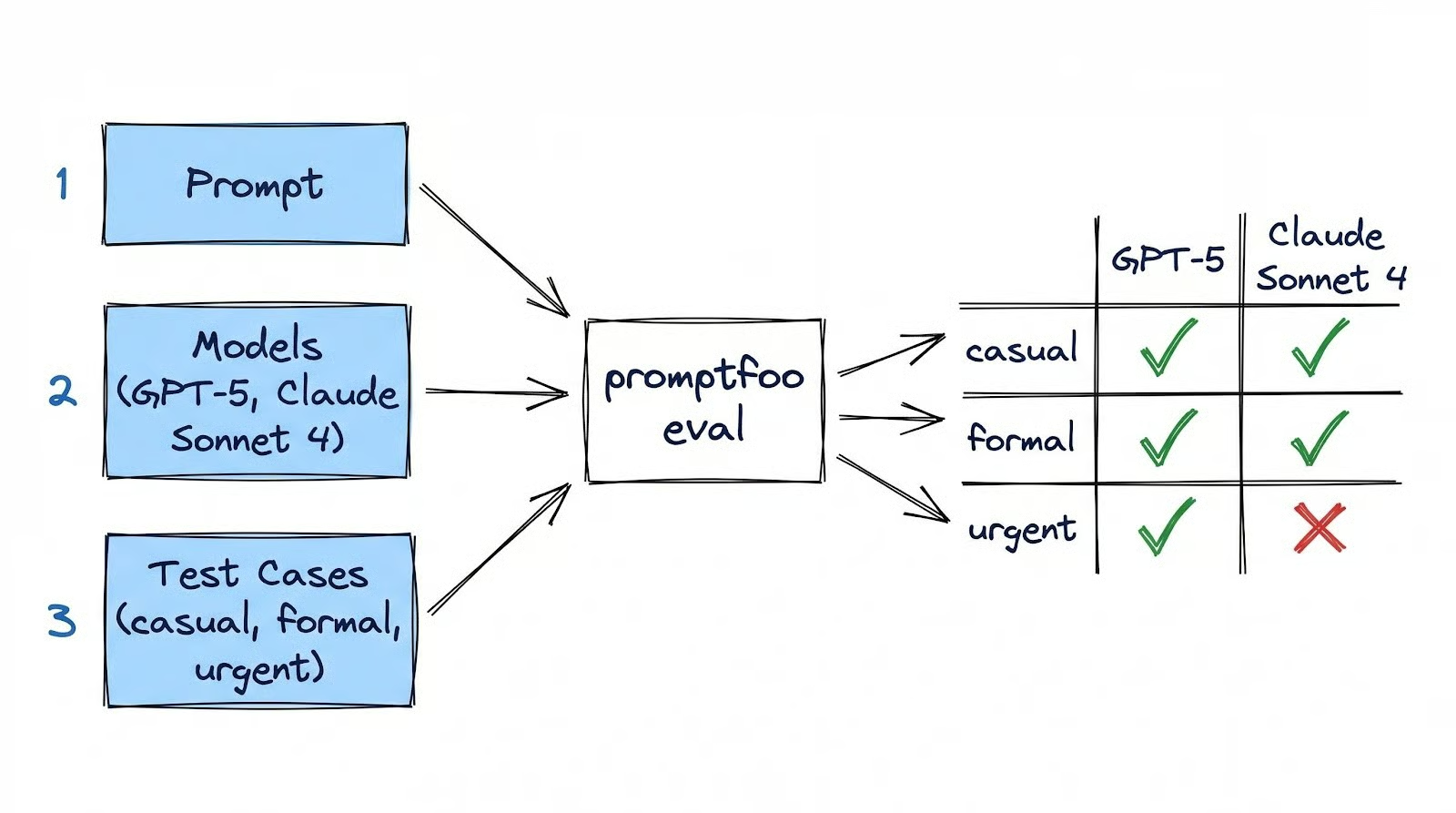
The whole eval lives in a single YAML file called promptfooconfig.yaml that you version-control alongside your code. Promptfoo runs on your machine: your config, results, and cache all stay local. The only external calls are to model APIs like OpenAI or Anthropic, which you'd be making with or without Promptfoo.
Other tools in this space exist, like DeepEval (Python-native, pytest-style), LangSmith (production monitoring for LangChain), and Braintrust (team dashboards). Promptfoo is the best starting point because it's free, runs locally, and gets you from zero to a working eval faster than any of them.
Install Promptfoo globally and initialize a new project:
npm install -g promptfoo
mkdir email-writer-eval
cd email-writer-eval
promptfoo init
The init command walks you through an interactive setup. It asks what you'd like to do (choose "Not sure yet") and which model provider to use (choose "[OpenAI] GPT 5, GPT 4.1, ...").
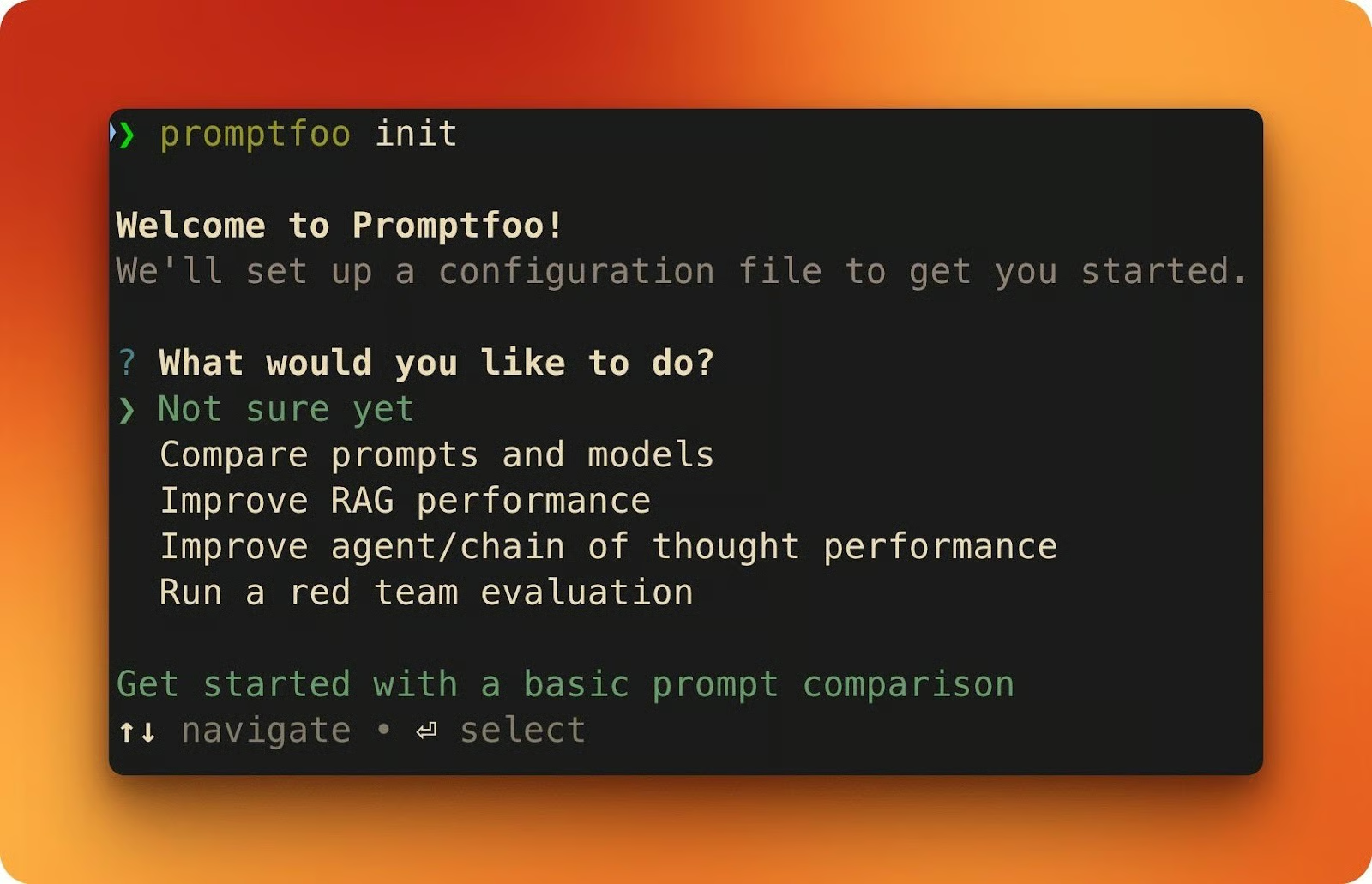
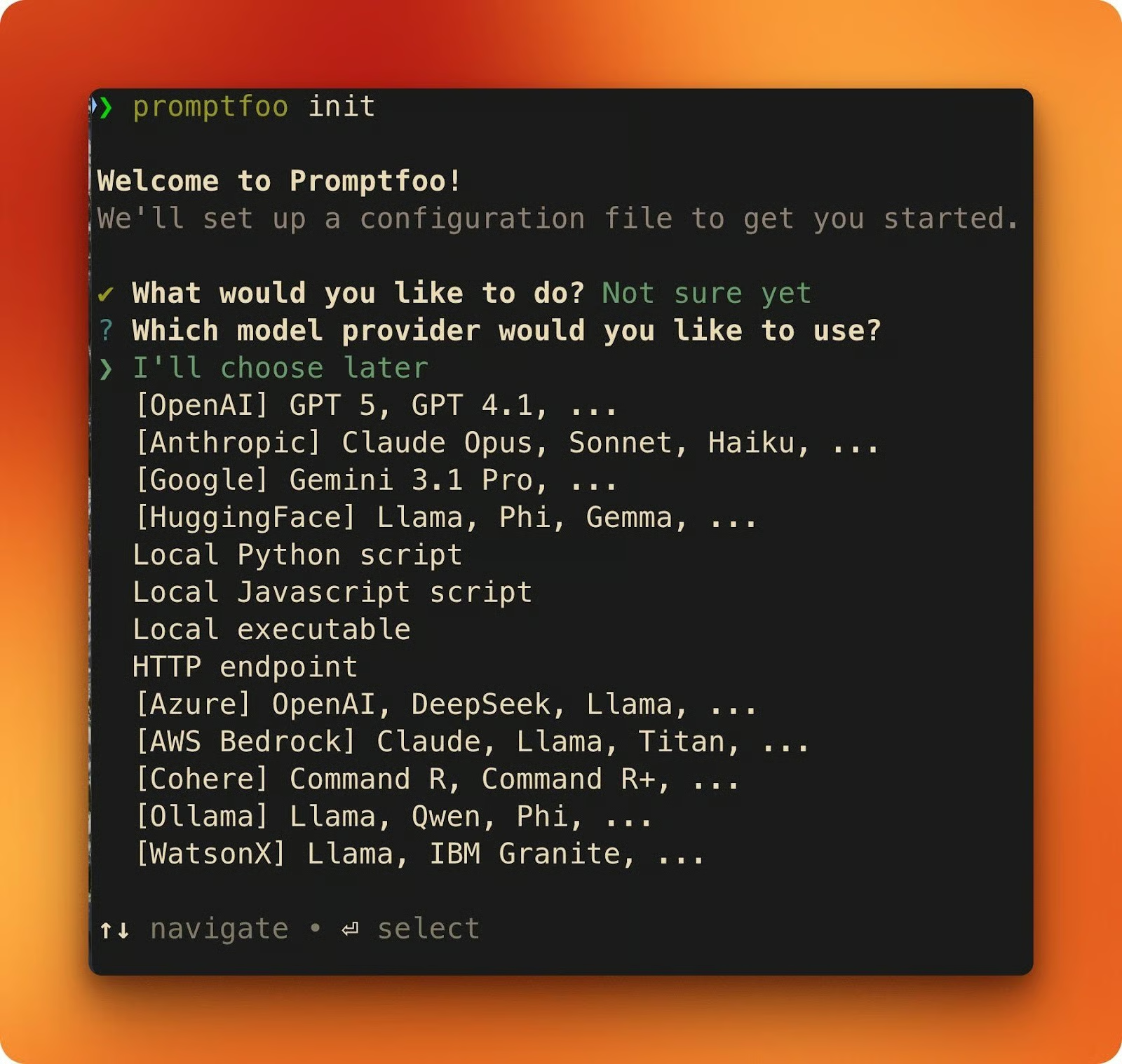
When it finishes, you'll have two files: a sample promptfooconfig.yaml and a README.md.
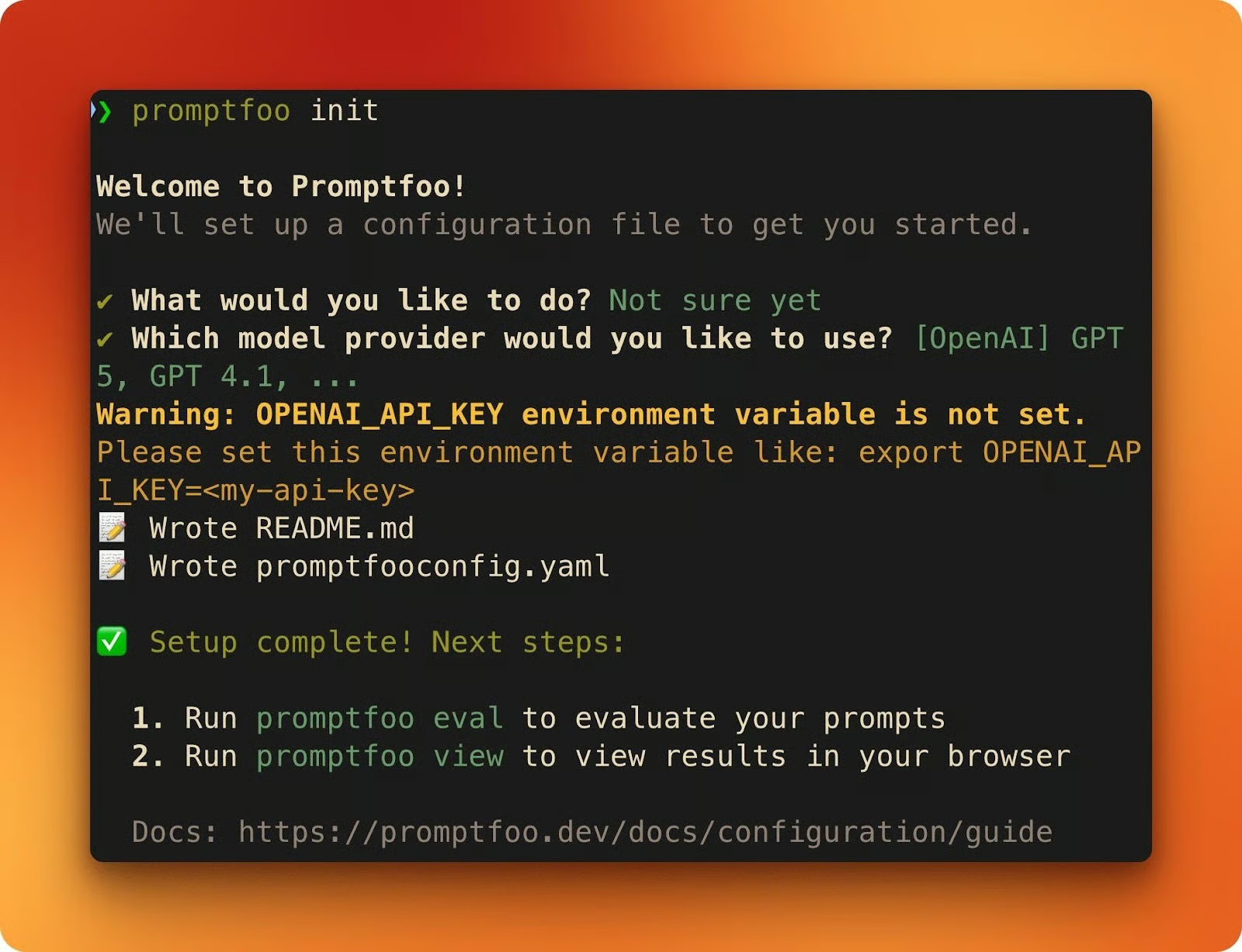
Next, set your API keys. You need at least one to run evals (have both to follow along with this tutorial):
export OPENAI_API_KEY=sk-...
export ANTHROPIC_API_KEY=sk-ant-...
If you only set ANTHROPIC_API_KEY and skip OpenAI, Promptfoo automatically uses Claude as the grading provider for model-assisted assertions like llm-rubric.
Open the generated promptfooconfig.yaml. Every Promptfoo config has three building blocks:
prompts is where your prompt templates go. Double-brace placeholders like {{variable}} get filled from each test case.
providers lists the models you want to test against.
tests defines the inputs and the assertions that decide whether each output passes or fails.
prompts:
  - \"Your prompt template with {{variable}}\"
...

providers:
  - openai:chat:gpt-5
...

tests:
  - vars:
      variable: \"test input\"
    assert:
      - type: contains
        value: \"expected substring\"
This sample config is a starting point. The next section replaces it with a real evaluation and explains the YAML structure in depth.
Here's the task: given bullet points and a tone (casual, formal, or urgent), write an email. You'll build an eval that tests this across two models.
The full config is available as a Gist if you want to see it all at once. We'll build it piece by piece below.
Delete the generated sample and create a new promptfooconfig.yaml. Start with the prompt and providers:
description: \"Email writer evaluation\"

prompts:
  - |
    Draft an email based on these bullet points.
    Match the specified tone throughout the email.

    Bullet points:
    {{bullet_points}}

    Tone: {{tone}}

providers:
  - id: openai:chat:gpt-5
    label: \"GPT-5\"
  - id: anthropic:messages:claude-sonnet-4-6
    label: \"Claude Sonnet 4.6\"
The prompt template has two placeholders: {{bullet_points}} and {{tone}}. Each test case fills these with different values. The label field on each provider gives you readable column headers in the results view instead of raw model IDs.
Next, add a defaultTest block. Assertions inside defaultTest apply to every test case automatically, so you don't repeat them:
defaultTest:
  assert:
    - type: latency
      threshold: 30000
This fails any response slower than 30 seconds. Frontier models like GPT-5 can take 10-20 seconds per request due to reasoning tokens, so the threshold needs room. You set this once, and it covers every test.
Now add the test cases. Each one provides different inputs and its own assertions:
tests:
  - vars:
      bullet_points: |
        - Recap of the design review decisions
        - Next steps: finalize mockups by Thursday
        - Ask if anyone has questions
      tone: \"casual\"
    assert:
      - type: icontains
        value: \"mockups\"
      - type: llm-rubric
        value: \"The email uses a casual tone with contractions and short sentences\"

  - vars:
      bullet_points: |
        - Q1 revenue exceeded targets by 12%
        - New enterprise client onboarded
        - Hiring plan for Q2 approved
      tone: \"formal\"
    assert:
      - type: icontains
        value: \"Q1\"
      - type: llm-rubric
        value: \"The email maintains a formal, professional tone throughout\"

  - vars:
      bullet_points: |
        - API migration deadline is Friday at 5pm
        - Three endpoints still need updating
        - Downtime window is Saturday 2-6am
      tone: \"urgent\"
    assert:
      - type: icontains
        value: \"Friday\"
      - type: llm-rubric
        value: \"The email conveys urgency with direct language and clear action items\"
Each test case pairs two types of assertions.
icontains is a simple string check: did the output include \"mockups,\" case-insensitive? It's fast, free, and doesn't call any API.
llm-rubric sends the output to another LLM and asks it to grade the response against your rubric. It costs tokens, but it catches things string matching can't, like whether an email actually sounds casual.
Run the evaluation:
promptfoo evalThen open the results in your browser:
promptfoo view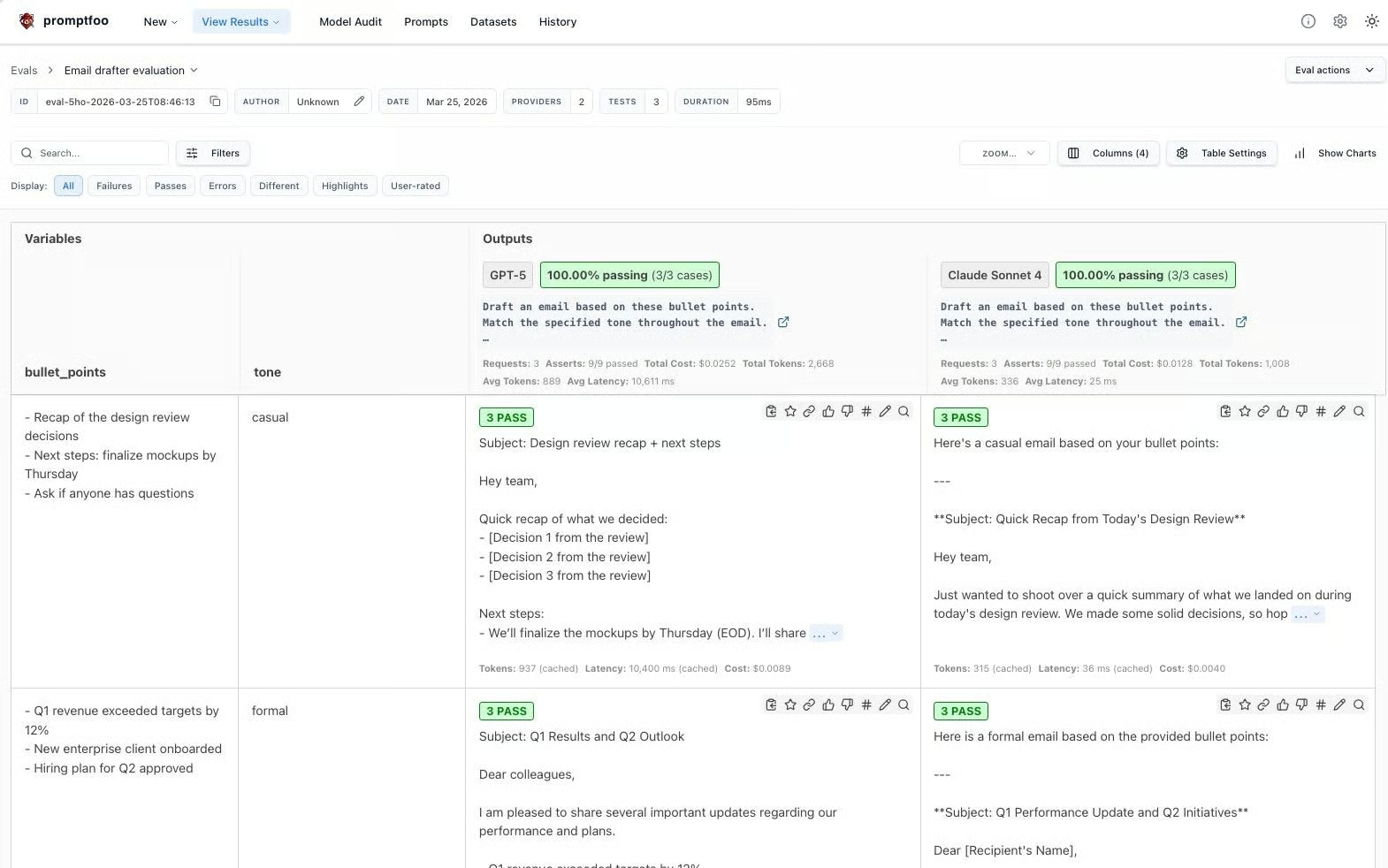
The web UI shows providers as columns and test cases as rows. Each cell shows pass/fail for every assertion, and you can click into any cell to see the full output and grading details.
Promptfoo caches API responses to disk by default (14-day TTL), so re-running the same eval costs nothing. Use --no-cache when you want fresh responses.
The first eval used icontains and llm-rubric. Those are two of many assertion types Promptfoo supports. This section walks through the main categories, and we'll keep adding assertions to the email writer config as we go.
These run locally, cost nothing, and return results instantly.
|
Type |
What it checks |
|
|
Output includes a substring (case-sensitive or not) |
|
|
Output matches a pattern (catch unfilled |
|
|
Output excludes something (template artifacts, refusals, placeholder text) |
|
|
Response arrived under N milliseconds |
|
|
Response costs less than $X |
You've already used icontains and latency. Let's add not-contains to the casual test case. If the model defaults to formal language, it might start with "Dear" instead of something casual like "Hey." Catching that is one line:
- type: not-contains
  value: \"Dear\"
Add this to the casual test case's assert list and re-run. Both models should pass: GPT-5 often opens with "Hey team," and Claude Sonnet 4 does, too. If either had started with "Dear Colleagues," this assertion would flag it instantly.
Every assertion type also supports a not- prefix: not-regex, not-equals, and so on.
These cost tokens, but can judge things that string matching can't. You've already used llm-rubric in the first eval. The rubric you write makes or breaks it.
A vague rubric like "The email sounds professional" tells the grader nothing useful. A specific one gives it something to measure:
- type: llm-rubric
  value: \"The email uses a casual tone: contractions like 'we'll' and 'don't',
    sentences under 20 words, no corporate jargon like 'synergy' or 'circle back',
    and opens with a greeting like 'Hey' or 'Hi team'\"
When you re-run the eval with this rubric, the grader's output gets specific too:
The more specific your rubric, the more consistent and useful the grading becomes.
Promptfoo also ships answer-relevance (did the output address the question?) and similar (cosine similarity against a reference via embeddings), both useful for RAG and search applications.
When built-in types don't cover your logic, write your own. For the email writer, you might want to check that outputs stay within a reasonable length. Here's an inline assertion that passes if the email is between 50 and 200 words:
- type: python
  value: \"50 <= len(output.split()) <= 200\"
Add this to the casual test case and re-run. In my run, both models pass: GPT-5 came in at 54 words, Claude Sonnet 4 at 187. But keep this assertion in mind for the next section, because it didn't pass everywhere.
For more complex checks, put the logic in a separate file:
# assert_length.py
def get_assert(output, context):
    word_count = len(output.split())
    in_range = 50 <= word_count <= 200
    return {
        \"pass\": in_range,
        \"score\": 1.0 if in_range else 0.0,
        \"reason\": f\"Word count: {word_count} (target: 50-200)\"
    }
Reference it in your config with type: python and value: file://assert_length.py. The reason field shows up in the results UI, so you can see exactly why a test passed or failed.
Here's what a real failure looks like.
Add the Python word count assertion to all three test cases and run the full eval across both models. In my case, five of the six combinations passed. Claude Sonnet 4.6 didn’t pass the urgency test case (this may or may not happen on your machine, given the non-deterministic behavior of LLMs).
In that run, the output came in at 207 words, seven over the limit. The llm-rubric actually passed, confirming the email used "urgent, direct language" with "clear actions." The icontains passed too, since "Friday" was in the output.
But the Python word count assertion failed. Claude prepended meta-commentary ("Here is a draft email based on your bullet points with an urgent tone:") before the actual email, pushing the word count over 200.
This is the kind of thing you'd never catch by eyeballing. The email itself read fine: right tone, right content. But the output was too long because the model added text that wasn't part of the email. One assertion caught it, and the eval flagged the whole test case.
The fix could go two ways: adjust the prompt to tell the model not to include preamble, or raise the word limit. Either way, you re-run the eval and check that it passes.
At this point, the casual test case has four assertions: icontains, not-contains, llm-rubric, and the Python word count. Not all of them matter equally. The weight field lets you express that:
assert:
  - type: icontains
    value: \"mockups\"
    weight: 1
  - type: not-contains
    value: \"Dear\"
    weight: 1
  - type: llm-rubric
    value: \"The email uses a casual tone with contractions and short sentences\"
    weight: 2
  - type: python
    value: \"50 <= len(output.split()) <= 200\"
    weight: 0.5
threshold: 0.7
Each assertion's score gets multiplied by its weight, and the test computes a weighted average. The threshold sets the minimum score to pass. Here, the tone rubric counts twice as much as the keyword checks, and the word count counts half.
Re-running the casual test with these weights, both models score 1.0 and pass. But if the llm-rubric had failed (weight 2) while the word count passed (weight 0.5), the weighted score would drop below the 0.7 threshold, and the test would fail. The weights let you tell Promptfoo what you actually care about most.
The config already has two providers, so promptfoo eval tested GPT-5 and Claude Sonnet 4 in a single pass. Open promptfoo view and you see them as separate columns in the results, with every test case scored independently for each model.
In my run of our eval, GPT-5 passed all six assertions across the three test cases. Claude Sonnet 4 passed five but failed the word count on the urgent email.
That's the kind of difference you'd never notice by trying a few prompts manually, but it shows up instantly in the grid. You're comparing scores against the same assertions on the same inputs, not your memory of which model "felt better" last time you tried it.
LLM outputs aren't deterministic, though. The same prompt can produce different results on consecutive runs, and a single pass won't tell you if a model is reliably good or just got lucky. The --repeat flag accounts for this:
promptfoo eval --repeat 3This runs each test case three times per provider. If a model passes the tone assertion twice but fails on the third run, that's a reliability signal you'd miss with a single pass.
Running evals locally works during development, but it depends on whoever changes the prompt remembering to run them. Promptfoo has an official GitHub Action that removes that dependency by running your eval suite on every pull request and posting the results as a comment.
To set it up, create a workflow file in your repo:
mkdir -p .github/workflowsThen create .github/workflows/prompt-eval.yml with the following content:
name: 'Prompt Evaluation'
on:
  pull_request:
    paths:
      - 'prompts/**'
jobs:
  evaluate:
    runs-on: ubuntu-latest
    permissions:
      contents: read
      pull-requests: write
    steps:
      - uses: actions/checkout@v4

      - name: Set up promptfoo cache
        uses: actions/cache@v4
        with:
          path: |
            ~/.promptfoo/cache
            .promptfoo-cache
          key: ${{ runner.os }}-promptfoo-${{ hashFiles('prompts/**') }}-${{ github.sha }}
          restore-keys: |
            ${{ runner.os }}-promptfoo-${{ hashFiles('prompts/**') }}-
            ${{ runner.os }}-promptfoo-

      - name: Run promptfoo evaluation
        uses: promptfoo/promptfoo-action@v1
        with:
          openai-api-key: ${{ secrets.OPENAI_API_KEY }}
          github-token: ${{ secrets.GITHUB_TOKEN }}
          config: 'promptfooconfig.yaml'
          cache-path: '.promptfoo-cache'
Before this works, you need to add your OPENAI_API_KEY (and optionally ANTHROPIC_API_KEY) as repository secrets in your GitHub repo under Settings > Secrets and variables > Actions.
The paths filter means the action only triggers when someone changes files in prompts/. The checkout step is required because the action uses git internally to diff prompt files between branches. It runs the full eval suite and posts a PR comment with the results and a link to the web viewer.
For more control over pass/fail logic, you can parse the JSON output directly:
promptfoo eval -c config.yaml -o results.json
FAILURES=$(jq '.results.stats.failures' results.json)
if [ \"$FAILURES\" -gt 0 ]; then exit 1; fi
The workflow from here:
Prompt changes get the same test-before-merge treatment as code changes.
The email writer from the intro still has a tone problem, but now there's a test that catches it before users do. You started with a blank YAML file and ended with an eval suite running across two models in CI.
The same approach applies to any LLM feature you build, whether it's a chatbot, a summarizer, or a classification pipeline. As long as you can write an assertion for what "good output" means, you can test for it automatically instead of eyeballing it.
When you're ready to go further, the Promptfoo docs cover a few areas worth looking at:
Red teaming: promptfoo redteam run scans for prompt injection and jailbreaks across dozens of attack plugins
Custom Python providers: Wrap any internal model or fine-tuned endpoint with file://my_provider.py
CSV test data: Scale your test suite with file://tests.csv when inline YAML gets unwieldy
If you want to improve the prompts you're testing against, our Prompt Engineering with the OpenAI API course covers many important techniques you can apply to any kind of AI development.
Prompt Engineering Courses
Course
Course
Course
blog
Matt David
3 min
Tutorial
Abid Ali Awan
9 min
Tutorial
Bexruz (Bex) Tuychiev
15 min
Tutorial
Abid Ali Awan
12 min
Tutorial
Maria Eugenia Inzaugarat
13 min
code-along
Andrea Valenzuela