Lernpfad
Grundlagen der KI
10 Std.
Code an ein Modell zu senden, ist der einfache Teil. Die eigentliche Arbeit passiert drumherum: festlegen, welche Dateien gelesen werden dürfen, die angeforderten Tool-Calls ausführen, erkennen, wann Schluss ist, und entscheiden, wie viel Reasoning du einkaufst.
Claude Opus 5 macht diese letzte Entscheidung explizit. Der effort-Parameter hat fünf Stufen, und Anthropic behauptet, mehr Einsatz lohnt sich genau bei der Arbeit, die ein Coding-Agent erledigt. Das ist leicht gesagt und schwer geprüft, also wollte ich eine enge Frage beantworten: Bei einem echten Bug mit Tests, die klar bestehen oder scheitern — sorgt mehr Effort für die bessere Reparatur?
Um das herauszufinden, bauen wir einen kleinen Bugfixing-Agenten und lassen dieselbe Aufgabe auf jeder Effort-Stufe laufen. Unterwegs behandeln wir:
Aufruf von claude-opus-5 und Parsen einer Antwort, die mit einem Thinking-Block beginnt
Steuern der Reasoning-Tiefe mit effort und sinnvolles Dimensionieren von max_tokens
Ausführen einer Multi-Turn-Tool-Schleife, die Thinking-Blocks und Tool-Fehler übersteht
Rückgabe eines validierten Pydantic-Reports statt Fließtext
Messen von Erfolg, Tokens, Latenz und Kosten über alle fünf Effort-Level
Reduzieren wiederholter Input-Kosten mit Prompt-Caching innerhalb eines Runs
Vorweg das Ende: Bei dieser Aufgabe hat die günstigste Einstellung den Bug in jedem Durchlauf behoben, und keine höhere Stufe war besser. Dieses Ergebnis ist spezifisch für dieses Repository; wertvoller ist das Test-Rig, das es erzeugt hat.
Der Agent nimmt einen Bugreport und kontrollierten Zugriff auf ein kleines Python-Repository, dann arbeitet er die Aufgabe ab: Dateien auflisten, relevante lesen, die Suite ausführen, patchen, erneut ausführen und berichten.
Claude fasst das Dateisystem nie an. Es gibt einen Tool-Request mit Namen und JSON-Argumenten aus, und unser Python-Code entscheidet, ob er ausgeführt wird und was zurückkommt. Diese Grenze ist das gesamte Sicherheitsmodell — behalte das im Kopf, wenn der Agent so wirkt, als handle er eigenständig.
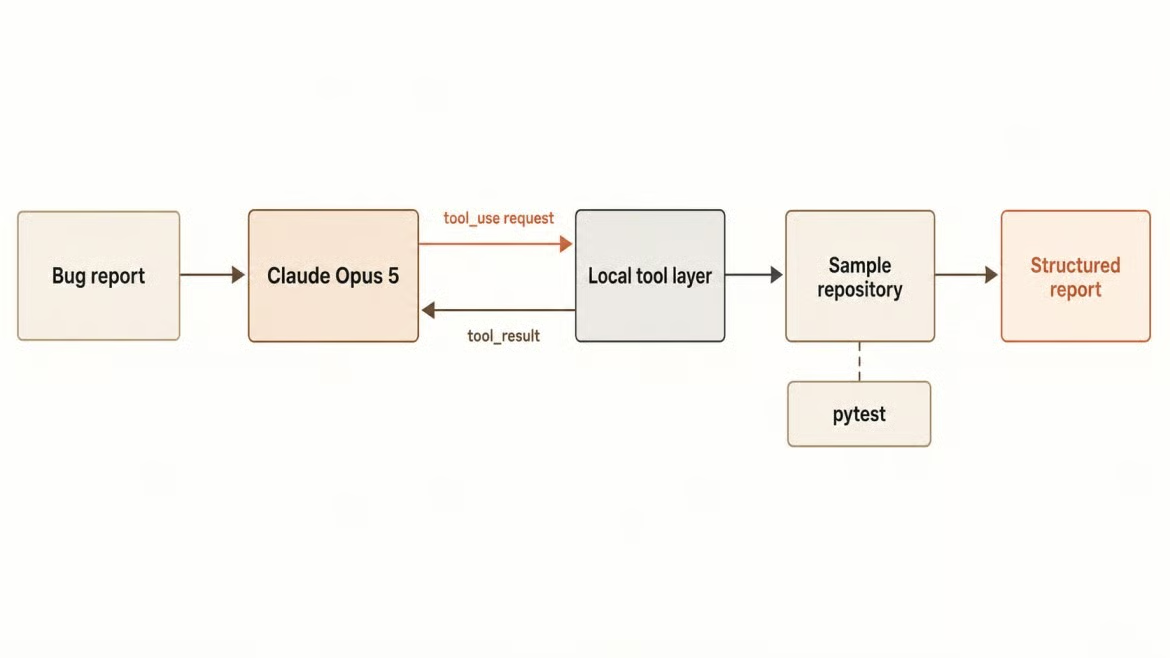
Bugreport fließt durch kontrollierte Tools. Bild: Autor.
Du brauchst Python 3.10 oder neuer, einen API-Schlüssel mit Zugriff auf claude-opus-5, Git zum Zurücksetzen des Beispiel-Repos und genug pytest-Erfahrung, um einen Fehler zu lesen. Das fertige Projekt liegt auf GitHub, falls du es am Stück lesen willst; die folgenden Abschnitte bauen es Schritt für Schritt auf.
git clone https://github.com/KhalidAbdelaty/claude-opus-5-api-tutorial.git
cd claude-opus-5-api-tutorial
python -m venv .venv
source .venv/bin/activate   # Windows: .venv\Scripts\activate
pip install -r requirements.txt
Kopiere .env.example nach .env und trage deinen Schlüssel ein. Der Schlüssel gehört in alles, was du daraus baust, serverseitig — niemals in den Request-Body und nie in Logs.
# agent/config.py
MODEL = "claude-opus-5"

PRICE_INPUT = 5.00
PRICE_OUTPUT = 25.00
PRICE_CACHE_WRITE_5M = 6.25
PRICE_CACHE_READ = 0.50

MAX_TOKENS = 32_000
MAX_ITERATIONS = 10
Diese vier Preise werden später wichtig. Alles zum Basis-Input-Satz zu verrechnen, unterschätzt Cache-Writes um ein Viertel und überschätzt Cache-Reads um den Faktor zehn — genau die Art Fehler, die ein Benchmark besser aussehen lässt, als er war.
Ein fairer Vergleich braucht einen Bug, der jedes Mal gleich fehlschlägt, also kam das Fixture vor dem Agenten. Das Beispiel-Repo ist ein Billing-Service mit einem gemeinsamen Datums-Helper, einem Subscriptions-Modul und einem Invoices-Modul. Der Helper dokumentiert ein Verhalten und implementiert ein anderes.
# billing/timeutils.py
def days_between(start: datetime, end: datetime) -> int:
    """Return the number of days from start to end, counting a partial day as a full day.

    Billing treats any remaining fraction of a day as a whole day, so a customer
    with four hours left has one day remaining, not zero.
    """
    delta = end - start
    return delta.days
timedelta.days schneidet ab, sodass zehn verbleibende Stunden Testphase als null Tage gemeldet werden. Zwei Module rufen diesen Helper auf, daher zeigt sich ein Defekt als zwei scheinbar unabhängige Fehlschläge: test_trial_active_on_final_day sperrt Kund:innen zu früh aus, und test_prorated_credit_counts_partial_day kürzt eine Erstattung um einen Tag.
Der Bugreport erwähnt nur das erste Symptom, wie ein Support-Ticket. Es gibt auch eine Falle: is_trial_active so zu patchen, dass es null akzeptiert, lässt den gemeldeten Test bestehen und den Invoice-Test scheitern — ein flacher Fix ist also messbar. Die Basis ist zwei Fails und vier Passes, per Git committet, damit git checkout -- . es zwischen Runs wiederherstellt.
Vor den Tools prüfen wir Authentifizierung und Response-Parsing. Die Messages API braucht einen Modell-String, ein erforderliches max_tokens und ein Messages-Array.
from anthropic import Anthropic
from dotenv import load_dotenv

load_dotenv()
client = Anthropic()

response = client.messages.create(
    model="claude-opus-5",
    max_tokens=1024,
    messages=[{"role": "user", "content": "A pytest assertion fails with: assert 0 == 1. What should I check first?"}],
)

print([block.type for block in response.content])
text = next((b.text for b in response.content if b.type == "text"), "")
Dieser erste print ist der Punkt der Übung. Er gibt ['thinking', 'text'] zurück, weil Thinking standardmäßig aktiv ist und der Thinking-Block zuerst kommt.

Erster Call liefert Thinking, dann Text. Bild: Autor.
Jeder Code, der auf response.content[0].text zugreift, wirft bei Opus 5 einen AttributeError. Also nach Block-Typ filtern. Und wenn du schon dabei bist, lass temperature, top_p und top_k weg, denn Nicht-Default-Werte liefern bei diesem Modell einen 400er.
Thinking und Effort werden oft verwechselt. Thinking bedeutet, ob das Modell vor der Antwort begründet — was der erste Call gezeigt hat. Effort steuert, wie viel Reasoning es betreibt, über alle Output-Tokens hinweg, inklusive Tool-Calls. Die Unterabschnitte unten decken die Stufung, die Token-Decke, auf die sie trifft, und die eine Kombination, die die API ablehnt.
Effort wird in output_config gesetzt, ohne Beta-Header.
response = client.messages.create(
    model="claude-opus-5",
    max_tokens=2048,
    output_config={"effort": "xhigh"},  # low | medium | high | xhigh | max
    messages=[{"role": "user", "content": bug_report}],
)
Der API-Standard ist high, und "high" explizit zu setzen, ist identisch zum Weglassen. Anthropic empfiehlt für agentisches Coding den Start bei xhigh und weist darauf hin, dass low und medium bei Opus 5 stärker sind als bei früheren Opus-Modellen. Die Guidance warnt auch, dass max einfache Aufgaben überdenkt — das war für mich die interessanteste Messung.
Wie erwähnt, umfasst max_tokens das Reasoning wie auch die Antwort. Ein Wert, der für ein Modell ohne Thinking getuned ist, schneidet Opus 5 mitten in der Aufgabe ab. Außerdem gibt es eine Stolperfalle.
client.messages.create(model="claude-opus-5", max_tokens=32000, messages=[...])
# ValueError: Streaming is required for operations that may take longer than 10 minutes.
Die SDKs verweigern einen Non-Streaming-Request oberhalb von 21.333 max_tokens. Das ist Client-seitige Validierung, kein API-Gesetz. Die Lösung ist Streaming: Die Schleife ruft client.messages.stream() auf und liest get_final_message() — und dieselben 32.000 gehen durch. Ich habe mich dafür entschieden, weil es Raum für höhere Effort-Level lässt.
Du kannst Thinking ausschalten, aber nur bei high oder darunter. In Kombination mit xhigh oder max wird es strikt abgelehnt.
effort=high  accepted, blocks=['text']
effort=xhigh HTTP 400: output_config.effort 'xhigh' is not supported when thinking
             is disabled on this model. Use effort 'high' or below, or enable thinking.
Deaktiviertes Thinking oberhalb von high abgelehnt. Bild: Autor.
Beachte die Blockliste beim akzeptierten Call: nur ['text'], der Thinking-Block fehlt. Den Effort zu senken ist ohnehin die sicherere Kostenkontrolle, daher blieb Thinking bei mir an.
Tools machen aus einem Modell einen Agenten — und sie sind auch der Punkt, an dem ein Agent nicht mehr sicher ist. Jede Definition besteht aus Name, Beschreibung und einem JSON-Input-Schema, und jede kostet bei jedem Request Input-Tokens. Ich habe es bei fünf Tools belassen, nach Schadpotenzial gruppiert.
list_files und search_code helfen dem Modell, die relevante Datei zu finden, ohne das ganze Repo in den Prompt zu kleben. read_file holt eine Datei über einen Repo-relativen Pfad — hier sitzen die Checks.
def _resolve(relative_path: str) -> Path:
    """Resolve a repository-relative path, refusing anything outside the repo."""
    candidate = Path(relative_path)
    if candidate.is_absolute():
        raise ToolError("Absolute paths are not allowed.")

    resolved = (REPO_ROOT / candidate).resolve()
    if resolved != REPO_ROOT.resolve() and REPO_ROOT.resolve() not in resolved.parents:
        raise ToolError("Path escapes the repository.")
    return resolved
Erst auflösen, dann vergleichen, sonst läuft ../../.ssh/id_rsa direkt aus deinem Sandbox-Verzeichnis. Zurückgelieferte Dateien sind auf 8.000 Zeichen begrenzt, weil jedes Tool-Ergebnis bei jedem späteren Request wieder mitgeschickt wird — und du jedes Mal dafür zahlst.
run_tests nimmt keine Argumente. Der Befehl ist in der Konfiguration fix, das Modell kann also keinen beliebigen Shell-Befehl anfordern.
def run_tests() -> str:
    completed = subprocess.run(
        [sys.executable, "-m", "pytest", "tests", "-q", "--no-header", "--tb=short"],
        cwd=REPO_ROOT, capture_output=True, text=True, timeout=120,
    )
    output = (completed.stdout + completed.stderr).strip()
    return f"exit_code: {completed.returncode}\n{output[:3000]}"
Eine Allowlist mit einem Eintrag ist die stärkste denkbare Allowlist. Wenn du später mehr brauchst, füge sie als eigene benannte Tools hinzu, nicht als command-Argument.
Für Schreibzugriffe verwende ich exakte String-Ersetzung statt Unified Diff, weil Diffs an Whitespace scheitern und Turns verschwenden. Das Tool lehnt Nicht-Python-Dateien ab, deckelt die Patch-Größe und verweigert Mehrdeutigkeit.
occurrences = source.count(old_text)
if occurrences == 0:
    raise ToolError("old_text was not found in the file. Read the file and retry.")
if occurrences > 1:
    raise ToolError(f"old_text appears {occurrences} times. Include more context.")
Diese Fehler gehen als Tool-Ergebnisse an Claude zurück, statt die Schleife zu crashen; das Modell liest sie und versucht es mit mehr Kontext erneut.
Ist alles vorbereitet, ist die Schleife kurz: Aufgabe mit Tool-Definitionen senden, die zurückgegebenen Blöcke prüfen, Gewünschtes ausführen, Ergebnisse zurücksenden, und wiederholen, bis das Modell nicht mehr fragt.
for iteration in range(1, max_iterations + 1):
    with client.messages.stream(
        model=MODEL,
        max_tokens=32_000,
        system=SYSTEM_PROMPT,
        tools=TOOLS,
        output_config={"effort": effort},
        output_format=RepairReport,
        cache_control={"type": "ephemeral"},
        messages=messages,
    ) as stream:
        response = stream.get_final_message()

    usage.add(response.usage)
    messages.append({"role": "assistant", "content": response.content})

    if response.stop_reason != "tool_use":
        break

    tool_results = []
    for block in response.content:
        if block.type == "tool_use":
            output, is_error = execute(block.name, dict(block.input or {}))
            tool_results.append({
                "type": "tool_result",
                "tool_use_id": block.id,
                "content": output,
                "is_error": is_error,
            })
    messages.append({"role": "user", "content": tool_results})
Drei Zeilen hier tragen die Logik. response.content komplett anzuhängen, statt nur die interessierenden Blöcke, erhält thinking und redacted_thinking; filterst du sie heraus, startet das Modell sein Reasoning nach jedem Tool-Ergebnis neu. tool_result-Blöcke müssen zuerst in der User-Message stehen, weil Text davor einen 400er erzeugt. Und is_error signalisiert Claude einen Tool-Fehlschlag — besser als ein stiller Leerstring.
Der System-Prompt bleibt in jedem Run fix, damit der Vergleich etwas bedeutet. Er weist das Modell an, vor dem Editieren zu untersuchen, die Ursache statt nur das Symptom zu finden, die kleinstmögliche Änderung zu machen und das Ausführen der Suite als Teil der Aufgabe zu betrachten. Was fehlt, ist "Prüfe deine Arbeit doppelt". Opus 5 verifiziert sich selbst; laut Anthropic solltest du solche Instruktionen beim Migrieren entfernen, weil sie Latenz und Tokens kosten, ohne den Patch zu verbessern.
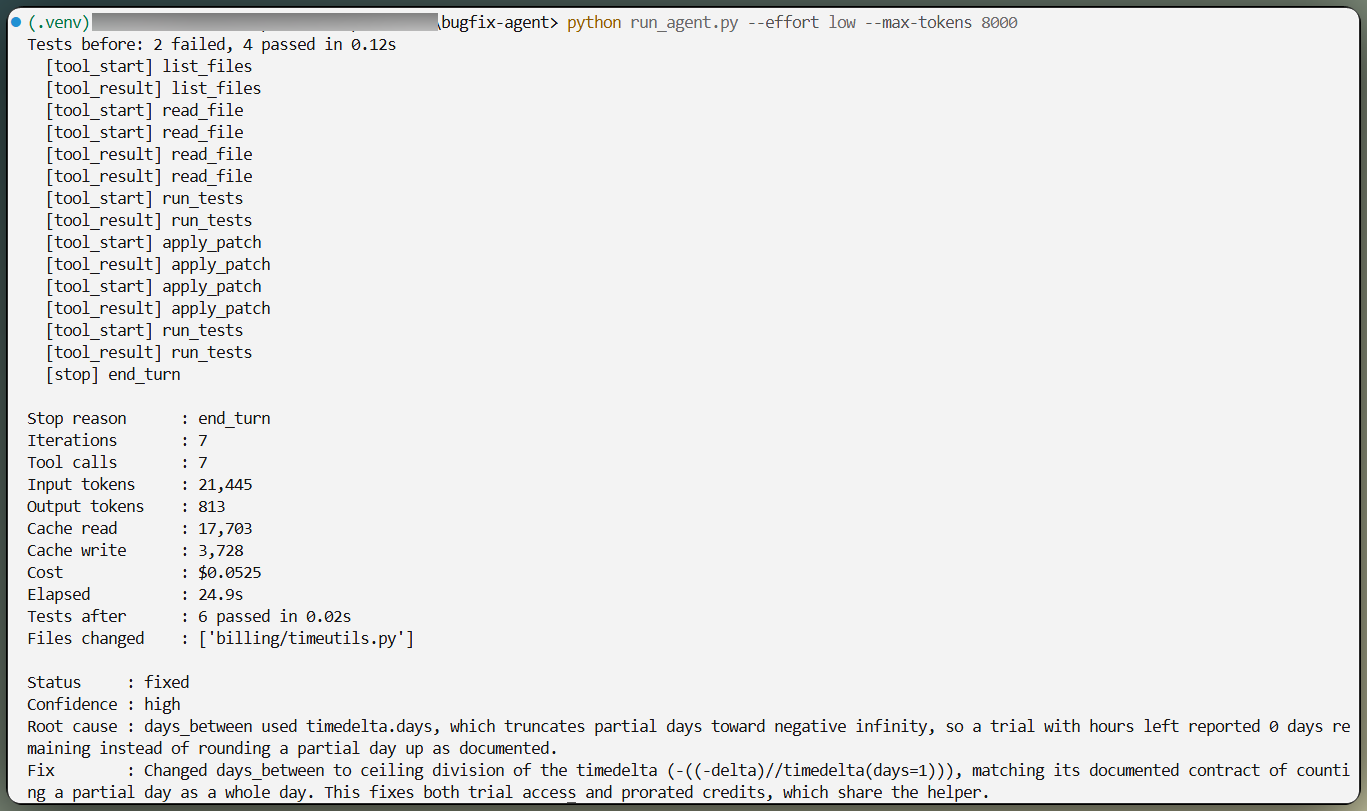
Agent untersucht, patcht, dann laufen die Tests erneut. Bild: Autor.
Fließtext reicht für einen Run. Für einen Benchmark mit vielen Vergleichen will ich ein typisiertes Objekt, also übergibt die Schleife ein Pydantic-Modell als output_format, und das SDK macht daraus ein JSON-Schema mit eingeschränktem Decoding.
class RepairReport(BaseModel):
    status: Literal["fixed", "partial", "not_fixed"]
    root_cause: str
    files_inspected: list[str]
    files_changed: list[str]
    fix_summary: str
    tests_before: str
    tests_after: str
    remaining_risks: list[str]
    confidence: Literal["low", "medium", "high"]

    @field_validator("status", "confidence", mode="before")
    @classmethod
    def _normalize_case(cls, value):
        """Enum capitalization is not guaranteed, so fold it before validating."""
        return value.strip().lower() if isinstance(value, str) else value
Der Validator ist sein Geld wert. Strukturierte Outputs garantieren keine Enum-Großschreibung, also kann ein Schema, das "high" erwartet, "High" bekommen — ohne Fehler und ohne speziellen Stop-Grund. Strenges Literal-Validieren würde dann eine im Grunde korrekte Antwort ablehnen.
Latenz und Kosten gehören nicht in dieses Schema. Das Modell berichtet, was es schlussfolgert; der Runner misst, was passiert, indem er pytest erneut ausführt und git diff liest. Über diese Trennung war ich später froh — die Benchmark-Zahlen machen klar, warum.
Darum geht es in diesem Tutorial: derselbe Bug, derselbe Prompt, dieselben Tools bei low, medium, high, xhigh und max. Output ist nicht deterministisch, und Sampling-Parameter werden auf diesem Modell abgelehnt, daher ist Wiederholen der einzige Hebel.
Jeder Run startet vom sauberen Basis-Commit und misst die Suite davor und danach. Bugreport, System-Prompt, Tool-Definitionen, Iterationslimit und max_tokens sind überall identisch; nur der Effort-String wechselt. Ich habe jede Stufe dreimal laufen lassen.
Ein Budget-Guard legt sich um alles, summiert nach jedem Request die echten Vier-Satz-Kosten und stoppt am Limit. Agent-Schleifen sind ein schneller Weg, zu viel auszugeben — ein von dir gesetzter Stopp ist besser, als die Zahl hinterher zu entdecken.
Hier die Durchschnitte über drei Runs pro Level, gemessen am 26. Juli 2026.
|
Effort |
Suite bestanden |
Tool-Calls |
Output-Tokens |
Zeit bis zum ersten Output |
Gesamtzeit |
Kosten pro Run |
|
|
3/3 |
8.0 |
827 |
2,9s |
24s |
$0.0387 |
|
|
3/3 |
8.0 |
1.008 |
2,7s |
26s |
$0.0466 |
|
|
3/3 |
10.0 |
1.352 |
2,9s |
29s |
$0.0659 |
|
|
3/3 |
11,3 |
1.546 |
2,8s |
35s |
$0.0778 |
|
|
2/3 |
8,3 |
1.787 |
6,6s |
38s |
$0.0762 |
Jede Stufe, die sich mit dem Repository beschäftigte, fand dieselbe Root Cause im gemeinsamen Datums-Helper und behob sie mit rund vier Zeilen in einer Datei. Keine ist in die Falle getappt und hat stattdessen die Trial-Prüfung gepatcht. Die gesamten fünfzehn Runs kosteten $0,92.
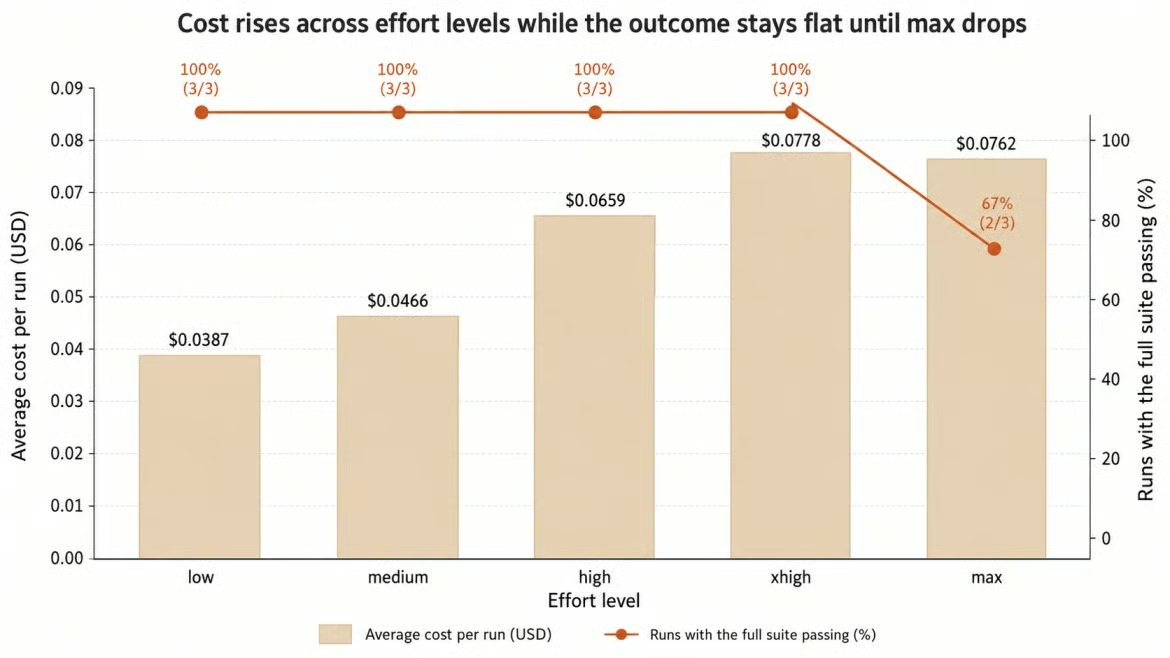
Kosten steigen, das Ergebnis nicht. Bild: Autor.
Ehrlich gelesen war die Aufgabe nicht schwer genug, um die Spitze der Leiter von der Basis zu trennen. Von low auf xhigh zu gehen, hat die Kosten verdoppelt und elf Sekunden addiert — bei identischem Ergebnis. In der Praxis würde ich low fahren und die Differenz in Testabdeckung stecken.
Die max-Zeile braucht eine Erklärung. Einer der drei Runs gab schon im ersten Turn einen schema-validen Report ohne einen einzigen Tool-Call zurück — mit root_cause = "b0" und leerer fix_summary. Pydantic akzeptierte es, weil die Form stimmte. Tests waren unberührt. Ohne diesen Ausreiß behoben die anderen beiden max-Versuche den Bug bei 12,5 Tool-Calls und $0,1112 pro Run — etwa dreimal so teuer wie low.
Dieser Fehlschlag ist für mich lehrreicher als die Tabelle. Ein Schema garantiert Struktur, nicht Substanz. Eine Anwendung, die report.status vertraut, hätte hier einen "partial"-Erfolg geloggt, obwohl nichts passiert ist. Der Runner hat es gefangen, weil er pytest ausgeführt hat, statt dem Modell zu glauben. Wenn du eines aus diesem Artikel mitnimmst, dann das. Und weil deine Aufgabe nicht meine ist, sieh das alles als Methode, nicht als Ergebnis.
Caching macht die Schleife günstig und wirkt innerhalb eines Runs, nicht über Effort-Level hinweg. Ein geänderter Effort-Wert invalidiert gecachte Präfixe, daher zahlt jede Stufe ihren eigenen Cache-Aufbau; ein warmer Cache wird nicht übernommen. Innerhalb eines Runs ist es anders, weil System-Prompt und Tool-Definitionen stabil bleiben, während die Historie wächst.
Ein top-level cache_control-Feld schaltet automatisches Caching ein: Der Breakpoint sitzt am letzten cachebaren Block und rückt mit dem Verlauf nach vorn.
response = client.messages.create(
    model="claude-opus-5",
    max_tokens=2048,
    system=SYSTEM_PROMPT,
    tools=TOOLS,
    cache_control={"type": "ephemeral"},
    messages=messages,
)
Zwei aufeinanderfolgende Turns zeigen den Effekt klar:
turn 1: uncached_input=2  cache_write=1231  cache_read=0     output=26
turn 2: uncached_input=2  cache_write=111   cache_read=1231  output=108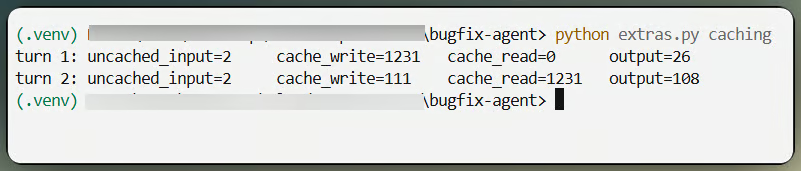
Gecachter Präfix im nächsten Turn gelesen. Bild: Autor.
Das stabile Präfix hat 1.231 Tokens, klar über dem Cache-Minimum. Im zweiten Turn wird es zu einem Zehntel des Input-Satzes gelesen, während nur das neue Tool-Ergebnis geschrieben wird. Über einen kompletten xhigh-Run kamen rund 32.600 von ca. 36.200 Input-Tokens aus dem Cache. Für Output-Tokens bringt Caching nichts.
Das für mich nützlichste Muster: Starte den Agenten mit Read-only-Tools und gib Schreibzugriff erst, nachdem er das Problem diagnostiziert hat. Naiv umgesetzt, müsste man das tools-Array ändern — es steht aber im gecachten Präfix und invalidiert sonst den gesamten Verlauf.
Mid-Conversation-Tool-Änderungen lösen das. Deklariere alle Tools vorab, damit das Array unverändert bleibt, und nutze tool_addition und tool_removal, um einzelne Tools ab einem Punkt an- oder abzukündigen. Die Blöcke reisen in einer role: "system"-Message, und eine System-Message darf nicht der erste Eintrag in messages sein. Beides findet man nicht dort, wo man es erwartet — ich habe es genauso herausgefunden wie du es dir vorstellst.
withhold_patch = {
    "role": "system",
    "content": [{"type": "tool_removal",
                 "tool": {"type": "tool_reference", "name": "apply_patch"}}],
}
messages = [{"role": "user", "content": task_prompt}, withhold_patch]
Später tool_removal gegen tool_addition tauschen, und das Tool ist wieder da. In meinem Run hat das Modell fünf Turns read-only untersucht, mit seiner Diagnose gestoppt und erst dann apply_patch erhalten, das es in Turn sechs und sieben nutzte, bevor die Suite bestand. Der Cache hielt durch, 25.557 Tokens wurden gelesen. Schreibzugriff kam erst, als die Belege vorlagen — das ist das eigentliche Argument für das Muster. Bring zuerst die fixe Tool-Schleife ans Laufen, dann erweitere so.
Eine agentische Aufgabe besteht aus vielen Requests, also stecken die Kosten in der Summe, nicht in der letzten Antwort. Jede Response bringt vier Zahlen mit, und jede wird zu einem anderen Satz abgerechnet.
def cost_usd(self) -> float:
    return (
        self.input_tokens * 5.00
        + self.output_tokens * 25.00
        + self.cache_creation_input_tokens * 6.25
        + self.cache_read_input_tokens * 0.50
    ) / 1_000_000
Der gesamte Input ist die Summe aller drei Input-Felder, denn input_tokens allein zählt nur, was hinter dem letzten Cache-Breakpoint liegt — eine häufige Quelle für Unterberichtung. Output-Tokens enthalten Thinking und Tool-Calls sowie sichtbaren Text und dominieren mit dem fünffachen Input-Satz jeden Run oben.
Ein Punkt fürs Skalieren: Thinking-Blöcke aus früheren Turns bleiben im Kontext und werden in jedem folgenden Turn erneut berechnet — lange Schleifen kosten also mehr, als die Tool-Ergebnisse vermuten lassen. Für Offline-Evaluation halbiert die Batch API beide Sätze. Fast Mode geht den anderen Weg mit $10 und $50 pro Million Tokens, als zugangsbeschränkte Research-Vorschau.
Außerdem lässt sich die gesamte Schleife deckeln statt einzelner Requests. Task Budgets geben dem Modell ein beratendes Budget und einen Countdown zum Einteilen, in Beta hinter task-budgets-2026-03-13, mit einer Untergrenze von 20.000 Tokens. Ich hatte dazu einen Abschnitt und habe ihn gestrichen, weil ich hier keinen Effekt gemessen habe — ein Nicht-Ergebnis braucht keine drei Absätze. Erwarte Ähnliches, wenn die Arbeit nie in die Nähe des Budgets kommt.
Das meiste bestehende Claude-Code läuft, sobald du den Modell-String änderst. Die Ausfälle bündeln sich an ein paar Stellen, und wir sind auf alle gestoßen — nutze das als Checkliste statt neuer Erklärung. Anthropics Migrationsguide enthält die Vollversion.
response.content[0] ist jetzt meist ein Thinking-Block, nicht Text
Eine Schleife, die die Assistant-Message aus ausgewählten Blöcken neu baut, verliert thinking und redacted_thinking
max_tokens für ein Non-Thinking-Modell getuned, schneidet ab; alles über 21.333 muss streamen
Thinking zu deaktivieren liefert bei xhigh oder max einen 400er
Nicht-Default temperature, top_p und top_k werden abgelehnt
Aus älteren Prompts übernommene Verifikationshinweise lassen Opus 5 über-verifizieren
Priority Tier und das Web-Fetch-Tool gibt es auf Opus 5 nicht
Effort verdient eine frische Runde Tuning statt des alten Werts
Letzteres würde ich am härtesten vertreten — dieser Artikel ist das Argument. Mein getunter Wert war am Ende die günstigste Stufe der Leiter.
Zwei Dinge ändern sich vor dem Go-Live. Agent-generierter Code ist untrusted Code, daher gehört die Tool-Schicht in eine isolierte Umgebung mit CPU-, Speicher- und Zeitlimits, und ein generierter Patch gehört vor dem Merge in menschliche Hände.
Das Zweite ist weniger offensichtlich. Opus 5 lässt Safety-Classifiers laufen, und ein Agent, der sicherheitsnahe Code liest, sitzt nahe an der "cyber"-Grenze. Eine Verweigerung kommt aber als HTTP 200 mit stop_reason: "refusal". Monitoring, das auf 5xx-Raten baut, sieht das nie. Instrumentiere Verweigerungen separat, verzweige auf stop_reason statt die darunterliegenden stop_details, die null sein können, und schalte fallbacks während Benchmarks ab, damit du weißt, welches Modell geantwortet hat.
Nutze Opus 5, wenn eine falsche Antwort teurer ist als der Request. Debugging über mehrere Dateien, Root-Cause-Analysen, Repo-weite Reviews, lange Tool-Schleifen und Migrationsplanung passen gut — und die Effort-Leiter erlaubt, Routinefälle günstig zu fahren und nur Schwieriges hochzuschalten.
Lass es für Formatierung, Klassifikation und hohes Volumen bei niedriger Komplexität — dort ist Claude Sonnet 5 das bessere Angebot. Lass es auch für alles, was du nicht validieren kannst — der gesamte Wert hier kam von einer Testsuite, die ehrlich antwortet. Für Fable 5 das Doppelte zu zahlen, lohnt nur für die eingangs genannten Aufgaben.
Mein echtes Routing-Rat ist: Miss die Aufgabenschwierigkeit und lass sie das Effort-Level wählen — statt alles nach oben zu schicken, weil es sicherer klingt. Es ist nicht sicherer. Der Benchmark zeigte: Es war der teure Weg zum selben Patch und einmal sogar ein Bericht über nichts.
Die Streamlit-App im Repo lässt dich das selbst fahren: Effort-Level wählen, Reasoning und Tool-Calls live verfolgen, Tokens, Kosten und Latenz im selben Run ablesen. Sie setzt das Repo so zurück wie der Benchmark — die Tabelle ist also deine Messung, nicht meine. Die Bildschirmaufnahme unten zeigt den Ablauf.
Lerne mit DataCamp
Lernpfad
Kurs
Kurs
Tutorial
Kurtis Pykes
15 Min.
Tutorial
Laiba Siddiqui
6 Min.
Tutorial
Matt Crabtree
5 Min.
Tutorial
DataCamp Team
5 Min.
Tutorial
Stephen Gruppetta
12 Min.
Tutorial
Mark Pedigo
10 Min.