
Course
Time Series Analysis in Python
4 hr
70.9K
Most online content goes straight to ARIMA and gives the AR part one line of explanation, if any. But AR is the foundation of the model. If you don't understand it, the rest of ARIMA won't make sense either.
In plain English, an autoregressive model predicts future values of a time series from its own past values. You'll see it in economics, finance, signal processing, and climate data. It's basically a regression model, so it connects what you already know about regression to time series forecasting, and it's the base ARIMA is built on.
In this article, I'll walk you through how an autoregressive model works, how to fit one in Python with statsmodels, and how to choose the right lag order.
An autoregressive model predicts the next value of a time series from a weighted sum of its previous values.
In the name, "auto" means self, and "regression" means you predict one variable from others. So an autoregressive model is a regression of a series on its own past.
Let's say you want to predict tomorrow's electricity demand. Today's demand is a good starting point, and yesterday's demand adds a bit more information. An autoregressive model turns that intuition into a formula, and it learns the weights from your data.
AR models are written as AR(p), where p is the order of the model. The order tells you how many past values the model uses:
p valuesA higher order doesn't automatically mean a better model. I'll show you how to choose p later in the article.
Here's the general form of an AR(p) model:

The general AR(p) model
Here's what each term does
y_t: The value of the series at time t, which is the value you want to predict
c: A constant that, together with the coefficients, sets the long-run mean of the series
phi_1 to phi_p: The coefficients, which tell you how much each past value contributes to the prediction
y_t-1 to y_t-p: The lagged values, where "lag" means how many steps back you look
epsilon_t: White noise, which is a random error with a mean of zero, constant variance, and no correlation over time
In simple terms, the model multiplies each of the last p values by its own weight and adds the constant. Whatever's left over is noise, the part of y_t the past can't explain.
AR(1) is the simplest version:
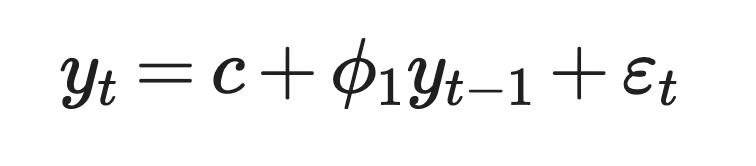
AR(1) model
The value of phi_1 controls how much of today impacts tomorrow.
Let's say c = 2 and phi_1 = 0.8. If today's value is 15, the model predicts 2 + 0.8 x 15 = 14 for tomorrow. The next prediction is 2 + 0.8 x 14 = 13.2. Each step moves the series closer to 10, which is its long-run mean, c / (1 - phi_1).
If phi_1 is negative, the series jumps above and below the mean from one step to the next.
AR(2) adds a second lag:

AR(2) model
With two lags, the model can describe patterns AR(1) can't, like cycles. For example, a positive phi_1 with a negative phi_2 can produce a series that rises and falls in waves, similar to a business cycle.
So every AR model comes down to two choices - how many lags to use, and what weights to give them.
An AR model works only when two things are true about your data. Past values have to be related to future values, and the series has to behave the same way over time. The first is called autocorrelation, and the second is called stationarity.
Autocorrelation is the correlation between a time series and a lagged copy of itself.
It's the reason AR models exist. If today's value tells you nothing about tomorrow's, the model has nothing to learn from past values.
In code, you take a column of values, copy it, and shift the copy down by one row. Now each row pairs a value with the value before it. The correlation between the two columns is the lag-1 autocorrelation. When you shift by two rows, you get the lag-2 autocorrelation.
Here's what that looks like in pandas:
import pandas as pd

df = pd.DataFrame({"temperature": [12, 14, 15, 13, 16, 18, 17, 19]})

# Shift the column down by one row to create the lag-1 copy
df["temperature_lag_1"] = df["temperature"].shift(1)

print(df)
print(df["temperature"].autocorr(lag=1))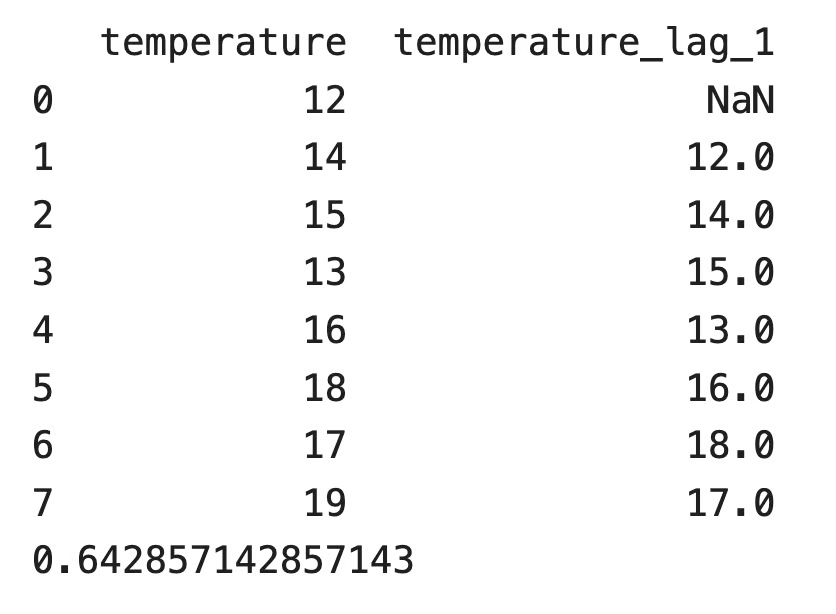
DataFrame with the temperature column and its lag-1 copy
The first row of the lagged column is empty because there's no reading before the first one. pandas skips that row and returns a lag-1 autocorrelation of 0.643. Warm days tend to follow warm days in this series.
The sign of the autocorrelation changes how the series behaves:
An autocorrelation close to zero means the past doesn't help. In that case, an AR model won't do much better than predicting the average.
AR models need a stationary time series.
A stationary series has the same mean, the same variance, and the same autocorrelation at a given lag, no matter which part of the series you look at. Statisticians call this weak-sense stationarity.
It matters because the model estimates one fixed set of coefficients. If the mean of the series drifts over time, coefficients learned from older data won't describe newer data. Stock prices are a common example of a non-stationary series because they trend over the years. Daily returns are much closer to stationary.
The coefficients themselves decide whether an AR process is stationary. For AR(1), the rule is simple: phi_1 has to be between -1 and 1.
abs(phi_1) < 1: Shocks fade over time, and the series returns to its mean
phi_1 = 1: The series becomes a random walk, and shocks never fade
abs(phi_1) > 1: Each shock grows bigger, and the series explodes
AR(2) needs three conditions at once: phi_1 + phi_2 < 1, phi_2 - phi_1 < 1, and abs(phi_2) < 1.
After two lags, you need a general rule. Every AR(p) model has a characteristic polynomial:

Characteristic polynomial
The process is weak-sense stationary when all roots of this polynomial are outside the unit circle, which means each root z has an absolute value greater than 1. The roots can be complex numbers, which is why the boundary is a circle on the complex plane and not a line.
You can check this with AR(1). The polynomial is 1 - phi_1 z = 0, so the root is z = 1 / phi_1. That root is outside the unit circle only when abs(phi_1) < 1, which is the same rule as before.
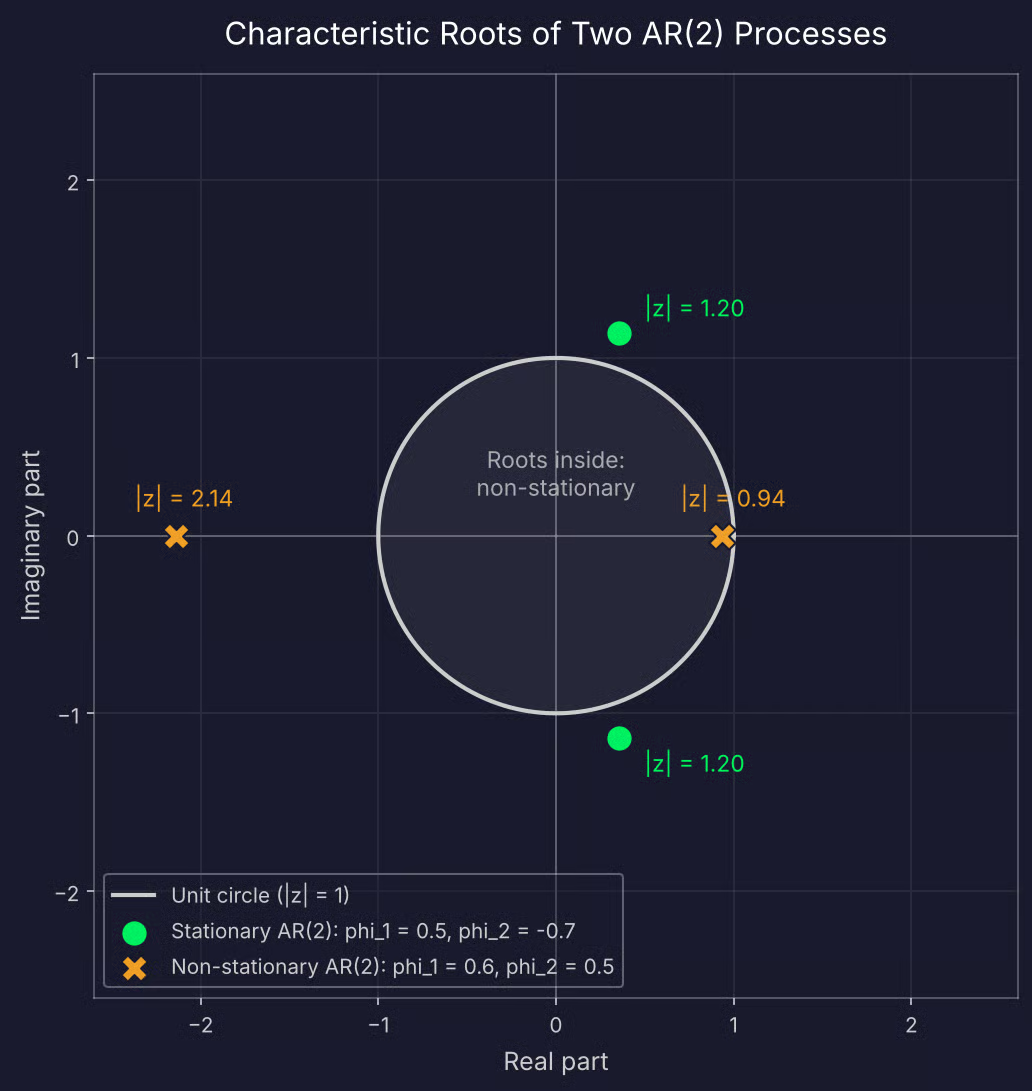
Roots of a stationary and a non-stationary AR(2) process
You won't compute these roots by hand. statsmodels returns them after you fit a model, and I'll show you how to test the data itself for stationarity in the Python section.
If your series isn't stationary, you can difference it - subtract each value from the next one - and model the differences. That's what the "I" in ARIMA models stands for.
Every AR model has the same equation. What changes from one type to the next is the order p, which is how many past values the model uses.
AR(1) uses only the previous value to predict the next one.
If that sounds like linear regression, that's because it is. When you place y_t-1 on the x-axis and y_t on the y-axis, AR(1) fits a straight line through the points. The constant c is the intercept, and phi_1 is the slope. If you know simple linear regression, you already know how AR(1) is estimated.
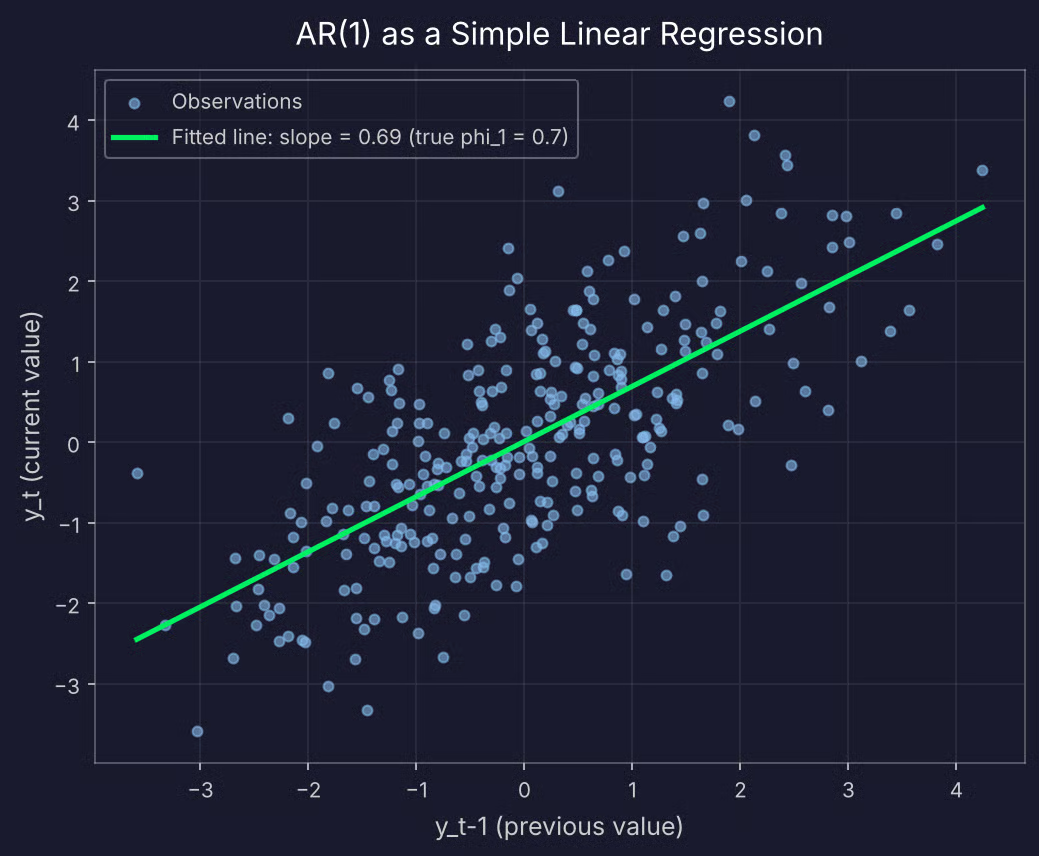
Scatter plot of y_t against y_t-1 for AR(1)
But there's one difference. In a standard regression, the predictor and the target are separate variables. In AR(1), the predictor is the same series shifted by one step. That's why you can't shuffle the rows or use a random train/test split - the order of the data is part of the model.
The value of phi_1 changes how the series looks:
phi_1 = 0.3: The series looks almost like random noise, since each value carries little information about the next one
phi_1 = 0.9: The series moves in long, smooth swings and takes a while to return to its mean
phi_1 = -0.8: The series zigzags above and below the mean at almost every step
phi_1 = 1: The series becomes a random walk and drifts with no mean to return to, which is the non-stationary case from the previous section
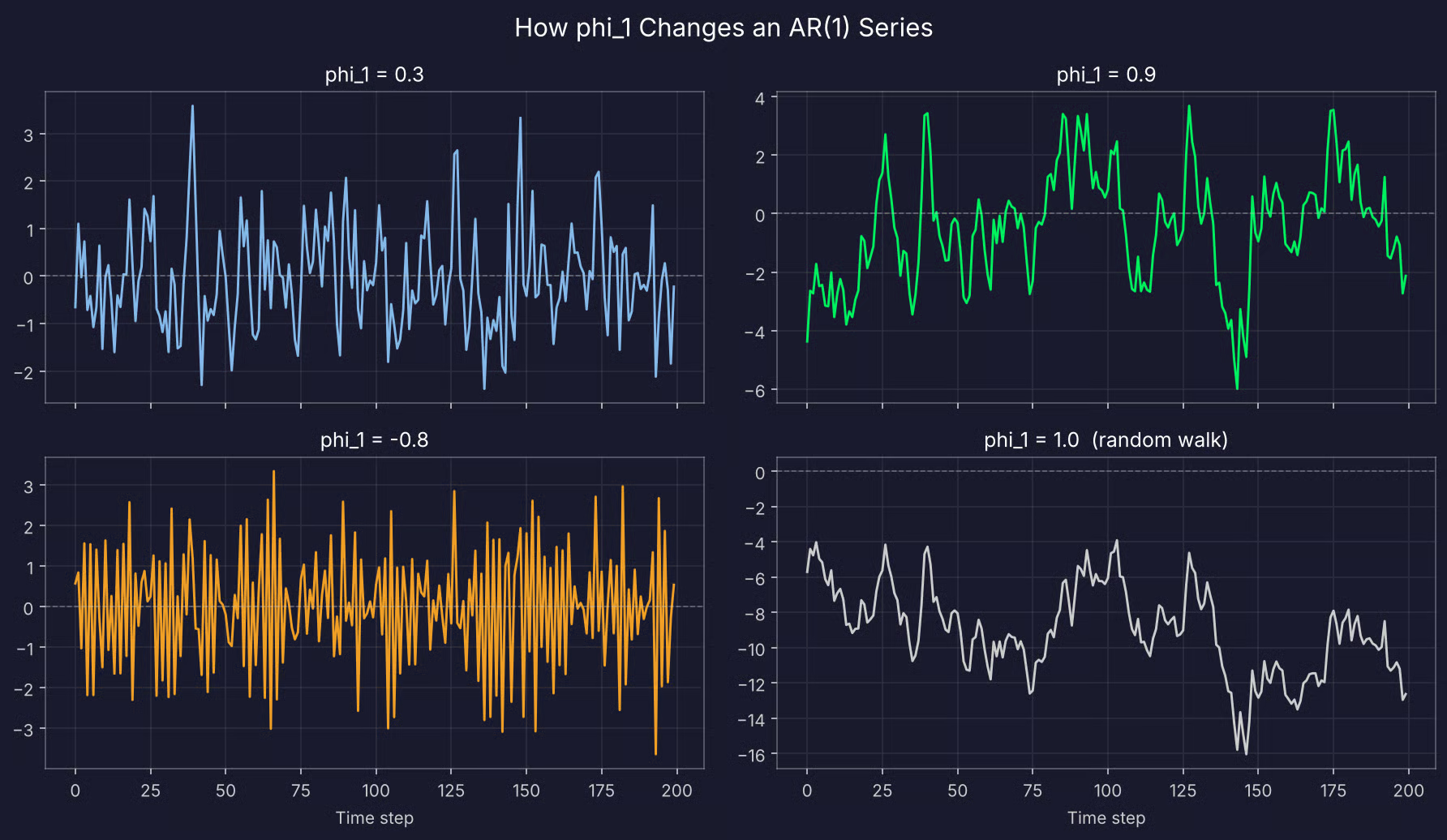
Four simulated AR(1) series
The closer phi_1 gets to 1 or -1, the longer a single shock affects the series.
AR(2) uses the previous two values. The second lag allows the model to produce patterns AR(1) can't, mainly cycles.
Here's how two sets of coefficients compare:
phi_1 = 0.5, phi_2 = 0.3: Both lags push in the same direction, so the series looks like an AR(1) with longer, smoother swings
phi_1 = 0.5, phi_2 = -0.7: The second lag works against the first, and the series rises and falls in waves that repeat roughly every five steps
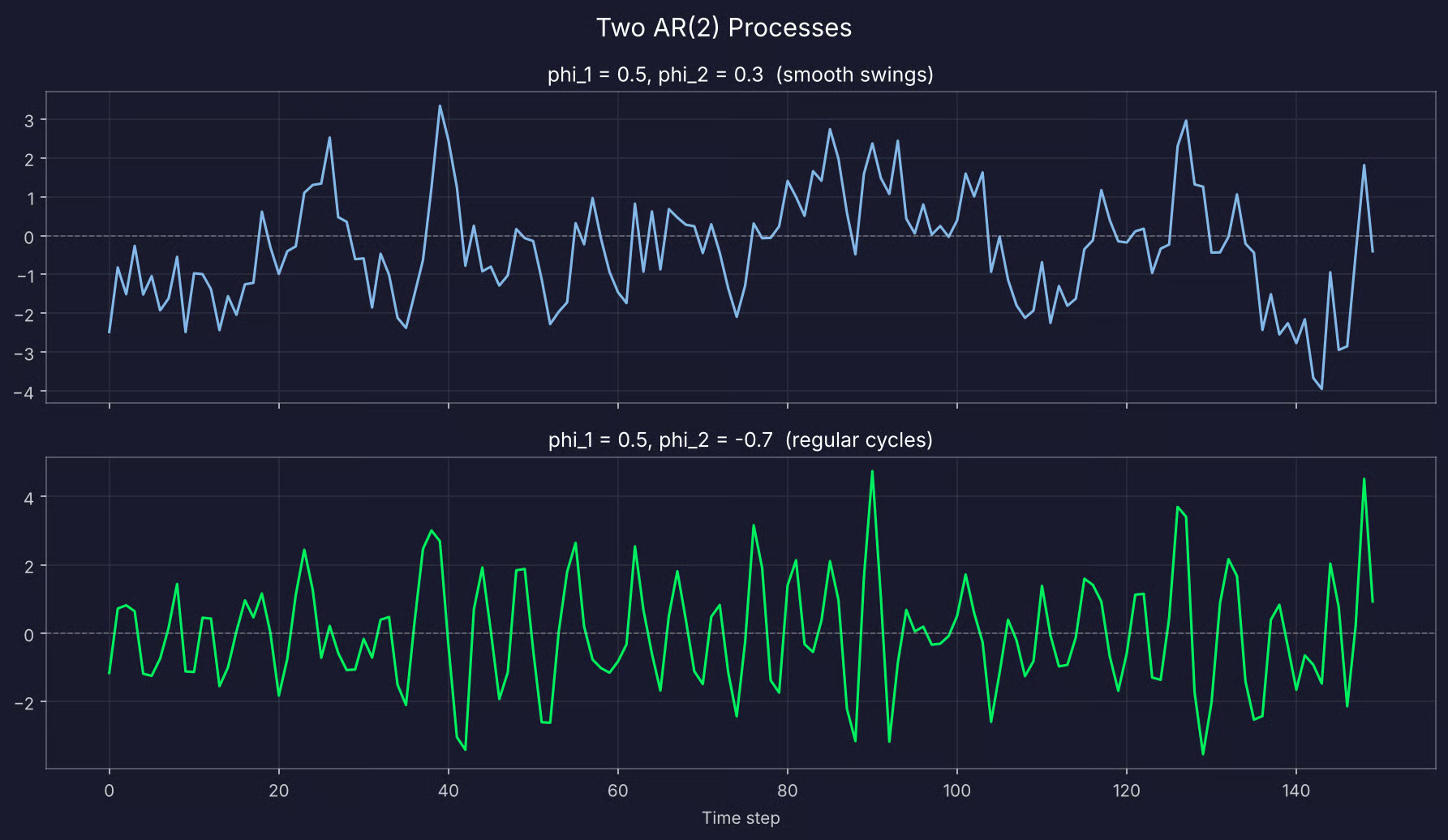
Two simulated AR(2) series
AR(3), AR(4), and beyond add one lag at a time. You need them when values further back carry information the recent ones don't.
Let's say you model monthly sales, and the same month last year predicts this month well. An AR(12) model includes that 12-month lag, along with the 11 lags in between.
Each extra lag adds a coefficient to estimate. This means you need more data, and the risk of overfitting increases. The coefficients also get harder to read - with 12 of them, you can't look at the numbers and tell what the series will do. You check the roots instead.
I'll show you how to choose the right order with PACF and AIC in the Python section.
AR models show up anywhere data is stored in order and the recent past says something about the near future.
Most uses fall into one of four groups:
The last one surprises a lot of people because the term behind today's chatbots comes from the same statistics you're reading about here.
In this section, I'll fit an autoregressive model in Python with statsmodels, from raw data to a forecast you can evaluate.
You need pandas and NumPy for the data, statsmodels for the model and tests, and scikit-learn for the error metric:
import numpy as np
import pandas as pd
import matplotlib.pyplot as plt
from statsmodels.tsa.ar_model import AutoReg, ar_select_order
from statsmodels.tsa.stattools import adfuller
from statsmodels.graphics.tsaplots import plot_pacf
from sklearn.metrics import mean_absolute_errorI'll simulate two years of daily electricity demand from an AR(2) process.
I've decided to use simulated data because you know the true coefficients up front. That way, you can check whether the model finds them, and whether the lag selection tools point to the right order.
The process has c = 15, phi_1 = 0.6, and phi_2 = 0.25, which puts the long-run mean at 100 MWh:
# Simulate two years of daily electricity demand (MWh) from an AR(2) process
rng = np.random.default_rng(42)
n_days, burn_in = 730, 100
c, phi_1, phi_2 = 15, 0.6, 0.25
noise = rng.normal(loc=0, scale=5, size=n_days + burn_in)

demand = np.zeros(n_days + burn_in)
demand[:2] = c / (1 - phi_1 - phi_2)
for t in range(2, n_days + burn_in):
    demand[t] = c + phi_1 * demand[t - 1] + phi_2 * demand[t - 2] + noise[t]

df = pd.DataFrame(
    {"demand": demand[burn_in:]},
    index=pd.date_range(start="2024-01-01", periods=n_days, freq="D"),
)

df.head()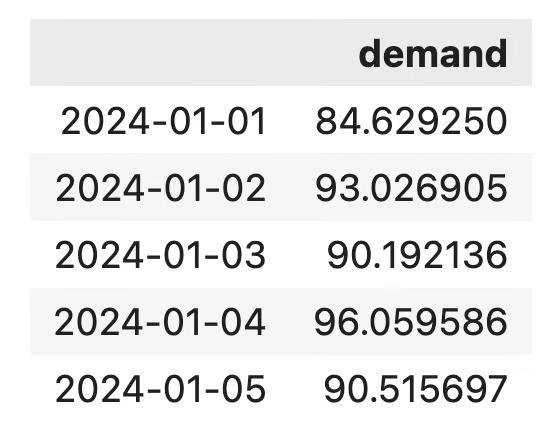
The daily electricity demand dataset
The first 100 simulated days are removed because that burn-in period gives the series time to settle into its normal behavior before you start to use it.
Here's what the full series looks like:
df["demand"].plot(figsize=(12, 4), title="Daily electricity demand (MWh)")
plt.show()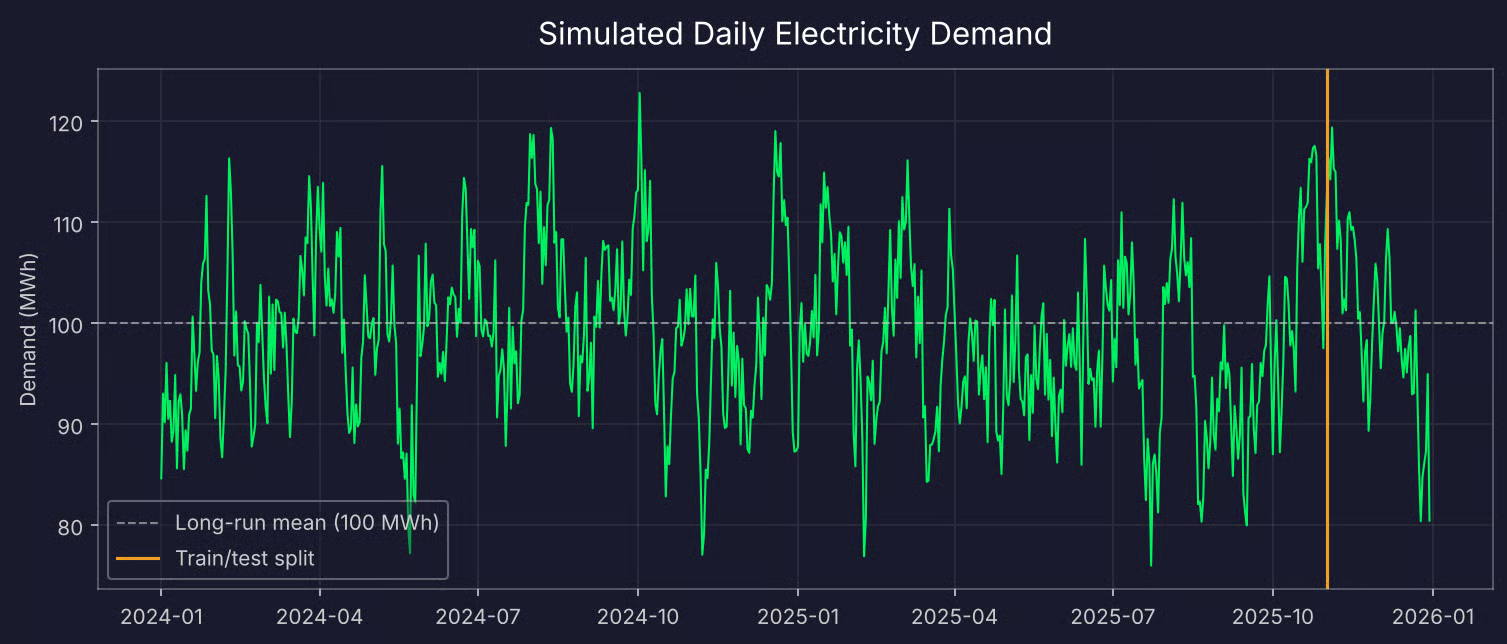
Two years of simulated daily electricity demand
The series moves up and down around 100 with no trend, which is what a stationary series should look like. But a visual check isn't proof.
The augmented Dickey-Fuller (ADF) test checks whether a series is stationary. Its null hypothesis is that the series is not stationary, so a small p-value is what you want:
adf_result = adfuller(df["demand"].dropna())

print(f"ADF statistic: {adf_result[0]:.3f}")
print(f"p-value: {adf_result[1]:.4f}")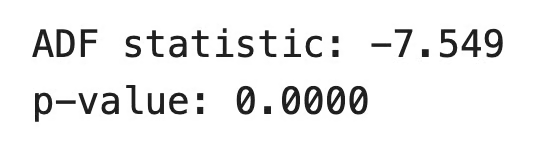
ADF test results
The p-value is well below 0.05, so you can reject the null hypothesis and treat the series as stationary.
If your own data fails this test, difference it with df["demand"].diff().dropna() and run the test again.
Time series data can't be shuffled, so the test set has to come from the end of the series. I'll keep the last 60 days for testing:
test_days = 60
train = df["demand"].iloc[:-test_days]
test = df["demand"].iloc[-test_days:]
That leaves 670 days for training and 60 for testing.
This is the step that decides how well the model works. If you choose too few lags, the model misses patterns in the data. But if you choose too many, it fits noise in the training data that won't repeat in the future.
You have two tools for it.
The first one is the partial autocorrelation function (PACF). It shows the correlation between the series and each lag after removing the effect of all shorter lags. For an AR(p) process, the PACF has significant spikes up to lag p and drops to around zero after that:
plot_pacf(train, lags=20, method="ywm")
plt.show()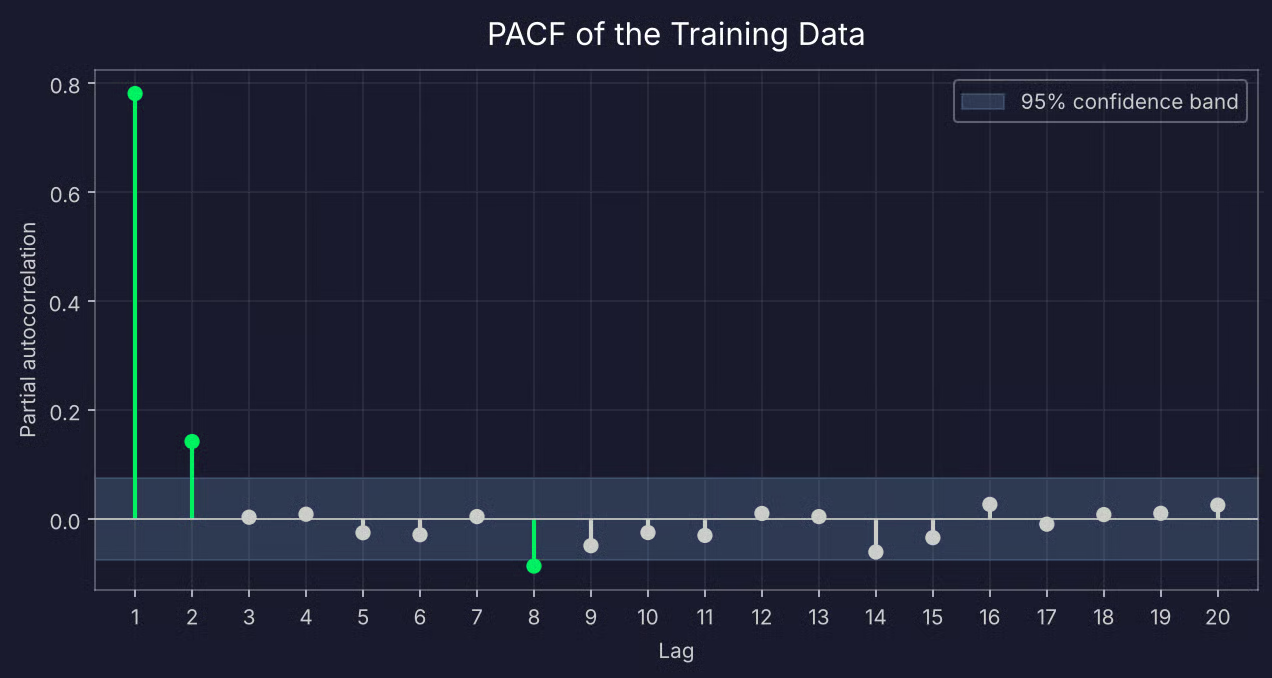
PACF of the training data
Lags 1 and 2 are far outside the confidence band, and lag 3 drops close to zero. That points to AR(2).
There's also a small spike at lag 8, just past the edge of the band. Don't read too much into it. The band is drawn at 95% confidence, so with 20 lags, you'd expect about one of them to cross it by chance.
The second tool is information criteria. AIC and BIC both reward a model for fitting the data well and penalize it for every extra parameter. BIC applies the bigger penalty, so it tends to choose smaller models. statsmodels can test every order up to a maximum and return the best one:
for criterion in ["aic", "bic"]:
    selection = ar_select_order(train, maxlag=20, ic=criterion, trend="c")
    print(f"{criterion.upper()} selects lags: {selection.ar_lags}")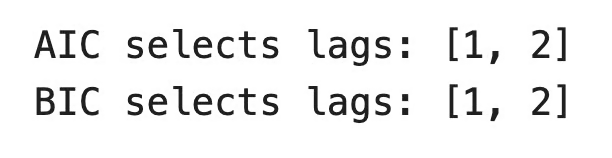
AIC/BIC lag selection
Both criteria agree with the PACF. In practice, you'll often see AIC choose a slightly larger model than BIC. If that happens, start with the smaller one.
With the order chosen, fitting the model takes two lines of code:
model = AutoReg(train, lags=2, trend="c")
results = model.fit()

print(results.params.round(3))
print(f"Absolute values of roots: {np.abs(results.roots).round(2)}")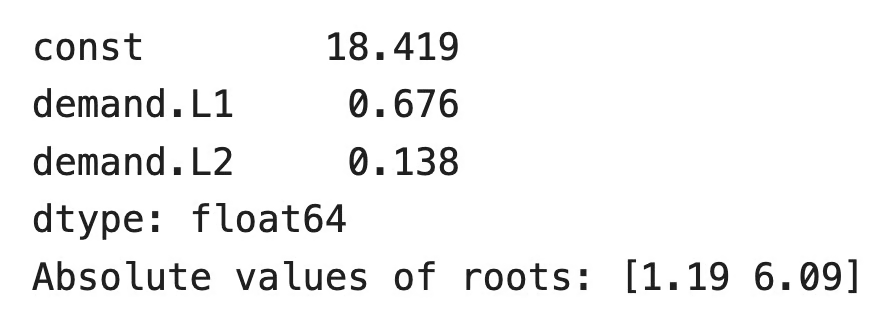
AR(2) model parameters
The true values are 0.6 and 0.25. The model gives a bit more weight to the first lag and less to the second, but the sum of the two coefficients is close - 0.81 versus 0.85. With 670 data points, you won't recover the exact values.
Both roots have a modulus greater than 1, so the fitted model is stationary. You can call results.summary() if you want standard errors, p-values, and the full roots table.
There are two ways to forecast the test period, and they answer different questions:
Multi-step forecasts come straight from the fitted results. For one-step forecasts, you apply the trained coefficients to the full series:
# Multi-step
multi_step = results.predict(start=len(train), end=len(df) - 1)

# One-step
full_model = AutoReg(df["demand"], lags=2, trend="c")
one_step = full_model.predict(results.params, start=len(train), end=len(df) - 1)

print(f"Multi-step MAE: {mean_absolute_error(test, multi_step):.2f} MWh")
print(f"One-step MAE: {mean_absolute_error(test, one_step):.2f} MWh")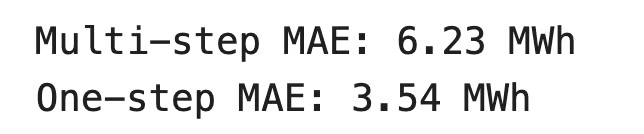
Forecast results
Mean absolute error (MAE) is the average absolute difference between the predictions and the actual values. It's in the same unit as the data, so you can read it directly. The one-step forecast misses by 3.54 MWh on average.
Here's how both forecasts compare to the actual values:
plt.figure(figsize=(12, 4))
plt.plot(test, label="Actual")
plt.plot(one_step, label="One-step forecast")
plt.plot(multi_step, label="Multi-step forecast", linestyle="--")
plt.legend()
plt.show()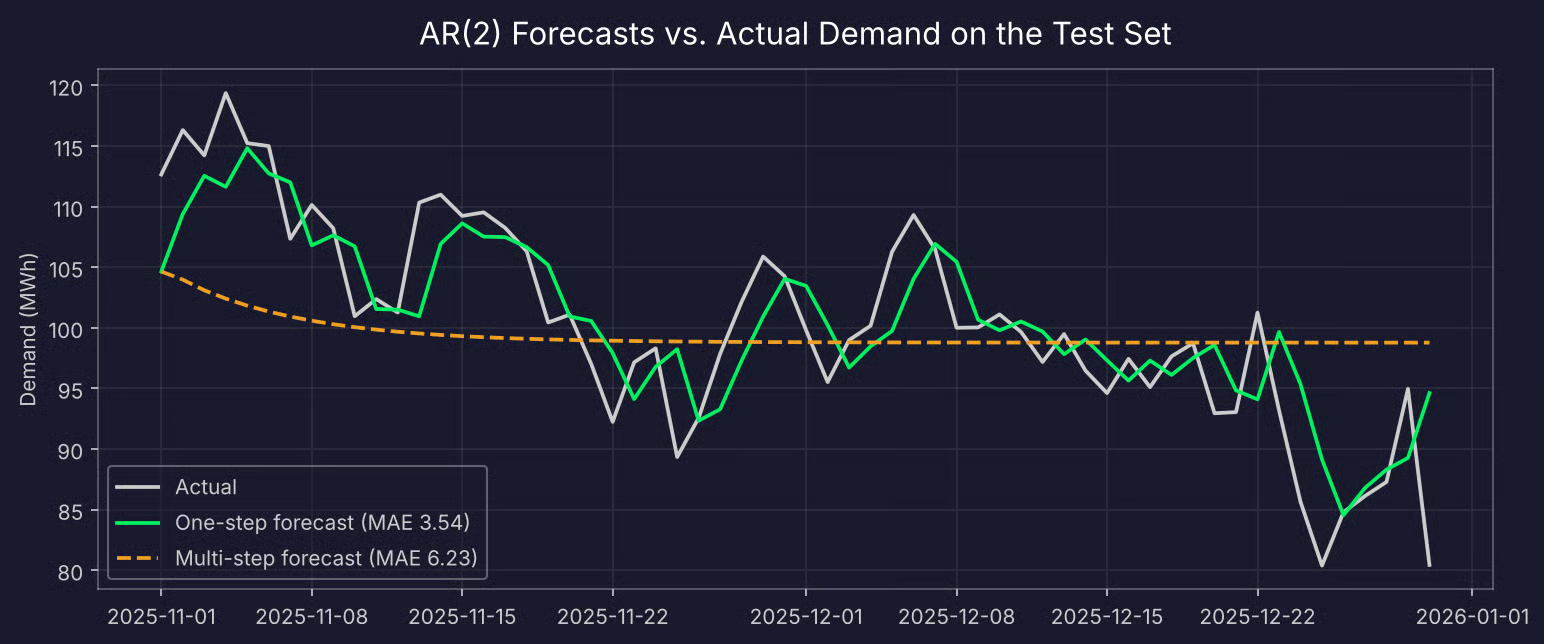
One-step and multi-step AR(2) forecasts compared to actual demand
The one-step forecast closely follows the actual values, about one day behind. The multi-step forecast starts at the last known value and then flattens out near the mean within about three weeks.
This is how every stationary AR model behaves - the further you forecast, the less the past tells you, and the best guess becomes the long-run mean. This is why AR models work best for short-term forecasts.
It's easy to assume that more history means better predictions. Let's test that by fitting models with a growing number of lags and comparing their one-step MAE:
for p in [1, 2, 5, 10, 20]:
    results_p = AutoReg(train, lags=p, trend="c").fit()
    preds_p = AutoReg(df["demand"], lags=p, trend="c").predict(
        results_p.params, start=len(train), end=len(df) - 1
    )
    print(f"AR({p}): MAE = {mean_absolute_error(test, preds_p):.2f} MWh")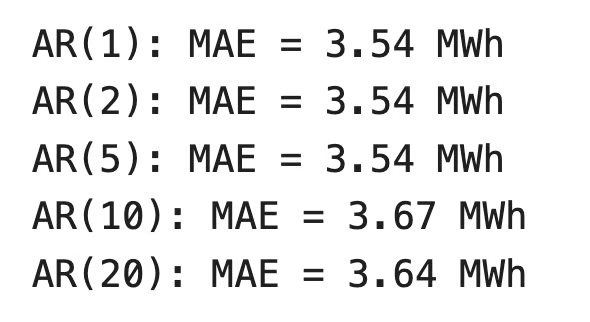
MAE with more lags
The error doesn't improve past AR(2), and it gets worse at AR(10) and AR(20). Those extra coefficients fit noise in the training data.
You'll also notice AR(1) does as well as AR(2) here. The estimated second coefficient is small, so it adds little on this test set. When two models perform the same, the simpler one is easier to explain and less likely to break on new data.
There's a cost side too. AR(20) estimates 21 parameters instead of 3.
Bottom line, let the PACF and information criteria suggest the order, and then just confirm it on a test set.
AR models are a good fit for many forecasting problems, but not all of them. Here's where they work and where they don't, and how they compare to the models built on top of them.
AR models have two main benefits:
They also have two main limitations:
There's one more problem. Lagged values are correlated with each other because they come from the same series. In the demand data, the correlation between y_t-1 and y_t-2 is 0.78.
This is called multicollinearity, and it affects any regression model. When two predictors move together, the model has a hard time telling which one is responsible. The coefficients become less stable, and their standard errors go up.
It explains what you saw earlier. The model estimated 0.676 and 0.138 instead of 0.6 and 0.25 - it moved weight from one lag to the other, but the sum stayed close. Predictions don't suffer much from this, but you can't trust individual coefficients as much. Each extra lag makes the problem worse.
AR is one of three building blocks of classical time series forecasting. The other two are moving average (MA) models and ARIMA, which combines them.
An AR model predicts from past values. An MA model predicts from past errors:

ARMA model
Here, mu is the mean of the series, theta_1 to theta_q are the coefficients, and epsilon_t-1 to epsilon_t-q are the random shocks from previous steps. Don't confuse it with a moving average in the rolling-mean sense. The name is the same, but the model is different.
The two models react to shocks in different ways. In an MA(q) model, a shock affects the series for exactly q steps. In an AR model, a shock fades over time but never fully drops to zero. This difference is also why you use different tools to choose the order - the PACF cuts off after lag p for AR models, and the ACF cuts off after lag q for MA models.
ARIMA puts it all together. ARIMA(p, d, q) has three parts:
This means AR is a special case of ARIMA. If you set d and q to zero, you get an AR model. You can check this with the demand data:
from statsmodels.tsa.arima.model import ARIMA

arima_results = ARIMA(train, order=(2, 0, 0)).fit()
print(arima_results.params.round(3))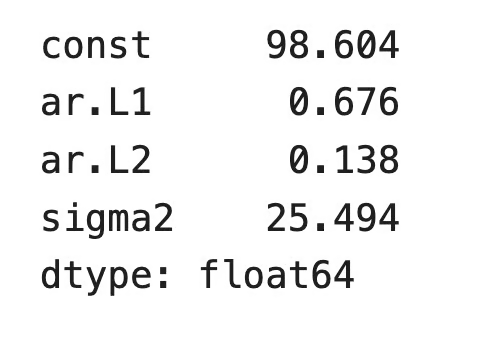
ARIMA model with 0 integration and moving average order
The AR coefficients match the ones from AutoReg. The constant is different because ARIMA reports the mean of the series, while AutoReg reports the intercept c.
Now let's see where ARIMA goes further. Let's say the city grows, and electricity demand rises a little every day. The series now has a trend, so the ADF test fails, and an AR model can no longer directly work with the series.
But ARIMA(2, 1, 0) model can. It differences the series once, so the model works with daily changes in demand instead of the raw values, and then fits AR(2) on those changes. If a shock like a heat wave also affects the next day's demand, you can add an MA term and get ARIMA(2, 1, 1).
The AR part does the same job in every case. ARIMA just prepares the data for it and models what's left over. If you want to go deeper, the ARIMA Models in R course covers the full process.
An autoregressive model predicts the next value of a series from its own past. It's a linear regression where the predictors are lagged copies of the target, and that makes it one of the easiest time series models to understand.
You'll see it in economics, speech coding, EEG analysis, and even in the name of today's language models. You've also seen where it isn't the best option, as it needs stationary data, depends on the right lag order, and correlated lags make individual coefficients less reliable.
If you understand AR models, the rest of classical forecasting gets much easier. ARIMA is the natural next step, and our ARIMA tutorial shows you how differencing and MA terms extend what you've learned here. For a hands-on path, try our ARIMA Models in Python course.
Learn with DataCamp
Course
Course
Course
Tutorial
Zaina Saadeddin
12 min
Tutorial
Vinod Chugani
15 min
Tutorial
Vinod Chugani
9 min
Tutorial
Moez Ali
15 min
Tutorial
Dario Radečić
15 min
Tutorial
Salin Kc
13 min