%22%3E%3Cpath%20d%3D%22m-369%200h408v79h-408z%22%20fill%3D%22%237933ff%22%2F%3E%3Cpath%20d%3D%22m-148%200h306v45h-306z%22%20fill%3D%22%23974dff%22%2F%3E%3C%2Fg%3E%3C%2Fsvg%3E)
%22%2F%3E%3C%2FclipPath%3E%3Cg%20clip-path%3D%22url(%23a)%22%3E%3Cpath%20d%3D%22m76%200h484v36h-484z%22%20fill%3D%22%23974dff%22%2F%3E%3Cpath%20d%3D%22m0%200h384v24h-384z%22%20fill%3D%22%2306bdfc%22%20transform%3D%22matrix(1%200%200%20-1%200%2060)%22%2F%3E%3C%2Fg%3E%3C%2Fsvg%3E)
What is Motif 3?
Motif-3 is a large-scale Mixture-of-Experts (MoE) model from Motif Technologies, built with 314B total parameters while activating only 13.2B parameters per token.
It features 384 routed experts, a 256K context window, and was trained on roughly 12.5 trillion tokens spanning code, mathematics, STEM, multilingual data, and other domains.
It is particularly well-suited to reasoning, coding, and agentic workloads. On the Artificial Analysis Intelligence Index, it reaches a score of 47, which puts it between Qwen3.8-27B and MiniMax-M3, which we tested in a similar setup.
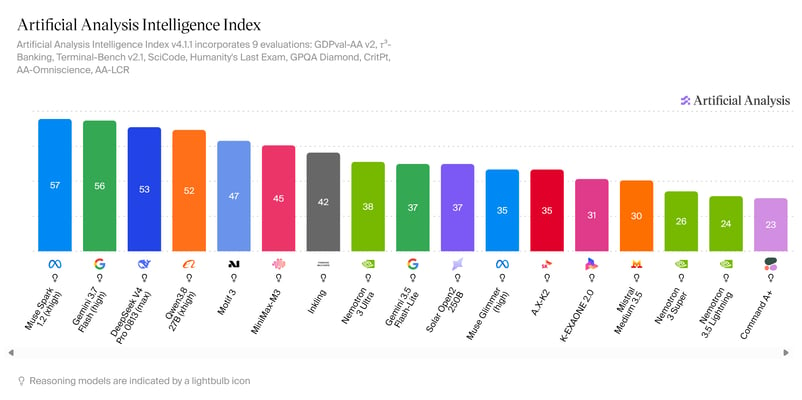
Source: AI Model & API Providers Analysis | Artificial Analysis
What is the Mixed Quant GGUF?
For this guide, we are using Baekpica/Motif-3-Mixed-Quant-GGUF, an independently created quantized version of Motif-3. Instead of using one precision level for the entire model, it uses mixed quantization, applying higher precision to important components and much lower precision to the enormous expert layers.
For example, important attention and always-active components use Q8_0, while much of the routed expert weights use IQ2_XXS and Q2_K. The model still keeps all 384 experts and all 53 layers, so nothing is pruned or removed. This reduces the model to approximately 94GB, compared with roughly 335GB for the Q8_0 GGUF, making it small enough to run entirely on a 141GB H200 with additional VRAM available for the runtime and KV cache.
For more background, I recommend reading our guides on quantization for LLMs and the GGUF format.
1. Rent and Set Up an H200 GPU Server
Motif-3 Mixed Quant is around 94GB, so you will need a GPU with enough VRAM to load the model and leave room for inference. I recommend renting a single NVIDIA H200 with 141GB VRAM from a GPU cloud provider such as Hyperbolic, RunPod, or Vast.ai.
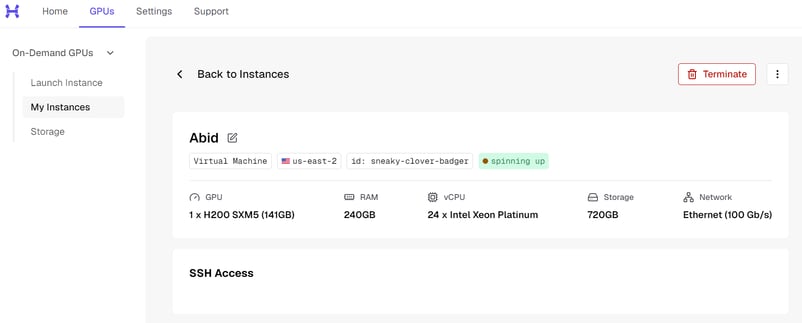
Once your instance is running, connect to it from your terminal or through VS Code Remote SSH. Your provider will give you the IP address. The command will look similar to:
The -L 8080:localhost:8080 option also forwards the Motif-3 API port to your local PC, so later you can access it at http://127.0.0.1:8080.
Now prepare the server:
apt update
apt install -y git cmake build-essential python3-pip

pip install -U huggingface_hub

mkdir -p /workspace/motif3
cd /workspace/motif3Finally, check that the H200 is available:
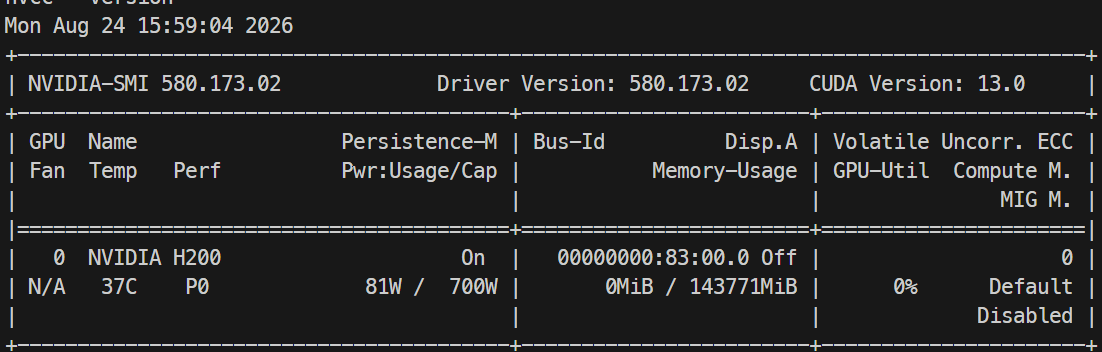
You should see an NVIDIA H200 with approximately 141GB of VRAM.
2. Download the Motif-3 Mixed Quant GGUF
Next, download the Baekpica/Motif-3-Mixed-Quant-GGUF model from Hugging Face. We are using the MQ87-88-FIT variant, which is split into 11 GGUF files with a combined size of about 94GB.
From the /workspace/motif3 directory, run:
hf download Baekpica/Motif-3-Mixed-Quant-GGUF \
  --include "Motif-3-MQ87-88-FIT-*.gguf" \
  --include MQ87-88-FIT-SHA256SUMS \
  --local-dir model
Depending on your connection, downloading all 94GB may take some time. Once complete, check that all the shards are available:
Before merging, verify the shards. The merge is a one-shot operation on 94GB, so it is worth catching a bad download now:
3. Merge the GGUF Shards
The ds4 runtime expects the model as a single GGUF file, so we first need to merge the 11 downloaded shards.
Clone llama.cpp and build its GGUF utility:
git clone --depth 1 https://github.com/ggml-org/llama.cpp.git

cmake -S llama.cpp -B llama.cpp/build -DLLAMA_CURL=OFF

cmake --build llama.cpp/build \
  --target llama-gguf-split \
-j$(nproc)Now merge all 11 shards into one file:
./llama.cpp/build/bin/llama-gguf-split --merge \
  model/Motif-3-MQ87-88-FIT-00001-of-00011.gguf \
motif3.ggufCheck the merged model:
You should see a large motif3.gguf file.
4. Install the Motif-3 Runtime
We need the ds4 runtime to load and serve Motif-3 efficiently on the NVIDIA H200.
Clone the dfm branch:
Compile it with CUDA support for the H200 (Hopper, sm_90). Note that ds4's primary target is the DGX Spark/GB10, and H200 support comes from the project's bring-up work rather than its main serving path:
Check that the binaries were successfully created:
You should see binaries such as ds4-server and ds4_weight_server.
5. Load Motif-3 onto the GPU
The weight server loads and manages the model weights on the GPU so the API server can use them for inference.
First, create directories for the runtime files and KV cache:
Run the preflight first to check that the model will fit before committing to a full load:
./ds4_weight_server \
  --base /workspace/motif3/motif3.gguf \
  --manifest /workspace/motif3/run/weights.manifest \
  --backend vmm \
  --scope base \
  --reserve-gb 24 \
  --no-repack-q8-aligned \
--dry-runIf that passes, run the same command again without --dry-run:
./ds4_weight_server \
  --base /workspace/motif3/motif3.gguf \
  --manifest /workspace/motif3/run/weights.manifest \
  --backend vmm \
  --scope base \
  --reserve-gb 24 \
  --no-repack-q8-aligned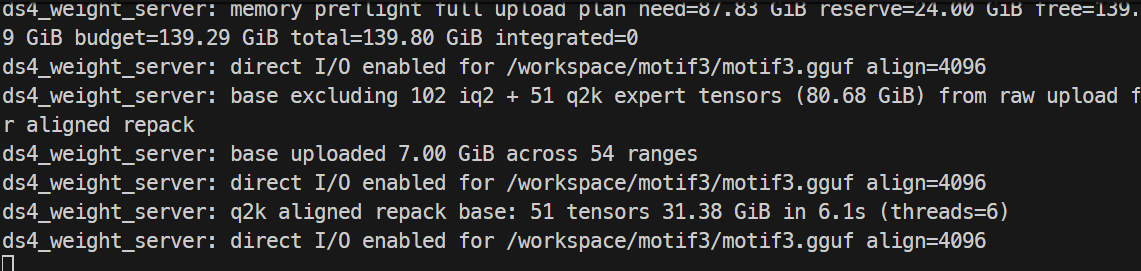
Keep this terminal running. The weight server needs to remain active while you run Motif-3.
6. Start and Test the Motif-3 API Server
Now we will start the ds4 API server, which exposes Motif-3 through an OpenAI-compatible endpoint that you can access from your local computer.
Open another terminal and connect to the server, then move into the ds4 directory:
Set the required environment variables:
export DS4_CUDA_WEIGHT_IPC_MANIFEST=/workspace/motif3/run/weights.manifest
export DS4_CUDA_WEIGHT_IPC_SCOPE=base
export DS4_SERVER_COALESCE_MAX=2
export DS4_SERVER_COALESCE_MAX_TOKENS=4096
export DS4_MOTIF3_PREFILL_CHUNK=4096Start the API server with a 125K context window. On H200, the runtime is validated up to 128K, with 256K only reaching partial prefill, so 125K sits just inside what has been tested:
./ds4-server \
  -m /workspace/motif3/motif3.gguf \
  --cuda \
  -c 125000 \
  --host 0.0.0.0 \
  --port 8080 \
  --no-spec \
  --kv-disk-dir /workspace/motif3/kv \
  --kv-disk-space-mb 32768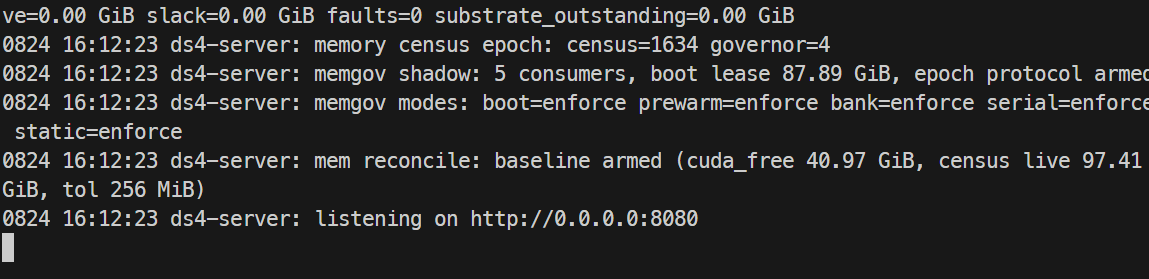
Keep this terminal running.
Because we forwarded port 8080 over SSH earlier, you can now open a terminal on your local PC and check the API:

You should see motif-3 listed as the model with a context length of 125000.
Now send your first prompt:
curl http://127.0.0.1:8080/v1/chat/completions \
  -H "Content-Type: application/json" \
  -d '{
    "model": "motif-3",
    "messages": [
      {
        "role": "user",
        "content": "Explain mixture-of-experts models in simple terms."
      }
    ],
    "max_tokens": 256,
    "temperature": 0
  }'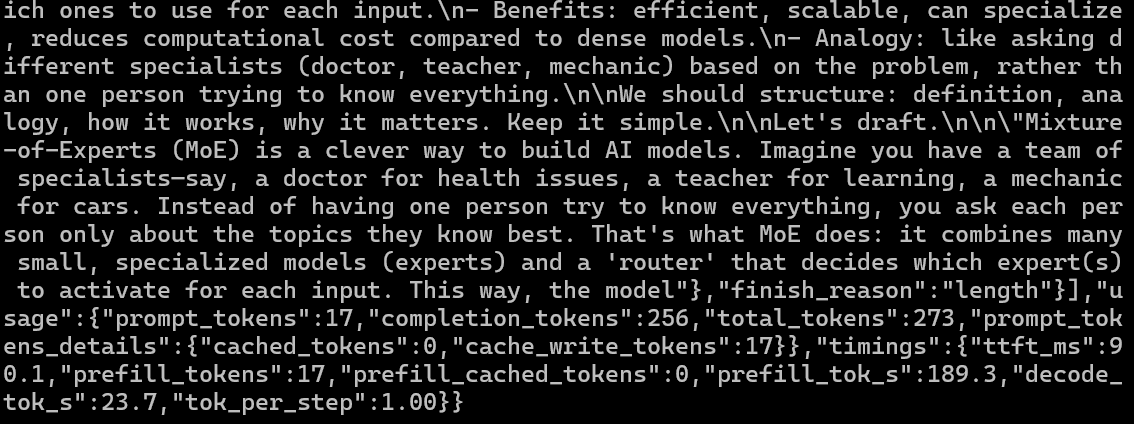
If everything is working, Motif-3 will generate a response directly from your H200. In my test, the model achieved these metrics:
- Generation speed: 23.7 tokens/second
- Prefill speed: 189.3 tokens/second
- Time to first token (TTFT): about 90 ms
You can also check GPU memory usage on the server:
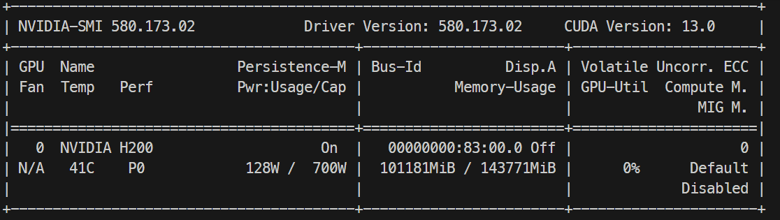
In my setup, Motif-3 used roughly 101GB of the H200's 141GB reported GPU memory, leaving additional VRAM available for inference and the KV cache.
7. Connect Motif-3 to the Pi Coding Agent
Now we will connect the local Motif-3 API to Pi, allowing the model to work as a coding agent that can create files, run commands, and iterate on a project.
Make sure Motif-3 is still available at:
Install Pi using the official installer:
Restart your terminal, then confirm the installation:
Pi supports custom OpenAI-compatible models through ~/.pi/agent/models.json. Create the configuration:
mkdir -p ~/.pi/agent

cat > ~/.pi/agent/models.json <<'EOF'
{
  "providers": {
    "motif-local": {
      "baseUrl": "http://127.0.0.1:8080/v1",
      "api": "openai-completions",
      "apiKey": "none",
      "models": [
        {
          "id": "motif-3",
          "name": "Motif-3",
          "reasoning": true,
          "input": ["text"],
          "contextWindow": 125000,
          "maxTokens": 125000
        }
      ]
    }
  }
}
EOF8. Test Motif-3 as a Coding Agent
Now we can give Motif-3 a real coding task and see whether it can build, run, and improve an application autonomously.
Create a test project and start Pi:
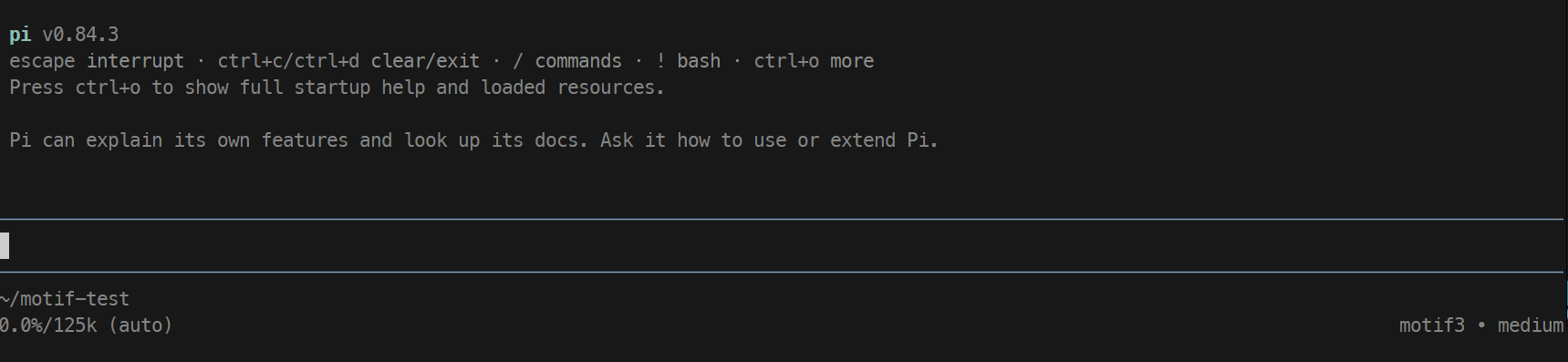
Creating a simple to-do app with Motif-3
Let’s test the model. First, we will ask it to build a simple to-do app.
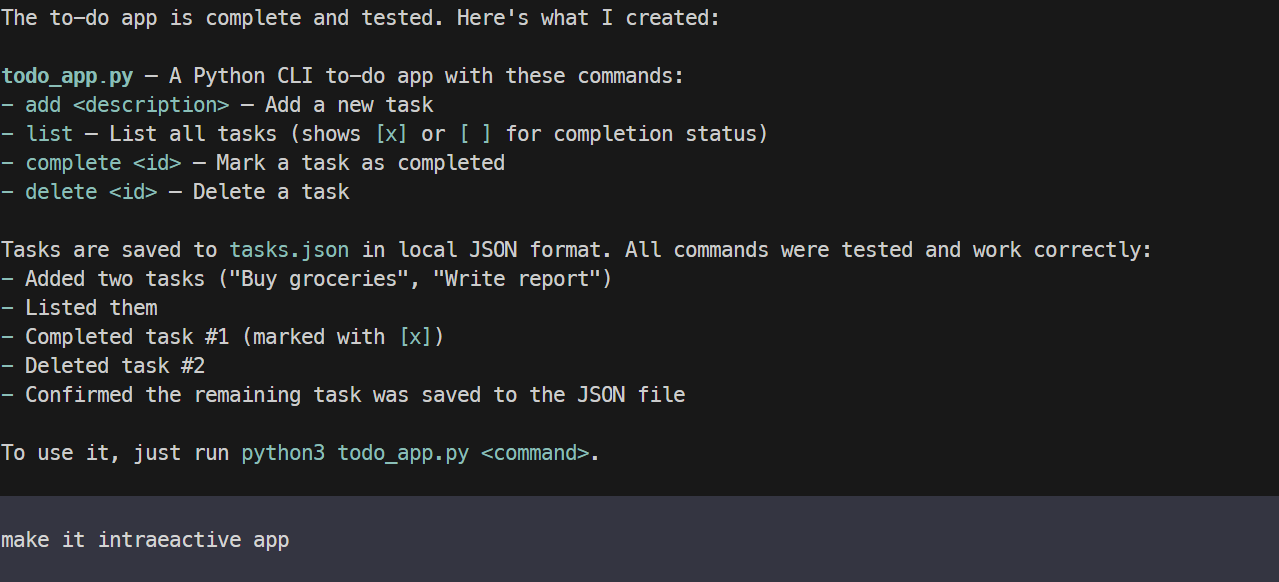
Create a simple Python CLI to-do app that can add, list, complete, and delete tasks, save them locally to a JSON file, then run and test it.Within a few minutes, Motif-3 created a working CLI application and tested it successfully. The functionality worked well, but the initial interface was very basic.
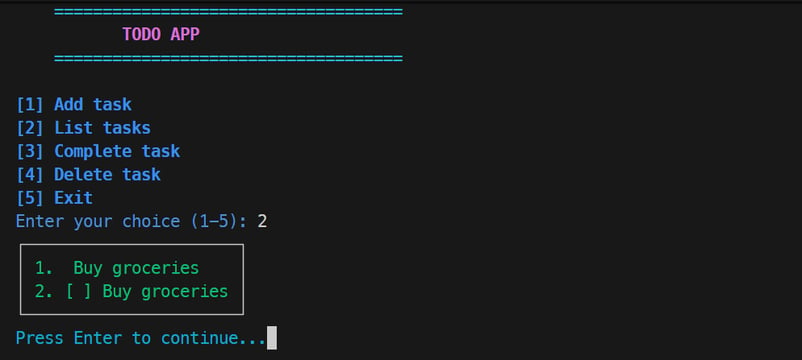
I then asked the agent to make the application more interactive and colorful, improve the layout, and enhance the terminal experience. Motif-3 modified the existing project rather than starting over, and the improved version was considerably more polished.
Building a website with Motif-3
Finally, I wanted to see how Motif-3 performed on a more visual web development task, where generating a working website is only part of the challenge.

The initial application worked, but there were several UI details I did not like. Instead of giving the model one huge redesign prompt, I asked it to fix the issues one by one, improving individual parts of the interface as I tested them.
This worked surprisingly well. Motif-3 was able to inspect the existing project, make targeted changes, and repeatedly refine the UI while keeping the application functional.
Overall, I was impressed with both its coding performance and its ability to iterate on an existing project through Pi.

Final Thoughts
Overall, my experience was a bit mixed. Motif-3 is impressive, but there are better and less memory-heavy models to run for most people.
Even with the mixed quantization, which reduces the size a lot, you still need around 100GB or more of GPU or combined memory to run it comfortably. Because of that, there are many smaller models that are much easier to run, such as Qwen3.8-27B and other coding-focused models.
That said, if you want something closer to the DeepSeek Flash class of models, Motif-3 is still really interesting. It is fast on an H200, the coding quality is good, and there is probably more performance you can get out of it with better tuning.
The main issue I had was with the Pi coding agent, where the generation would sometimes stop or get interrupted. I increased some of the output limits, and that helped, but it did not completely fix the problem. This is also my first time using the DS4 runtime, so there is probably more I can optimize in the future.
Still, if you are specifically looking for a Korean-developed model, or you want an alternative to Chinese-developed models, this is one of the more interesting options right now. It is also cool to see more countries building their own AI models and ecosystems instead of depending on just a few major providers.
Motif-3 FAQs
What is Motif 3?
Motif 3 is a 314B-parameter mixture-of-experts language model from Motif Technologies, a South Korean company. It activates 13.2B parameters per token across 384 routed experts with top-8 routing, and was pretrained on roughly 12.5 trillion tokens.
Is Motif 3 free to use commercially?
Yes. The final Motif 3 weights are released under the MIT license, which permits commercial use, fine-tuning, and redistribution. Note that the earlier Motif-3-Beta preview carried a non-commercial restriction, so make sure you are using the final checkpoint.
What hardware do I need to run Motif 3 locally?
At full precision, far more than most people have. With the mixed-quant GGUF used in this guide, the model comes down to about 94GB, which fits on a single 141GB H200 or a 128GB DGX Spark with room for the runtime and KV cache.
What is Motif 3's context window?
262,144 tokens, or 256K. In practice, your usable context depends on the runtime and available memory. On H200, the ds4 path is validated up to 128K, with 256K only reaching partial prefill.
What is Motif 3 good at?
It was trained with a heavy emphasis on code, mathematics, and STEM data, and performs particularly well on agentic and tool-use benchmarks. It is also strong in Korean, which is unsurprising given its origin.

As a certified data scientist, I am passionate about leveraging cutting-edge technology to create innovative machine learning applications. With a strong background in speech recognition, data analysis and reporting, MLOps, conversational AI, and NLP, I have honed my skills in developing intelligent systems that can make a real impact. In addition to my technical expertise, I am also a skilled communicator with a talent for distilling complex concepts into clear and concise language. As a result, I have become a sought-after blogger on data science, sharing my insights and experiences with a growing community of fellow data professionals. Currently, I am focusing on content creation and editing, working with large language models to develop powerful and engaging content that can help businesses and individuals alike make the most of their data.
%22%3E%0A%20%20%20%20%20%20%20%20%3Crect%20fill%3D%22%23EFEBE4%22%20height%3D%22180%22%20width%3D%22336%22%20%2F%3E%0A%20%20%20%20%20%20%20%20%3Crect%0A%20%20%20%20%20%20%20%20%20%20fill%3D%22%23DD3400%22%0A%20%20%20%20%20%20%20%20%20%20height%3D%22106.6%22%0A%20%20%20%20%20%20%20%20%20%20transform%3D%22rotate(-30%20-208.588%20220.18)%22%0A%20%20%20%20%20%20%20%20%20%20width%3D%22456.125%22%0A%20%20%20%20%20%20%20%20%20%20x%3D%22-208.588%22%0A%20%20%20%20%20%20%20%20%20%20y%3D%22220.18%22%0A%20%20%20%20%20%20%20%20%2F%3E%0A%20%20%20%20%20%20%20%20%3Crect%0A%20%20%20%20%20%20%20%20%20%20fill%3D%22%23FFEC3C%22%0A%20%20%20%20%20%20%20%20%20%20height%3D%2235.875%22%0A%20%20%20%20%20%20%20%20%20%20transform%3D%22rotate(-30%20-208.588%20220.18)%22%0A%20%20%20%20%20%20%20%20%20%20width%3D%22347.576%22%0A%20%20%20%20%20%20%20%20%20%20x%3D%22-208.588%22%0A%20%20%20%20%20%20%20%20%20%20y%3D%22220.18%22%0A%20%20%20%20%20%20%20%20%2F%3E%0A%20%20%20%20%20%20%20%20%3Crect%0A%20%20%20%20%20%20%20%20%20%20fill%3D%22%23FF931E%22%0A%20%20%20%20%20%20%20%20%20%20height%3D%2235.875%22%0A%20%20%20%20%20%20%20%20%20%20transform%3D%22rotate(-30%20-226.525%20189.111)%22%0A%20%20%20%20%20%20%20%20%20%20width%3D%22347.576%22%0A%20%20%20%20%20%20%20%20%20%20x%3D%22-226.525%22%0A%20%20%20%20%20%20%20%20%20%20y%3D%22189.111%22%0A%20%20%20%20%20%20%20%20%2F%3E%0A%20%20%20%20%20%20%20%20%3Crect%0A%20%20%20%20%20%20%20%20%20%20fill%3D%22%23DD3400%22%0A%20%20%20%20%20%20%20%20%20%20height%3D%22106.6%22%0A%20%20%20%20%20%20%20%20%20%20transform%3D%22rotate(-30%2085.5879%20256.055)%22%0A%20%20%20%20%20%20%20%20%20%20width%3D%22456.125%22%0A%20%20%20%20%20%20%20%20%20%20x%3D%2285.5879%22%0A%20%20%20%20%20%20%20%20%20%20y%3D%22256.055%22%0A%20%20%20%20%20%20%20%20%2F%3E%0A%20%20%20%20%20%20%20%20%3Crect%0A%20%20%20%20%20%20%20%20%20%20fill%3D%22%23FFEC3C%22%0A%20%20%20%20%20%20%20%20%20%20height%3D%2235.875%22%0A%20%20%20%20%20%20%20%20%20%20transform%3D%22rotate(-30%2085.5879%20256.055)%22%0A%20%20%20%20%20%20%20%20%20%20width%3D%22184.5%22%0A%20%20%20%20%20%20%20%20%20%20x%3D%2285.5879%22%0A%20%20%20%20%20%20%20%20%20%20y%3D%22256.055%22%0A%20%20%20%20%20%20%20%20%2F%3E%0A%20%20%20%20%20%20%20%20%3Crect%0A%20%20%20%20%20%20%20%20%20%20fill%3D%22%23FF931E%22%0A%20%20%20%20%20%20%20%20%20%20height%3D%2235.875%22%0A%20%20%20%20%20%20%20%20%20%20transform%3D%22rotate(-30%20227.432%20132.736)%22%0A%20%20%20%20%20%20%20%20%20%20width%3D%22271.625%22%0A%20%20%20%20%20%20%20%20%20%20x%3D%22227.432%22%0A%20%20%20%20%20%20%20%20%20%20y%3D%22132.736%22%0A%20%20%20%20%20%20%20%20%2F%3E%0A%20%20%20%20%20%20%3C%2Fg%3E%0A%20%20%20%20%20%20%3Cdefs%3E%0A%20%20%20%20%20%20%20%20%3CclipPath%20id%3D%22clip%22%3E%0A%20%20%20%20%20%20%20%20%20%20%3Crect%20fill%3D%22white%22%20height%3D%22180%22%20width%3D%22336%22%20%2F%3E%0A%20%20%20%20%20%20%20%20%3C%2FclipPath%3E%0A%20%20%20%20%20%20%3C%2Fdefs%3E%0A%20%20%20%20%3C%2Fsvg%3E)

%22%3E%0A%20%20%20%20%20%20%20%20%3Crect%20fill%3D%22%23EFEBE4%22%20height%3D%22180%22%20width%3D%22336%22%20%2F%3E%0A%20%20%20%20%20%20%20%20%3Crect%0A%20%20%20%20%20%20%20%20%20%20fill%3D%22%23FF931E%22%0A%20%20%20%20%20%20%20%20%20%20height%3D%22106.6%22%0A%20%20%20%20%20%20%20%20%20%20transform%3D%22rotate(-30%20-208.588%20220.18)%22%0A%20%20%20%20%20%20%20%20%20%20width%3D%22456.125%22%0A%20%20%20%20%20%20%20%20%20%20x%3D%22-208.588%22%0A%20%20%20%20%20%20%20%20%20%20y%3D%22220.18%22%0A%20%20%20%20%20%20%20%20%2F%3E%0A%20%20%20%20%20%20%20%20%3Crect%0A%20%20%20%20%20%20%20%20%20%20fill%3D%22%23F7F3EB%22%0A%20%20%20%20%20%20%20%20%20%20height%3D%2235.875%22%0A%20%20%20%20%20%20%20%20%20%20transform%3D%22rotate(-30%20-208.588%20220.18)%22%0A%20%20%20%20%20%20%20%20%20%20width%3D%22347.576%22%0A%20%20%20%20%20%20%20%20%20%20x%3D%22-208.588%22%0A%20%20%20%20%20%20%20%20%20%20y%3D%22220.18%22%0A%20%20%20%20%20%20%20%20%2F%3E%0A%20%20%20%20%20%20%20%20%3Crect%0A%20%20%20%20%20%20%20%20%20%20fill%3D%22%23000820%22%0A%20%20%20%20%20%20%20%20%20%20height%3D%2235.875%22%0A%20%20%20%20%20%20%20%20%20%20transform%3D%22rotate(-30%20-226.525%20189.111)%22%0A%20%20%20%20%20%20%20%20%20%20width%3D%22347.576%22%0A%20%20%20%20%20%20%20%20%20%20x%3D%22-226.525%22%0A%20%20%20%20%20%20%20%20%20%20y%3D%22189.111%22%0A%20%20%20%20%20%20%20%20%2F%3E%0A%20%20%20%20%20%20%20%20%3Crect%0A%20%20%20%20%20%20%20%20%20%20fill%3D%22%23000820%22%0A%20%20%20%20%20%20%20%20%20%20height%3D%22106.6%22%0A%20%20%20%20%20%20%20%20%20%20transform%3D%22rotate(-30%2085.5879%20256.055)%22%0A%20%20%20%20%20%20%20%20%20%20width%3D%22456.125%22%0A%20%20%20%20%20%20%20%20%20%20x%3D%2285.5879%22%0A%20%20%20%20%20%20%20%20%20%20y%3D%22256.055%22%0A%20%20%20%20%20%20%20%20%2F%3E%0A%20%20%20%20%20%20%20%20%3Crect%0A%20%20%20%20%20%20%20%20%20%20fill%3D%22%23D87300%22%0A%20%20%20%20%20%20%20%20%20%20height%3D%2235.875%22%0A%20%20%20%20%20%20%20%20%20%20transform%3D%22rotate(-30%2085.5879%20256.055)%22%0A%20%20%20%20%20%20%20%20%20%20width%3D%22184.5%22%0A%20%20%20%20%20%20%20%20%20%20x%3D%2285.5879%22%0A%20%20%20%20%20%20%20%20%20%20y%3D%22256.055%22%0A%20%20%20%20%20%20%20%20%2F%3E%0A%20%20%20%20%20%20%20%20%3Crect%0A%20%20%20%20%20%20%20%20%20%20fill%3D%22%23FF931E%22%0A%20%20%20%20%20%20%20%20%20%20height%3D%2235.875%22%0A%20%20%20%20%20%20%20%20%20%20transform%3D%22rotate(-30%20227.432%20132.736)%22%0A%20%20%20%20%20%20%20%20%20%20width%3D%22271.625%22%0A%20%20%20%20%20%20%20%20%20%20x%3D%22227.432%22%0A%20%20%20%20%20%20%20%20%20%20y%3D%22132.736%22%0A%20%20%20%20%20%20%20%20%2F%3E%0A%20%20%20%20%20%20%3C%2Fg%3E%0A%20%20%20%20%20%20%3Cdefs%3E%0A%20%20%20%20%20%20%20%20%3CclipPath%20id%3D%22clip%22%3E%0A%20%20%20%20%20%20%20%20%20%20%3Crect%20fill%3D%22white%22%20height%3D%22180%22%20width%3D%22336%22%20%2F%3E%0A%20%20%20%20%20%20%20%20%3C%2FclipPath%3E%0A%20%20%20%20%20%20%3C%2Fdefs%3E%0A%20%20%20%20%3C%2Fsvg%3E)
%22%3E%0A%20%20%20%20%20%20%20%20%3Crect%20fill%3D%22%2305192D%22%20height%3D%22180%22%20width%3D%22336%22%20%2F%3E%0A%20%20%20%20%20%20%20%20%3Crect%0A%20%20%20%20%20%20%20%20%20%20fill%3D%22%23B08EFF%22%0A%20%20%20%20%20%20%20%20%20%20height%3D%22106.6%22%0A%20%20%20%20%20%20%20%20%20%20transform%3D%22rotate(-30%20-208.588%20220.18)%22%0A%20%20%20%20%20%20%20%20%20%20width%3D%22456.125%22%0A%20%20%20%20%20%20%20%20%20%20x%3D%22-208.588%22%0A%20%20%20%20%20%20%20%20%20%20y%3D%22220.18%22%0A%20%20%20%20%20%20%20%20%2F%3E%0A%20%20%20%20%20%20%20%20%3Crect%0A%20%20%20%20%20%20%20%20%20%20fill%3D%22%237933FF%22%0A%20%20%20%20%20%20%20%20%20%20height%3D%2235.875%22%0A%20%20%20%20%20%20%20%20%20%20transform%3D%22rotate(-30%20-208.588%20220.18)%22%0A%20%20%20%20%20%20%20%20%20%20width%3D%22347.576%22%0A%20%20%20%20%20%20%20%20%20%20x%3D%22-208.588%22%0A%20%20%20%20%20%20%20%20%20%20y%3D%22220.18%22%0A%20%20%20%20%20%20%20%20%2F%3E%0A%20%20%20%20%20%20%20%20%3Crect%0A%20%20%20%20%20%20%20%20%20%20fill%3D%22%2372E5FE%22%0A%20%20%20%20%20%20%20%20%20%20height%3D%2235.875%22%0A%20%20%20%20%20%20%20%20%20%20transform%3D%22rotate(-30%20-226.525%20189.111)%22%0A%20%20%20%20%20%20%20%20%20%20width%3D%22347.576%22%0A%20%20%20%20%20%20%20%20%20%20x%3D%22-226.525%22%0A%20%20%20%20%20%20%20%20%20%20y%3D%22189.111%22%0A%20%20%20%20%20%20%20%20%2F%3E%0A%20%20%20%20%20%20%20%20%3Crect%0A%20%20%20%20%20%20%20%20%20%20fill%3D%22%235EB1FF%22%0A%20%20%20%20%20%20%20%20%20%20height%3D%22106.6%22%0A%20%20%20%20%20%20%20%20%20%20transform%3D%22rotate(-30%2085.5879%20256.055)%22%0A%20%20%20%20%20%20%20%20%20%20width%3D%22456.125%22%0A%20%20%20%20%20%20%20%20%20%20x%3D%2285.5879%22%0A%20%20%20%20%20%20%20%20%20%20y%3D%22256.055%22%0A%20%20%20%20%20%20%20%20%2F%3E%0A%20%20%20%20%20%20%20%20%3Crect%0A%20%20%20%20%20%20%20%20%20%20fill%3D%22%23B08EFF%22%0A%20%20%20%20%20%20%20%20%20%20height%3D%2235.875%22%0A%20%20%20%20%20%20%20%20%20%20transform%3D%22rotate(-30%2085.5879%20256.055)%22%0A%20%20%20%20%20%20%20%20%20%20width%3D%22184.5%22%0A%20%20%20%20%20%20%20%20%20%20x%3D%2285.5879%22%0A%20%20%20%20%20%20%20%20%20%20y%3D%22256.055%22%0A%20%20%20%20%20%20%20%20%2F%3E%0A%20%20%20%20%20%20%20%20%3Crect%0A%20%20%20%20%20%20%20%20%20%20fill%3D%22%2372E5FE%22%0A%20%20%20%20%20%20%20%20%20%20height%3D%2235.875%22%0A%20%20%20%20%20%20%20%20%20%20transform%3D%22rotate(-30%20227.432%20132.736)%22%0A%20%20%20%20%20%20%20%20%20%20width%3D%22271.625%22%0A%20%20%20%20%20%20%20%20%20%20x%3D%22227.432%22%0A%20%20%20%20%20%20%20%20%20%20y%3D%22132.736%22%0A%20%20%20%20%20%20%20%20%2F%3E%0A%20%20%20%20%20%20%3C%2Fg%3E%0A%20%20%20%20%20%20%3Cdefs%3E%0A%20%20%20%20%20%20%20%20%3CclipPath%20id%3D%22clip%22%3E%0A%20%20%20%20%20%20%20%20%20%20%3Crect%20fill%3D%22white%22%20height%3D%22180%22%20width%3D%22336%22%20%2F%3E%0A%20%20%20%20%20%20%20%20%3C%2FclipPath%3E%0A%20%20%20%20%20%20%3C%2Fdefs%3E%0A%20%20%20%20%3C%2Fsvg%3E)
%22%3E%0A%20%20%20%20%20%20%20%20%3Crect%20fill%3D%22%23F7F3EB%22%20height%3D%22180%22%20width%3D%22336%22%20%2F%3E%0A%20%20%20%20%20%20%20%20%3Crect%0A%20%20%20%20%20%20%20%20%20%20fill%3D%22%23000820%22%0A%20%20%20%20%20%20%20%20%20%20height%3D%22106.6%22%0A%20%20%20%20%20%20%20%20%20%20transform%3D%22rotate(-30%20-208.588%20220.18)%22%0A%20%20%20%20%20%20%20%20%20%20width%3D%22456.125%22%0A%20%20%20%20%20%20%20%20%20%20x%3D%22-208.588%22%0A%20%20%20%20%20%20%20%20%20%20y%3D%22220.18%22%0A%20%20%20%20%20%20%20%20%2F%3E%0A%20%20%20%20%20%20%20%20%3Crect%0A%20%20%20%20%20%20%20%20%20%20fill%3D%22%2300C74E%22%0A%20%20%20%20%20%20%20%20%20%20height%3D%2235.875%22%0A%20%20%20%20%20%20%20%20%20%20transform%3D%22rotate(-30%20-208.588%20220.18)%22%0A%20%20%20%20%20%20%20%20%20%20width%3D%22347.576%22%0A%20%20%20%20%20%20%20%20%20%20x%3D%22-208.588%22%0A%20%20%20%20%20%20%20%20%20%20y%3D%22220.18%22%0A%20%20%20%20%20%20%20%20%2F%3E%0A%20%20%20%20%20%20%20%20%3Crect%0A%20%20%20%20%20%20%20%20%20%20fill%3D%22%23FF931E%22%0A%20%20%20%20%20%20%20%20%20%20height%3D%2235.875%22%0A%20%20%20%20%20%20%20%20%20%20transform%3D%22rotate(-30%20-226.525%20189.111)%22%0A%20%20%20%20%20%20%20%20%20%20width%3D%22347.576%22%0A%20%20%20%20%20%20%20%20%20%20x%3D%22-226.525%22%0A%20%20%20%20%20%20%20%20%20%20y%3D%22189.111%22%0A%20%20%20%20%20%20%20%20%2F%3E%0A%20%20%20%20%20%20%20%20%3Crect%0A%20%20%20%20%20%20%20%20%20%20fill%3D%22%23D87300%22%0A%20%20%20%20%20%20%20%20%20%20height%3D%22106.6%22%0A%20%20%20%20%20%20%20%20%20%20transform%3D%22rotate(-30%2085.5879%20256.055)%22%0A%20%20%20%20%20%20%20%20%20%20width%3D%22456.125%22%0A%20%20%20%20%20%20%20%20%20%20x%3D%2285.5879%22%0A%20%20%20%20%20%20%20%20%20%20y%3D%22256.055%22%0A%20%20%20%20%20%20%20%20%2F%3E%0A%20%20%20%20%20%20%20%20%3Crect%0A%20%20%20%20%20%20%20%20%20%20fill%3D%22%23000820%22%0A%20%20%20%20%20%20%20%20%20%20height%3D%2235.875%22%0A%20%20%20%20%20%20%20%20%20%20transform%3D%22rotate(-30%2085.5879%20256.055)%22%0A%20%20%20%20%20%20%20%20%20%20width%3D%22184.5%22%0A%20%20%20%20%20%20%20%20%20%20x%3D%2285.5879%22%0A%20%20%20%20%20%20%20%20%20%20y%3D%22256.055%22%0A%20%20%20%20%20%20%20%20%2F%3E%0A%20%20%20%20%20%20%20%20%3Crect%0A%20%20%20%20%20%20%20%20%20%20fill%3D%22%2300C74E%22%0A%20%20%20%20%20%20%20%20%20%20height%3D%2235.875%22%0A%20%20%20%20%20%20%20%20%20%20transform%3D%22rotate(-30%20227.432%20132.736)%22%0A%20%20%20%20%20%20%20%20%20%20width%3D%22271.625%22%0A%20%20%20%20%20%20%20%20%20%20x%3D%22227.432%22%0A%20%20%20%20%20%20%20%20%20%20y%3D%22132.736%22%0A%20%20%20%20%20%20%20%20%2F%3E%0A%20%20%20%20%20%20%3C%2Fg%3E%0A%20%20%20%20%20%20%3Cdefs%3E%0A%20%20%20%20%20%20%20%20%3CclipPath%20id%3D%22clip%22%3E%0A%20%20%20%20%20%20%20%20%20%20%3Crect%20fill%3D%22white%22%20height%3D%22180%22%20width%3D%22336%22%20%2F%3E%0A%20%20%20%20%20%20%20%20%3C%2FclipPath%3E%0A%20%20%20%20%20%20%3C%2Fdefs%3E%0A%20%20%20%20%3C%2Fsvg%3E)

%22%3E%0A%20%20%20%20%20%20%20%20%3Crect%20fill%3D%22%23EFEBE4%22%20height%3D%22180%22%20width%3D%22336%22%20%2F%3E%0A%20%20%20%20%20%20%20%20%3Crect%0A%20%20%20%20%20%20%20%20%20%20fill%3D%22%2372E5FE%22%0A%20%20%20%20%20%20%20%20%20%20height%3D%22106.6%22%0A%20%20%20%20%20%20%20%20%20%20transform%3D%22rotate(-30%20-208.588%20220.18)%22%0A%20%20%20%20%20%20%20%20%20%20width%3D%22456.125%22%0A%20%20%20%20%20%20%20%20%20%20x%3D%22-208.588%22%0A%20%20%20%20%20%20%20%20%20%20y%3D%22220.18%22%0A%20%20%20%20%20%20%20%20%2F%3E%0A%20%20%20%20%20%20%20%20%3Crect%0A%20%20%20%20%20%20%20%20%20%20fill%3D%22%23000820%22%0A%20%20%20%20%20%20%20%20%20%20height%3D%2235.875%22%0A%20%20%20%20%20%20%20%20%20%20transform%3D%22rotate(-30%20-208.588%20220.18)%22%0A%20%20%20%20%20%20%20%20%20%20width%3D%22347.576%22%0A%20%20%20%20%20%20%20%20%20%20x%3D%22-208.588%22%0A%20%20%20%20%20%20%20%20%20%20y%3D%22220.18%22%0A%20%20%20%20%20%20%20%20%2F%3E%0A%20%20%20%20%20%20%20%20%3Crect%0A%20%20%20%20%20%20%20%20%20%20fill%3D%22%235EB1FF%22%0A%20%20%20%20%20%20%20%20%20%20height%3D%2235.875%22%0A%20%20%20%20%20%20%20%20%20%20transform%3D%22rotate(-30%20-226.525%20189.111)%22%0A%20%20%20%20%20%20%20%20%20%20width%3D%22347.576%22%0A%20%20%20%20%20%20%20%20%20%20x%3D%22-226.525%22%0A%20%20%20%20%20%20%20%20%20%20y%3D%22189.111%22%0A%20%20%20%20%20%20%20%20%2F%3E%0A%20%20%20%20%20%20%20%20%3Crect%0A%20%20%20%20%20%20%20%20%20%20fill%3D%22%23000820%22%0A%20%20%20%20%20%20%20%20%20%20height%3D%22106.6%22%0A%20%20%20%20%20%20%20%20%20%20transform%3D%22rotate(-30%2085.5879%20256.055)%22%0A%20%20%20%20%20%20%20%20%20%20width%3D%22456.125%22%0A%20%20%20%20%20%20%20%20%20%20x%3D%2285.5879%22%0A%20%20%20%20%20%20%20%20%20%20y%3D%22256.055%22%0A%20%20%20%20%20%20%20%20%2F%3E%0A%20%20%20%20%20%20%20%20%3Crect%0A%20%20%20%20%20%20%20%20%20%20fill%3D%22%23D87300%22%0A%20%20%20%20%20%20%20%20%20%20height%3D%2235.875%22%0A%20%20%20%20%20%20%20%20%20%20transform%3D%22rotate(-30%2085.5879%20256.055)%22%0A%20%20%20%20%20%20%20%20%20%20width%3D%22184.5%22%0A%20%20%20%20%20%20%20%20%20%20x%3D%2285.5879%22%0A%20%20%20%20%20%20%20%20%20%20y%3D%22256.055%22%0A%20%20%20%20%20%20%20%20%2F%3E%0A%20%20%20%20%20%20%20%20%3Crect%0A%20%20%20%20%20%20%20%20%20%20fill%3D%22%235646A5%22%0A%20%20%20%20%20%20%20%20%20%20height%3D%2235.875%22%0A%20%20%20%20%20%20%20%20%20%20transform%3D%22rotate(-30%20227.432%20132.736)%22%0A%20%20%20%20%20%20%20%20%20%20width%3D%22271.625%22%0A%20%20%20%20%20%20%20%20%20%20x%3D%22227.432%22%0A%20%20%20%20%20%20%20%20%20%20y%3D%22132.736%22%0A%20%20%20%20%20%20%20%20%2F%3E%0A%20%20%20%20%20%20%3C%2Fg%3E%0A%20%20%20%20%20%20%3Cdefs%3E%0A%20%20%20%20%20%20%20%20%3CclipPath%20id%3D%22clip%22%3E%0A%20%20%20%20%20%20%20%20%20%20%3Crect%20fill%3D%22white%22%20height%3D%22180%22%20width%3D%22336%22%20%2F%3E%0A%20%20%20%20%20%20%20%20%3C%2FclipPath%3E%0A%20%20%20%20%20%20%3C%2Fdefs%3E%0A%20%20%20%20%3C%2Fsvg%3E)
Motif-3 is a 314B-parameter mixture-of-experts model built entirely from scratch by Motif Technologies, a roughly 30-person team in South Korea, as part of the country's government-run Dokpamo sovereign AI program. It shipped in August 2026 under the MIT license, making it one of the few frontier-scale open-weight models developed outside the US and China.
In this guide, I am using the Baekpica/Motif-3-Mixed-Quant-GGUF, an independent mixed-quantized version that preserves the model’s full architecture while reducing its size to about 94GB. I am running it on a Hyperbolic NVIDIA H200 with 141GB of VRAM, which provides enough memory to keep the quantized model in GPU memory while leaving additional headroom for inference, runtime, and the KV cache.
In this guide, we will learn how to: