
Gemini 3.8 Live vs. GPT-Live-1 at a Glance
What the table below can't show is that in both cases your own app still does the actual work, like running your functions and keeping track of what the user asked for.
|
Comparison point |
Gemini 3.8 Live |
GPT-Live-1 |
|
Role |
One model that listens, sees, reasons, and asks your app to act |
Voice model that talks and hands harder work to a backend |
|
Model IDs |
|
|
|
Native inputs |
Text, audio, images, video frames |
Text and audio only |
|
Where deeper reasoning runs |
Inside the model, with more of it on Extended Thinking |
In a backend you choose |
|
Who runs your functions |
Your application (Search grounding runs on Google's side) |
Your application; hosted tools such as web search run with the backend |
|
Billing unit |
Tokens, including thinking tokens |
Connected session minutes, plus backend usage |
|
Free tier |
Yes |
No |
What Are Gemini 3.8 Live and GPT-Live-1?
Both are speech-to-speech models, so audio goes in, and audio comes out with no separate transcription step.
What is Gemini 3.8 Live?
Gemini 3.8 Live is Google's low-latency live dialogue model. It accepts text, images, audio, and video, reasons between turns, and calls functions asynchronously. Both Gemini variants list a 131,072-token input limit on their model pages.
Gemini 3.8 Live Extended Thinking is a separate model, not a setting. It adds background reasoning at a low, medium, or high level while it narrates progress.
Google's release notes list both model IDs as generally available, while the Live API capabilities guide still labels the API as preview.
What is GPT-Live-1?
GPT-Live-1 is OpenAI's full-duplex voice model. Full duplex is the technical name for the listen-while-talking behavior I described in the intro.
OpenAI calls the hand-off to the backend delegation. The voice can keep talking while that work runs.
GPT-Live-1 is also not the same product as OpenAI's GPT-Realtime-2 line or the backend model it delegates to. GPT-Realtime-2.1 keeps reasoning and tools inside one realtime model, so everything I say about delegation applies to GPT-Live-1 only.
What Is the Main Difference Between Gemini 3.8 Live and GPT-Live-1?
The TL;DR gave the short version, so this is the full one. Gemini 3.8 Live chooses function calls inside the live session, while GPT-Live-1 hands the reasoning to a separate backend. In both designs, your application runs your own functions.
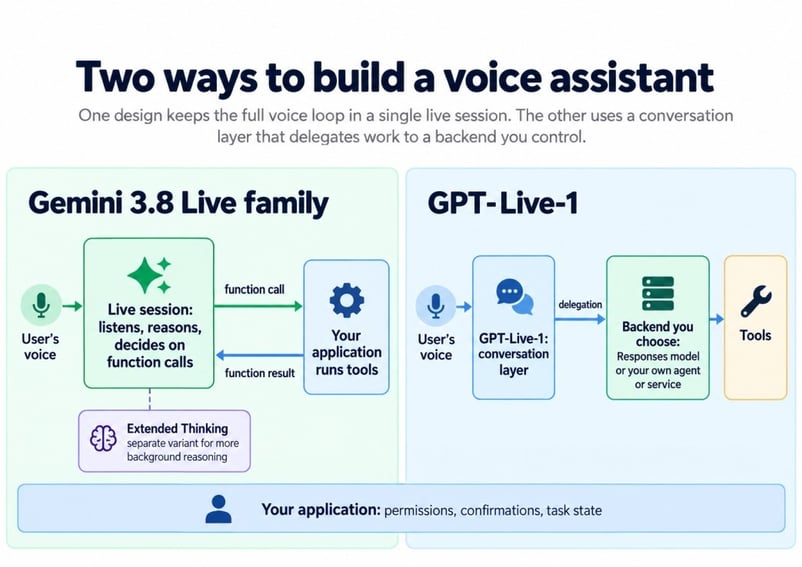
Where each model puts the thinking. Image by Author.
Most of what follows traces back to that split, so here is each side first.
How Gemini 3.8 Live plans inside one session
With Gemini, there is no second model to configure. The live model emits a function call when it needs data, and your client returns the result, as Google's thinking guide describes.
Moving to Extended Thinking keeps the same WebSocket endpoint and requires no backend model, though the client code does change.
How GPT-Live-1 delegation works
GPT-Live-1 handles speech and decides when to ask for help; the backend handles reasoning, tools, and business rules. OpenAI's prompting guide puts the full task procedure in the backend's instructions.
With Responses delegation, OpenAI runs a model you configure. With client delegation, the work goes to any model or service your application runs. Either way, the delegation guide says your application owns permissions, records, and task state.
Why the architecture difference matters
The price of the split is more parts: a voice session, a backend, and state shared between them. In return, you can change the reasoning model without touching the voice.
That trade looks worse if you have no backend yet, but better if you need to upgrade an existing agent without changing its voice.
How Do Gemini 3.8 Live and GPT-Live-1 Handle Interruptions?
Both handle interruptions, but GPT-Live-1 is built around them, along with pauses and backchannels (the "mm-hmm" a listener makes). Gemini 3.8 Live supports barge-in, and its proactive audio is always on, but Google's docs don't call it full duplex.
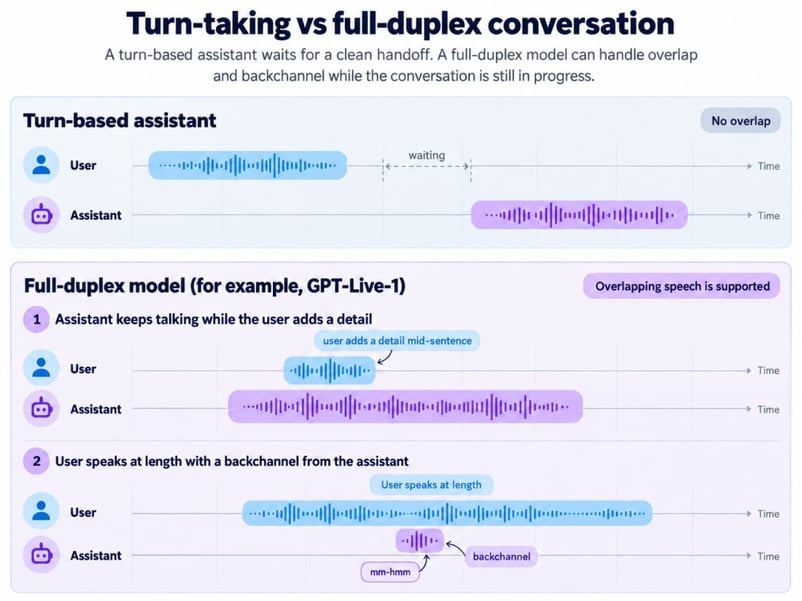
Taking turns versus talking at once. Image by Author.
OpenAI's launch post quotes the language app Speak saying GPT-Live-1 cut interruptions by almost 80% versus turn-based systems, a customer claim rather than an independent test.
On Gemini, proactive audio lets the model skip speech that isn't meant for it. Our Gemini tutorial found that laptop speaker audio leaking into the mic counts as the user cutting in, so test with and without headphones.
How Do Gemini 3.8 Live and GPT-Live-1 Handle Reasoning and Tool Calls?
Gemini scales reasoning by switching from base Live to Extended Thinking. GPT-Live-1 scales it by changing the backend, so compare Extended Thinking with a complete GPT-Live-1 setup, not the voice model alone.
Gemini 3.8 Live vs. Gemini 3.8 Live Extended Thinking
Base Gemini 3.8 Live has no thinking_level setting and accepts BLOCKING functions for older code. Extended Thinking changes four client behaviors:
-
Tools: only
NON_BLOCKINGfunctions work, and a blocking one returns a hard error. -
Thinking levels: there's no minimal option, only the three levels listed above.
-
End of a turn:
turnComplete: trueno longer means the model is done, so your client watchesinteraction_statusuntil it readsIDLE. -
Scheduling: function scheduling isn't supported.
Google recommends Extended Thinking for multi-step tasks and slow tools. It costs more latency and output tokens.
One thing annoyed me in Google's docs. The launch post says Gemini 3.8 Live can "keep chatting while tasks finish in the background," but the thinking guide says the base model "waits for tool execution before speaking." Our Gemini tutorial saw the second behavior during a weather lookup, so I'd plan around the guide until Google clarifies.
Which backend models work with GPT-Live-1?
GPT-Live-1 can sit in front of any backend you configure. OpenAI's docs point to three GPT-6 backends:
-
GPT-6 Luna (
gpt-6-luna), the delegation guide's suggested starting point -
GPT-6 Sol (
gpt-6-sol), the guide's suggestion for harder tasks -
GPT-6 Astra, which the launch post recommends for complex customer issues
The Artificial Analysis rows "GPT-Live-1 (Astra, medium)" and "GPT-Live-1 (Sol, low)" are system configurations, not voice-model versions. Artificial Analysis doesn't name the Sol generation, and OpenAI released GPT-6.1 Sol after those tests ran.
What happens when a caller changes the request mid-task
Suppose a caller asks to move a booking to Friday, then says "actually, Thursday" while the lookup runs. Only the second request still counts.
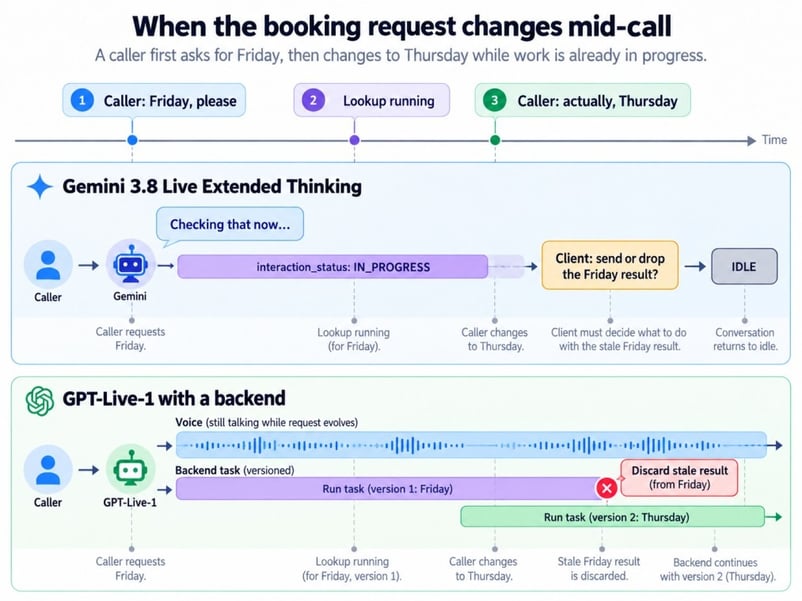
A changed request during slow work. Image by Author.
On GPT-Live-1, interrupting the voice doesn't cancel backend work. Responses delegation can still return the old result to the voice, while client delegation lets your code drop it first.
On Gemini, your client can drop the stale tool result. Either way, your application decides what the current task is.
Do Gemini 3.8 Live and GPT-Live-1 Support Images and Video?
Gemini 3.8 Live accepts images and video natively; GPT-Live-1 lists both as unsupported. A GPT-Live-1 app can still send a photo to a separate vision backend, but it cannot watch a live camera itself.
For Gemini, frames enter the same session as the audio, so the model can answer "is this the right cable?" while the user holds it up. That has two costs. Video frames are sent by default, and Google's session guide caps sessions with audio and video at 2 minutes, versus 15 for audio only, unless you turn on context window compression.
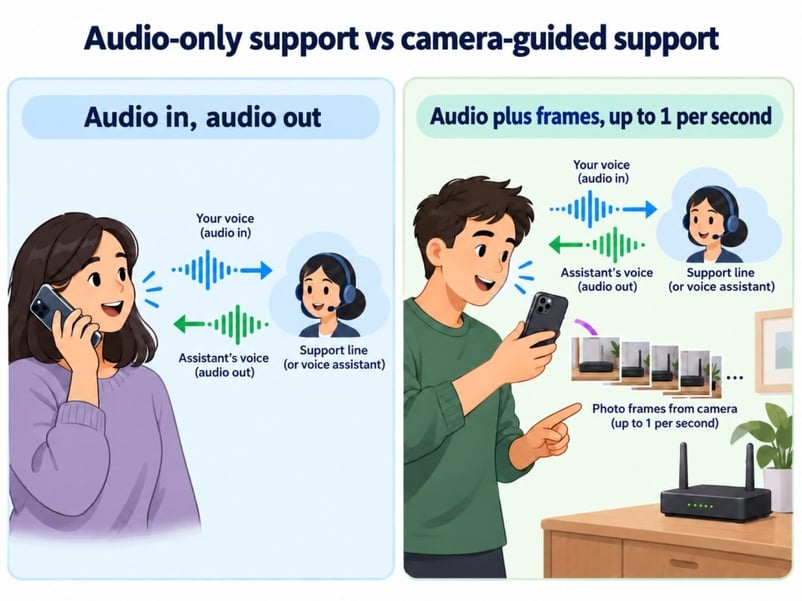
Phone calls versus camera repair sessions. Image by Author.
A reservations line never sees a frame, and the speech leaderboards below don't measure vision.
Gemini 3.8 Live vs. GPT-Live-1 Benchmarks
No single benchmark settles this comparison. Among the four configurations of the two models, Astra leads the main index, Sol leads conversational dynamics, and base Gemini has the highest Arena Elo of the four configurations.
First, how the main index works, since that explains most of the gaps.
How the Artificial Analysis Speech to Speech Index works
The index gives equal weight to four different skills:
- Big Bench Audio: reasoning questions asked out loud
- τ-Voice: multi-step customer service tasks, such as changing a flight
- Arena score: blind human votes on which agent people preferred
- Task success rate: how often a conversation ended with the right final tool call
Conversational dynamics is reported separately under the v2.0 methodology.
Here are the four configurations that matter here.
|
Configuration |
Index |
Big Bench Audio |
τ-Voice |
Conversational dynamics |
Arena Elo |
Task success |
TTFA |
|
GPT-Live-1 (Astra, medium) |
83.2 |
90.1% |
74.5% |
94.9% |
1027 |
87.4% |
1.34 s |
|
Gemini 3.8 Live Extended Thinking (High) |
82.6 |
97.7% |
68.6% |
91.9% |
966 |
89.1% |
1.35 s |
|
GPT-Live-1 (Sol, low) |
80.1 |
89.0% |
59.3% |
97.3% |
1037 |
90.9% |
1.24 s |
|
Gemini 3.8 Live |
74.5 |
91.7% |
30.1% |
96.1% |
1074 |
93.2% |
1.18 s |
Both GPT-Live-1 τ-Voice scores come from one trial, so treat them with caution.
Agent tasks vs. human preference scores
On τ-Voice, Astra scores 74.5%, Extended Thinking 68.6%, and base Gemini 30.1%. Extra reasoning matters once tools are chained.
Conversation tells a different story: Sol scores highest, and the Arena confidence intervals for base Gemini and Sol overlap.
The 0.6-point index gap between Astra and Extended Thinking has no published confidence interval. They have already swapped places once, so I'd still call it a tie.
Which model responds faster?
Base Gemini 3.8 Live has the quickest time to first audio (TTFA) in the table, but the spread across all four is under 0.2 seconds. TTFA is how long a model takes to produce its first audio token.
TTFA misses interruption response and the time needed to finish a booking or lookup. The latter depends more on your backend and tools.
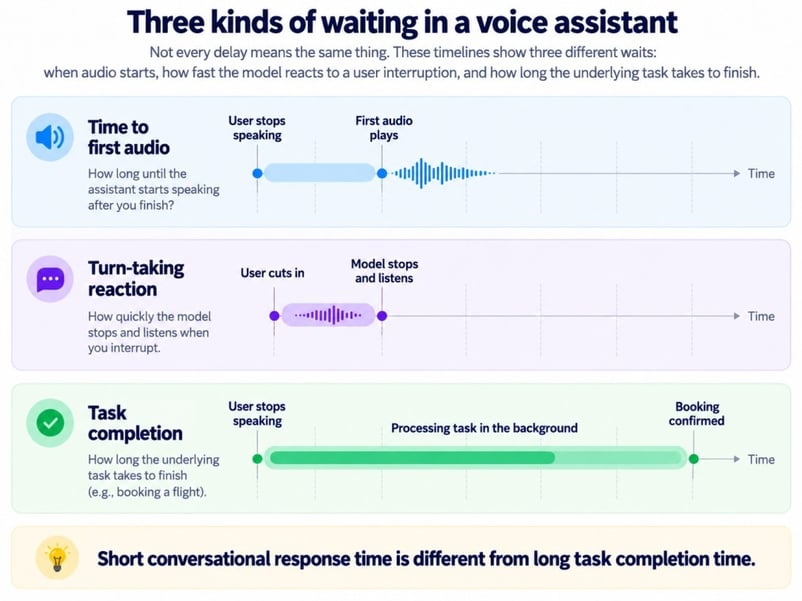
Three kinds of waiting in voice. Image by Author.
Both Extended Thinking and GPT-Live-1 can keep talking through a slow lookup. The caller is still waiting for the booking.
What voice benchmarks don't measure
For a support line, the leaderboards can't tell you:
- whether your phone provider and codec carry it cleanly
- whether the agent still follows your script ten minutes in
- how it hears a caller with a strong accent on a noisy street
- what the call cost once the backend and tools are counted
A pilot with your own recordings answers those questions better.
Gemini 3.8 Live vs. GPT-Live-1 Pricing: Which Is Cheaper?
Base Gemini is cheapest in Artificial Analysis's test, but the models charge for different things. Cost per successful task matters more than either sticker price.
The rates below are the list prices on Google's pricing page and the GPT-Live-1 model page as I write this, and Gemini's per-minute figures are Google's own conversions from token prices.
|
Cost item |
Gemini 3.8 Live and Extended Thinking (paid tier) |
GPT-Live-1 |
|
Audio input |
$3.00 per 1M tokens (about $0.005/min) |
Covered by $0.05 per minute, billed per second |
|
Audio output |
$12.00 per 1M tokens (about $0.018/min) |
Covered by the same session fee |
|
Image or video input |
$1.00 per 1M tokens (about $0.002/min) |
Not supported |
|
Reasoning |
Thinking tokens billed at output rates |
Backend model tokens at that model's price |
|
Search and tools |
5,000 free Search requests a month, then $14 per 1,000 |
Billed by the backend model and tools you use |
Thinking tokens make Extended Thinking cost more than base Gemini. Artificial Analysis estimates $0.84 per input-audio hour for base Gemini, $3.50 for Extended Thinking, $4.47 for Sol, and $5.83 for Astra, excluding tools and cache discounts. Gemini Live doesn't support caching; a GPT-Live-1 backend can.
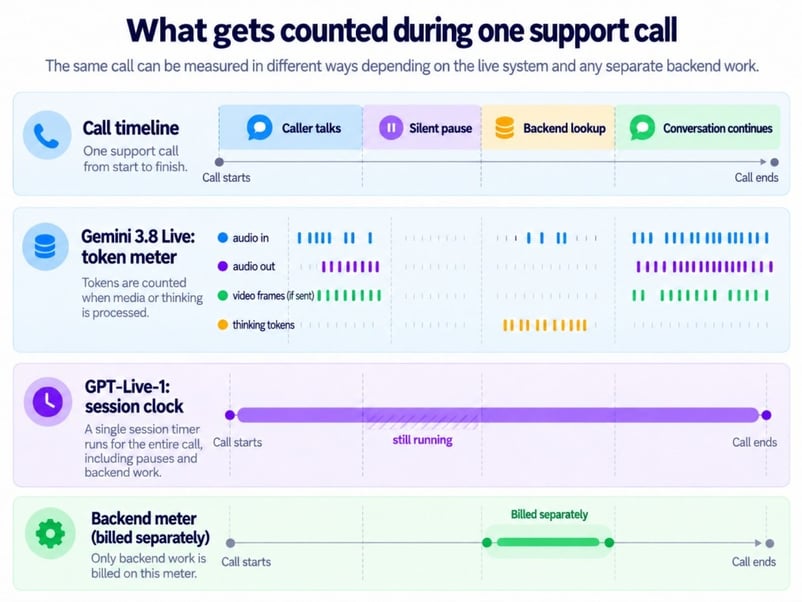
What each meter counts during calls. Image by Author.
GPT-Live-1's clock runs through silence, and muting doesn't stop it. Add the table's charges and phone costs, then divide by completed tasks.
Browser, Server, and Phone Support in Gemini 3.8 Live and GPT-Live-1
Browser and server apps can connect to either model, but phone deployment separates them. The diagram shows the connection options; the operational differences are connection lifetime and who sits in the call path.
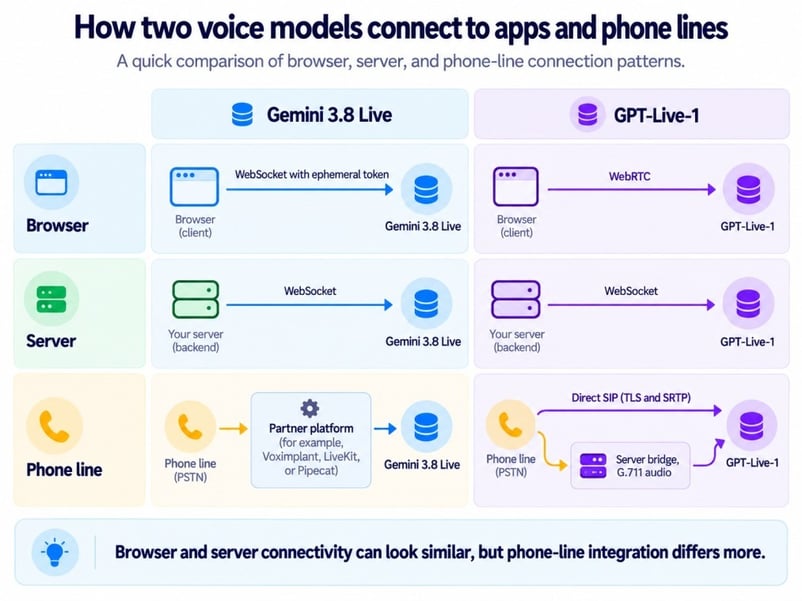
Browser, server, and phone connection paths. Image by Author.
Gemini connections reset after about 10 minutes, so longer calls need session resumption. With GPT-Live-1, log the voice connection and delegated backend work separately.
Phone calls and SIP support
Direct SIP leaves one fewer vendor in the GPT-Live-1 call path. Gemini's partner route adds another service to configure, monitor, and debug.
A few developers on OpenAI's forum report GPT-Live-1 promising an action without creating a delegation. OpenAI support hasn’t called it a bug; it pointed to its prompting guide, which notes that a spoken acknowledgment doesn’t confirm backend work started. I’d log delegation events separately from speech.
Since November 2, OpenAI also supports outbound SIP calling for all organizations, so GPT-Live-1 can place calls as well as answer them.
Gemini 3.8 Live vs. GPT-Live-1: Which Should You Use?
The choice comes down to two questions: does the assistant need to see, and do you already have a backend? A yes to the first points toward Gemini; a yes to the second points toward GPT-Live-1.
Skip to the scenario below that matches your product.
Phone support and reservations
A phone line needs interruption handling and confirmations before anything irreversible. GPT-Live-1 lines up well, with the SIP support covered above and booking logic kept in the backend.
Camera and screen troubleshooting
When a user points a phone at a router, the model has to reason about what it sees right now. Gemini 3.8 Live does that in one session, without a separate vision component, as long as you plan for the 2-minute video cap from the images section.
Multi-step work in the background
For tasks that chain tools, compare Extended Thinking with GPT-Live-1 plus Astra. Astra leads τ-Voice on one trial, so the choice still comes down to where reasoning should live.
Adding voice to an agent you already run
Client delegation can add GPT-Live-1 to an existing agent without rewriting its reasoning loop. With Gemini, the live model becomes the planner.
High call volume on a tight budget
Short, simple calls point to base Gemini, the cheapest setup in Artificial Analysis's test. Multi-step tools change that calculation.
Final Thoughts
The clearest way to frame this comparison is that Gemini 3.8 Live combines seeing, reasoning, and speaking in one model, while GPT-Live-1 separates the voice from the intelligence behind it. Neither one dominates, and the two are close enough on sounding human and answering fast that architecture will determine most real decisions.
What I find most interesting is how quickly the agent-task lead moved toward GPT-Live-1 with Astra. That score belongs to the whole system, not only the voice model, so it's the delegation argument in action, though one test run is a signal and not a verdict.
The other thing worth watching is OpenAI's backend lineup, since GPT-6.1 Sol arrived in late September 2026. Each new backend can move GPT-Live-1's scores without touching the voice, while Google's comparable change would mean switching the live model.
For now, Gemini 3.8 Live is the easier choice for anything with a camera, and GPT-Live-1 is the easier choice for phone products with a backend already in place. Either way, your code still has to handle the Friday-to-Thursday booking problem.
For the agent concepts behind either path, our Introduction to AI Agents course covers tools, memory, and planning.
FAQs
Can GPT-Live-1 use a Gemini model as its backend?
Yes. Client delegation can send the work to a Gemini text model behind your own backend. You'd pay OpenAI for voice minutes and Google for backend tokens.
How long can a GPT-Live-1 conversation stay in context?
GPT-Live-1 has a 128,000-token context window that counts audio tokens, not only the transcript. Once usage passes 90%, it starts a replacement voice engine that carries up to 8,192 tokens of recent history and summaries, so keep confirmed actions and task state in your own application.
What rate limits apply to Gemini 3.8 Live and GPT-Live-1?
GPT-Live-1 allows 50 concurrent sessions on Build, 300 on Launch, and 500 on Grow, with no free-tier access. Google doesn't publish limits just for Live and points you to Google AI Studio for your project's current limits.
Can I reuse my existing voice app code?
Mostly on Gemini, less so on OpenAI. Code written for Gemini 3.1 Flash Live mainly needs the new model string, minus any thinking_level setting, which gemini-3.8-live doesn't accept. Also remove enable_affective_dialog and proactive_audio: false if your code carries them over from older models. GPT-Live-1 uses its own v1/live/sessions endpoint rather than v1/realtime, so a Realtime API app needs rework, and OpenAI publishes a migration guide for it.
Is Gemini 3.8 Live audio watermarked?
Yes. Google says all audio generated by its AI products, including both Gemini 3.8 Live models, carries a SynthID watermark that listeners can't hear, which helps if you ever need to show a caller heard synthetic speech.

I’m a data engineer and community builder who works across data pipelines, cloud, and AI tooling while writing practical, high-impact tutorials for DataCamp and emerging developers.






Older voice assistants mostly take turns: you speak, you wait, and then they answer. Google's Gemini 3.8 Live and OpenAI's GPT-Live-1 are real-time voice agents that can handle interruptions and mid-sentence changes. Neither one is better across the board.
The difference is where the thinking happens. Gemini 3.8 Live hears you, can inspect camera input, reasons, and decides when to ask your app to act. GPT-Live-1 focuses on the conversation and can listen while it talks. When GPT-Live-1 needs harder thinking or an action, it passes the work to a second model or service called the backend.
OpenAI brought GPT-Live-1 to its API this September, and Google released Gemini 3.8 Live less than a week later. Our Gemini 3.8 Live overview covers Google's launch. If you want to build with either one, our Gemini 3.8 Live tutorial and GPT-Live-1 API tutorial cover the setup.
TL;DR
Short on time? Here's the comparison in six points:
A camera requirement or existing backend may settle the choice before the leaderboard does. The table below shows why.