Course
Multi-Agent Systems with LangGraph
2 hr 45 min
8.6K
Give an agent one job, and it does fine. Give it three, and watch what happens around the second handoff: it forgets what it found in step one, it rates its own draft generously, and it announces success while the output sits there unfinished.
The argument about that pattern boiled over in mid-July 2026, when "graph engineering" hit X (formerly Twitter) and the timeline immediately split between people announcing the death of the agent loop and people calling the term content-farm filler.
My take is that the graph engineering label is optional and the underlying escalation is not, which I will try to justify before we write any code.
Most of what you build this month should still be a single loop, and the fastest way to waste a week is to draw a diagram with 6 boxes for a job that needed 1.
An agent graph has 3 parts:
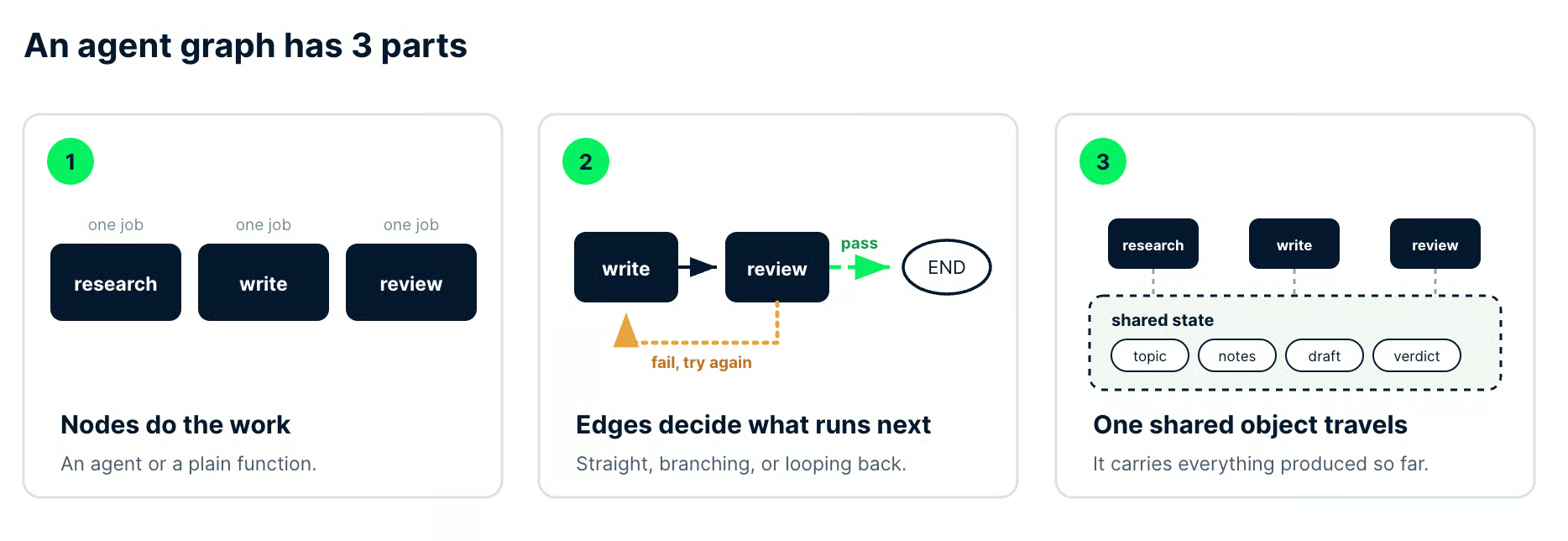
Image by Author. The 3 parts shown on the pipeline we build later: 3 named nodes, a pass edge, and a retry edge, and one state object collecting topic, notes, draft, and verdict.
Declaring all 3 up front, instead of letting a single agent improvise its own path, is what the term graph engineering describes.
This tutorial builds a working researcher, writer, and reviewer pipeline in Python with LangGraph, including a conditional edge that returns failed drafts for revision.
You need Python, pip, and some familiarity with large language models (LLMs) or AI agents. If agents are new, our Introduction to AI Agents course covers the concepts this article assumes, and our LangGraph agents tutorial covers the hands-on side.
Graph engineering is the practice of making an agent system's control flow explicit in code rather than leaving it to the model's judgment.
You declare which specialized workers exist, which transitions between them are allowed, and what information travels along those transitions.
The agent still reasons freely, but it reasons inside one node instead of across the whole job.
That last sentence is the whole distinction.
In a loop, you set a goal and a quality bar, and the agent picks its own route to clear them. In a graph, you fix the route and the checkpoints, so the model's autonomy is bounded by a structure you can read in a diff.
The label got loud on X in July 2026, but it did not start there. Itamar Friedman of CodiumAI (now Qodo) described a shift "from prompt engineering to flow (/graph) engineering" back in February 2024, and his team's AlphaCodium paper put numbers on it.
GPT-4 pass@5 accuracy on the CodeContests validation set went from 19% with one well-designed prompt to 44% with a multi-stage flow. That is 5 attempts per problem in both conditions, not single-shot.
What happened in July 2026 was amplification.
On July 18, Peter Steinberger asked on X, "Are we still talking loops or did we shift to graphs yet?", 1 week after Mike Masson posted the ladder running prompt, context, harness, loop, graph. The question drew 3.1 million views, and the phrase it spread was already in use.
The pushback came fast. Harrison Chase, a LangChain cofounder from the team behind LangGraph, asked whether the whole thing was "basically just langgraph?"
Dale Everett pushed from the other side, arguing that a loop was always a one-node graph, so the July excitement was rediscovering old ground. LangChain's own retrospective, 3 Years of Graph Engineering with LangGraph, takes a similar line, framing agent graphs as a pattern it has been building for 3 years.
So I file the term under useful shorthand.
What it gave us is a shared name for design questions that used to sit buried in framework documentation, and a name earns its keep when you are arguing about architecture in a pull request.
Graph engineering describes the execution structure, which separates it from two things that borrow its vocabulary.
Knowledge graphs and GraphRAG describe data.
They turn documents into entities and relationships so a retrieval system can traverse the connections between facts, and the tooling, the storage, and the evaluation metrics all differ.
For that side of the word, our tutorial on using a knowledge graph to implement a RAG application is the right starting point, with our introduction to graph theory covering the math that sits under both.
The second thing it is not is a new capability.
LangGraph, Google's Agent Development Kit (ADK), and Microsoft AutoGen all shipped multi-agent orchestration before the label went viral, so if you have written a StateGraph you were already doing this.
Plenty of readers will find they have been graph engineering for a year under the name "my LangGraph pipeline."
Each layer of AI engineering takes control of something one step further out from the model.
The useful way to read this table is the right-hand column, which tells you what actually goes wrong when you skip a rung and try to build on top of it anyway.
| Layer | What you control | What breaks if you skip it |
|---|---|---|
| Prompt | The wording of the request | The model answers a question you did not ask |
| Context | Which inputs reach the model | It reasons well over the wrong material |
| Harness | Tools, memory, file and API access | It cannot touch anything outside the chat window |
| Loop | The repeat-until-done cycle | It stops early, or it never stops |
| Graph | Which worker runs next, and on what | One agent tries to be 4 agents and forgets 3 of them |
Skipping a rung is the most common way graph projects fail, and the failure is rarely obvious.
Three unreliable nodes wired together do not average out into a reliable system.
They produce a system that fails in more places, costs more per failure, and takes longer to diagnose because the bad output is now 2 handoffs away from the node that caused it.
Any agent graph, whether it has 3 nodes or 30, decomposes into nodes, edges, and shared state.
Once you can name those 3 parts in a codebase, most orchestration frameworks become readable without their documentation.
A node is one unit of work with a name and a single responsibility.
It can be an LLM call with a specialized prompt and its own tools, or it can be an ordinary Python function that queries a database, validates a schema, or writes a file.
Reserve the model calls for steps that need semantic judgment.
If a rule has a known answer, put it in Python, where it runs in microseconds, costs nothing, and returns the same result twice.
Here is the test I use for whether something should be split: try describing the node in one sentence with no conjunction.
A node that "pulls the sources and decides whether we have enough" has already failed the test, because you cannot swap the retrieval half without disturbing the judgment half.
An edge determines what runs after the current node finishes.
Four shapes cover almost everything you will build:
Edges are also where your stopping logic belongs. Retry caps, quality gates, and escalation rules are all routing decisions, and keeping them in the edge functions means you can audit the control flow in one place instead of hunting through node bodies.
Shared state is the single object that every node reads from and writes to as the run progresses.
Without it, you have several agents doing adjacent work and passing each other nothing, so the writer cannot see what the researcher found, and the reviewer cannot see either.
In LangGraph, the state is usually a TypedDict.
Ours accumulates the topic, the researcher's notes, the current draft, the reviewer's verdict and feedback, and a revision counter. Each node returns only the fields it changed, and the framework merges those returns into the running object.
Write ownership is where graphs decay first.
Decide before you code which node is allowed to write each field, because a state object that 3 different nodes can overwrite is a debugging session you have already scheduled for yourself.
Loop engineering designs the cycle that a single agent repeats until it finishes, and graph engineering designs the coordination between several of those cycles.
This is the most consequential decision in the article, so it comes before the tutorial.
The default answer is the loop.
A single well-scoped agent with a strict verifier is faster to build, cheaper to run, and much easier to debug than any graph doing the same job.
This is not only my preference.
A UC Berkeley team (first author Mert Cemri) starts from the observation that multi-agent gains over single-agent setups are often minimal, then annotates 1,600+ execution traces from 7 multi-agent frameworks to find out why (arXiv:2503.13657, v3).
Their taxonomy, built from a close reading of 150 of those traces, names 14 distinct failure modes.
Those 14 modes sort into 3 categories: system design issues, inter-agent misalignment, and task verification.
Hold onto that third one until we reach the reviewer node.
Treat these as triggers, not a checklist.
One clear yes on the right-hand column is enough, and 5 vague ones are not.
| Question about your task | A loop handles it | You want a graph |
|---|---|---|
| Can you write the job as one instruction? | Yes, and a person could follow it start to finish | It reads like a handoff between 2 different roles |
| Does every step want the same model? | One model and one toolset throughout | Gathering wants cheap and fast, judging wants sharp |
| Do any steps not depend on each other? | Each step needs the previous step's output | Several lookups that could all run at once |
| Who decides the output is good enough? | The agent rereads its own work | Something that did not write it has to sign off |
| What should happen when a step fails? | Retry it and carry on | Contain the failure so the rest of the run survives |
| Does anyone have to audit the path taken? | The trace is for you and your teammates | Someone outside needs to see which step ran, and why |
The over-engineered version I run into most is not even about agents. Someone needs to clean and geocode a list of 800 hotel addresses, and it arrives as a 5-node graph: a loader node, a normalizer node, a geocoder node, a validator node, and a writer node, with shared state threading between them.
Every one of those steps is deterministic, so what they actually built is a 40-line Python script wearing a framework, and it now costs money per row and fails in ways pandas never would.
The right-sized version is the one we are about to build.
Producing a short researched brief splits into work a single loop struggles with: gathering raw material, turning it into prose, and then judging that prose from the outside.
The third step is the reason the graph exists, because an agent reviewing its own draft is not reviewing.
Three things justify a node.
If you cannot point at one of them for every node you added, delete the node and fold its work into a neighbor.
Real specialization comes first.
Our researcher wants a cheap, fast model and, in production, search tools. The writer wants neither of those and benefits from a stronger model, so the split is doing work instead of decorating a diagram.
Second, parallelism that you will actually notice.
Fan-out pays when branches are independent and the wall-clock saving matters to someone, and costs you extra complexity when neither is true.
Third, and this is the one I would defend hardest, independent verification.
An agent grading its own homework grades kindly, so a separate reviewer node holding read-only access to the draft is usually the most valuable node in any graph.
For a framework-level view of how different libraries express these patterns, our comparison of CrewAI vs LangGraph vs AutoGen lays out the tradeoffs.
We are building a LangGraph multi-agent pipeline with a researcher, a writer, and a reviewer that produces a short researched brief and returns failed drafts for revision.
LangGraph is a low-level orchestration framework for stateful agents, and its StateGraph maps almost one-to-one onto the nodes, edges, and state from the previous section.
Everything below was checked against langgraph 1.2.11 and langchain-anthropic 1.7.1 in September 2026.
If the library is new to you, our LangGraph tutorial covers the fundamentals. This section moves quickly, and our guide to LangChain vs LangGraph vs LangSmith vs LangFlow sorts out which piece of that family does what.
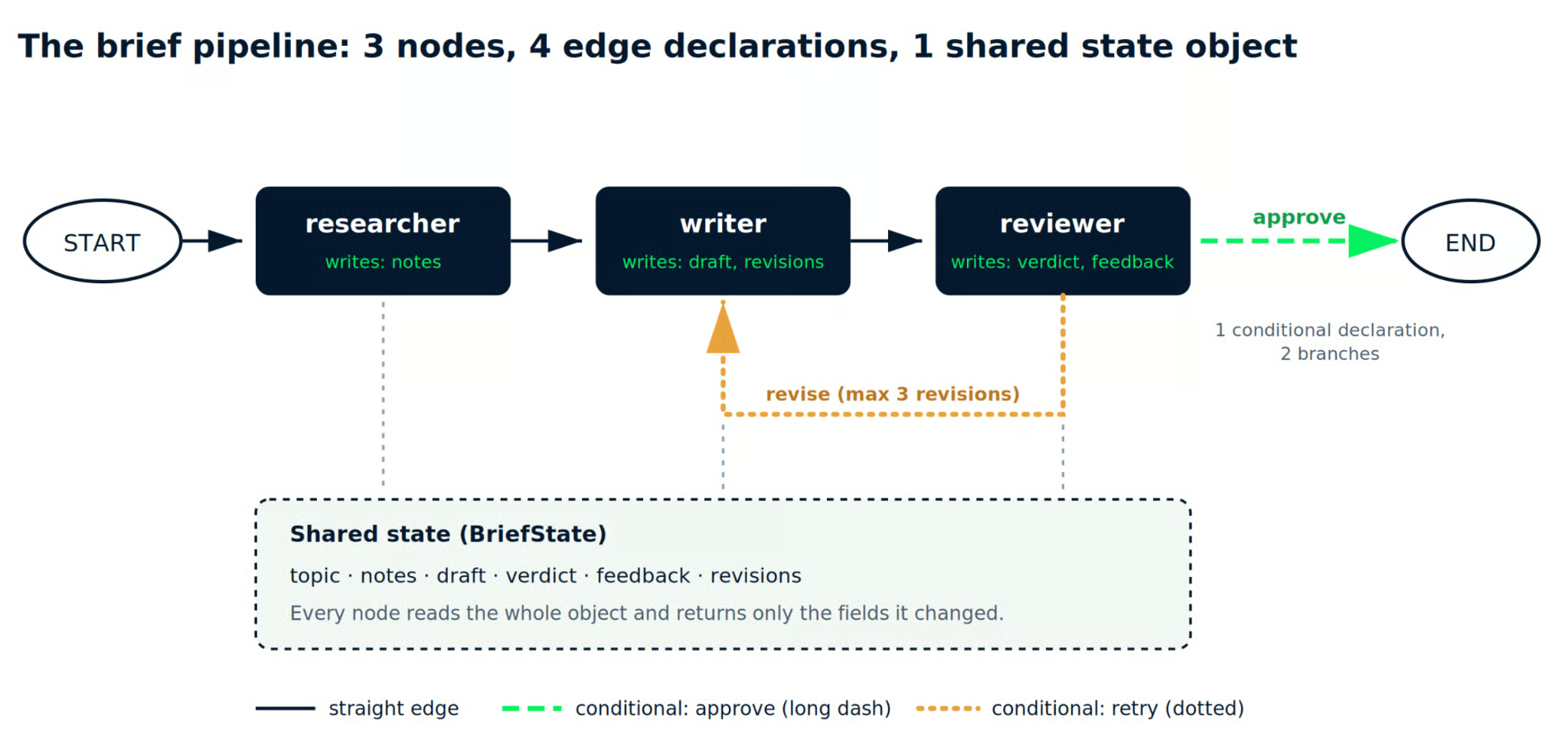
Image by Author. The pipeline we are about to build. Solid lines are the 3 straight edges; the dashed and dotted lines are the 2 branches of a single conditional edge.
Install the packages, plus python-dotenv so your key stays out of the source:
pip install langgraph langchain-anthropic python-dotenvCreate a .env file next to your script:
ANTHROPIC_API_KEY=sk-ant-your-key-hereNow the imports and the state schema. Writing the TypedDict first is worth the 2 minutes, because it is the contract every node agrees to:
from typing import Literal, TypedDict

from dotenv import load_dotenv
from langchain_anthropic import ChatAnthropic
from langgraph.graph import END, START, StateGraph

load_dotenv()

MAX_REVISIONS = 3

# A cheap model for gathering, a stronger one for writing and reviewing.
fast_llm = ChatAnthropic(model="claude-haiku-4-5-20251001", max_tokens=2000)
main_llm = ChatAnthropic(model="claude-sonnet-5", max_tokens=2000)


class BriefState(TypedDict):
    topic: str
    notes: str
    draft: str
    verdict: str
    feedback: str
    revisions: int
Two models, not one. That is the "different model per step" trigger from the decision table showing up in real code, since research is high-volume and low-judgment work that does not need the expensive model.
MAX_REVISIONS is doing quiet but important work here.
Without a cap, a strict reviewer and a stubborn writer will pass a draft back and forth until your invoice gets interesting.
Every node follows the same contract. It receives the current state, does its one job, and returns a dictionary containing only the fields it changed.
The researcher gathers raw material and writes it into notes:
def researcher(state: BriefState) -> dict:
    """Gather raw material and write it into shared state as notes."""
    prompt = (
        f"Topic: {state['topic']}\n\n"
        "List 6 to 8 concrete facts, numbers, or named examples a writer "
        "could use. Bullet points only. No introduction, no conclusion."
    )
    response = fast_llm.invoke(prompt)
    return {"notes": response.text}
A production version of this node would call a search tool instead of relying on the model's own knowledge.
I kept it as one .invoke() call so the graph structure stays visible, so treat the notes it produces as unverified.
The writer reads those notes and produces a draft. It also checks for reviewer feedback, which gives the retry edge something to act on:
def writer(state: BriefState) -> dict:
    """Turn notes into a draft, applying reviewer feedback on a retry."""
    feedback = state.get("feedback", "")
    revision_note = (
        f"\n\nThe reviewer rejected your last draft. Fix this: {feedback}"
        if feedback
        else ""
    )
    prompt = (
        f"Write a 200-word brief on: {state['topic']}\n\n"
        f"Use only these notes:\n{state['notes']}{revision_note}"
    )
    response = main_llm.invoke(prompt)
    return {
        "draft": response.text,
        "revisions": state.get("revisions", 0) + 1,
    }
The reviewer scores the draft.
It never saw the writer's reasoning and produced none of the text, so it can be blunt about the result.
This is the Berkeley taxonomy's third failure category, given a node of its own.
Task verification breaks down when nothing independent checks the output, so the fix is a worker that cannot mark its own homework:
def reviewer(state: BriefState) -> dict:
    """Score the draft. This node never writes, so it can be honest."""
    prompt = (
        "You are a skeptical editor. Reject the draft if it makes a claim "
        "the notes do not support, or if it runs past 250 words.\n\n"
        f"NOTES:\n{state['notes']}\n\nDRAFT:\n{state['draft']}\n\n"
        "Reply with APPROVE or REVISE on the first line. "
        "If REVISE, add one line explaining the single biggest problem."
    )
    response = main_llm.invoke(prompt)
    text = response.text.strip()
    verdict = "approve" if text.upper().startswith("APPROVE") else "revise"
    return {"verdict": verdict, "feedback": text}
Note .text rather than .content on all three nodes.
Both return a string for a simple reply, but .text also does the right thing when a response arrives as multiple content blocks, which saves you a confusing AttributeError: 'list' object has no attribute 'strip' later.
Parsing the verdict off the first line keeps this readable, and it is fragile.
For anything running unattended, swap that string check for LangChain's structured output so the verdict comes back as a typed field instead of a prefix you hoped the model would respect.
The routing function is the conditional edge. It reads the state after the reviewer runs and returns the name of whatever should happen next:
def route_after_review(state: BriefState) -> Literal["writer", "__end__"]:
    """The conditional edge: ship it, or send it back to the writer."""
    if state["verdict"] == "approve":
        return END
    # revisions counts every draft, including the first, so ">" allows
    # 1 original draft plus MAX_REVISIONS rewrites.
    if state["revisions"] > MAX_REVISIONS:
        return END
    return "writer"
Keep that function silent. A print() inside it lands on stdout while the stream loop is still printing the previous chunk, so the cap notice shows up a step early and the trace looks out of order.
The revision cap lives here rather than inside a node, because stopping is a control-flow decision and control flow belongs on the edges.
Now assemble the graph. Nodes, then edges, then compile:
builder = StateGraph(BriefState)

builder.add_node("researcher", researcher)
builder.add_node("writer", writer)
builder.add_node("reviewer", reviewer)

builder.add_edge(START, "researcher")
builder.add_edge("researcher", "writer")
builder.add_edge("writer", "reviewer")
builder.add_conditional_edges(
    "reviewer",
    route_after_review,
    {"writer": "writer", END: END},
)

graph = builder.compile()
That third argument to .add_conditional_edges() is the path map.
It lists every destination the routing function might return, and LangGraph uses it to draw the branch before any node has run.
Invoke the compiled graph with an initial state. Only topic and revisions need values, because the other fields get filled in as execution flows through:
result = graph.invoke(
    {"topic": "Why Postgres beat MongoDB for most startups", "revisions": 0}
)

if result["verdict"] != "approve":
    print(f"Hit the {MAX_REVISIONS}-revision cap. Shipped as is.")

print(f"Revisions: {result['revisions']}")
print(f"Verdict: {result['verdict']}")
print(result["draft"])
That gives you the final state and nothing else. Not much help when a run goes sideways.
Swap .invoke() for .stream() with stream_mode="updates" to watch each node report what it wrote. Each call is a separate run with its own model calls, so use one or the other rather than running both:
for step in graph.stream(
    {"topic": "Why Postgres beat MongoDB for most startups", "revisions": 0},
    stream_mode="updates",
):
    for node, update in step.items():
        print(f"[{node}] wrote: {list(update.keys())}")
On a run where the reviewer rejects the first draft, that prints the following:
[researcher] wrote: ['notes']
[writer] wrote: ['draft', 'revisions']
[reviewer] wrote: ['verdict', 'feedback']
[writer] wrote: ['draft', 'revisions']
[reviewer] wrote: ['verdict', 'feedback']
Two things are visible there that the final state hides.
The researcher ran once, and its notes persisted through both writing passes, so a retry does not re-research. Each node also touched only its own fields, turning the write-ownership rule from earlier into something you can verify.
Count the calls while you are here.
That rejected path costs 5 model calls against roughly 1 for a single-loop version of the same task, and the only way to know whether the extra 4 bought you anything is to log the verdicts and read them.
You do not need extra tooling to see the shape of what you built:
print(graph.get_graph().draw_ascii())      # needs: pip install grandalf
print(graph.get_graph().draw_mermaid())    # paste into any Mermaid renderer
The Mermaid output renders the conditional branch as dashed lines running from reviewer to both __end__ and back to writer.
That confirms your retry edge exists before you spend anything on model calls. The ASCII view only draws the straight path from start to end, so use the Mermaid output when you want to see the loop.
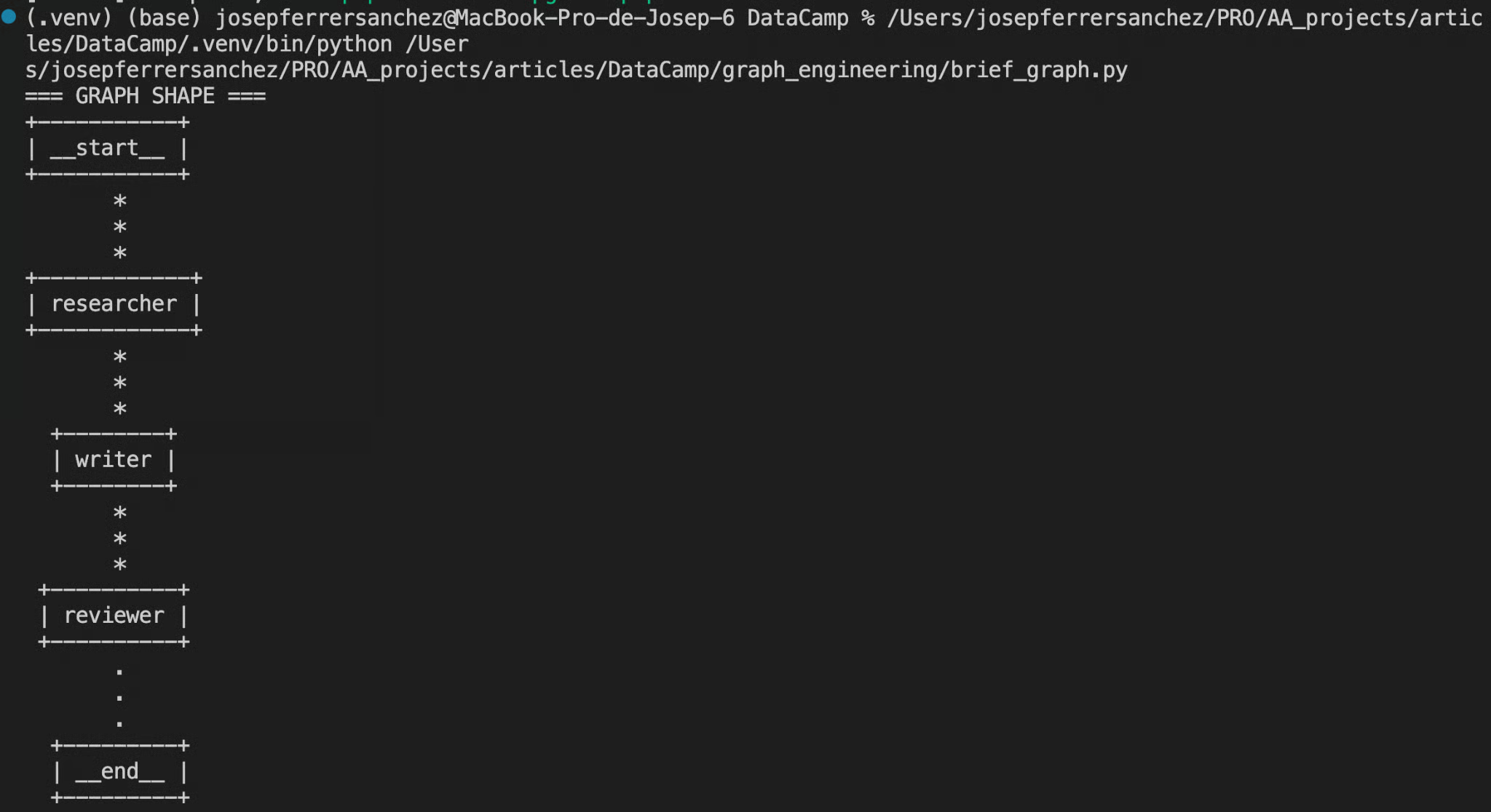
Screenshot by Author. Terminal showing the .draw_ascii() output, with __start__, researcher, writer, reviewer, and __end__ stacked vertically and connected.
For step-through debugging with state inspection at each node, LangGraph Studio connects to a local server. That needs its own package and a config file, so pip install "langgraph-cli[inmem]", add a langgraph.json pointing at your compiled graph object, then run langgraph dev and open the Studio URL it prints.
Our LangGraph Studio guide walks through the interface (it dates from 2024, so check its setup steps against the commands above), and our LangGraph agents tutorial covers adding real tools to a node like our researcher.
One scoping note.
This pipeline is sequential, so it never demonstrates fan-out, the pattern where the researcher would query several sources at once, and a join node would merge the results.
That is the natural next extension, and also where costs multiply fastest.
The failure modes in agentic AI graph engineering repeat often enough to name. These are the three I check before shipping anything.
Every node is a loop in its own right, with a prompt, tools, and a definition of done.
Wiring 3 shaky nodes together gives you a shaky system with triple the surface area and a much worse debugging story.
Get one node working alone first.
A researcher that returns vague notes when you call it directly returns vague notes inside a graph too, and the writer downstream will confidently build on them.
Resist putting logic in a node when it belongs on an edge.
Stopping conditions, branch decisions, and retry caps are routing, and routing belongs in the edge function, where you can read all of it at once.
Apply the no-conjunction test from earlier.
A node that searches sources and decides whether there are enough of them is 2 nodes sharing a function signature.
Fan-out and retry loops multiply token usage in ways a diagram hides completely.
A 5-way fan-out feeding a join node with a 3-retry cap is not 5 calls, and depending on where the retry sits, it can be 15 or more before you count the join.
Set the cap explicitly, as we did with MAX_REVISIONS. Then log per-node token counts and read them after a week, because the node you assumed was cheap is usually the one running most often.
AutoGen still gets recommended for graph orchestration, and its experimental GraphFlow work was real prior art, but the repository is in maintenance mode as of September 2026, with no new features.
Microsoft directs new users to the Microsoft Agent Framework, which has its own graph-based workflows, through a published migration guide.
Starting today, LangGraph, Google's ADK, or Microsoft Agent Framework are the safer choices, and our Building AI Agents with Google ADK course covers ADK in depth.
Graph engineering is the coordination layer above loop engineering.
Nodes do the work, edges decide what runs next, and one shared object carries information between them.
Strip away the July 2026 timeline noise, and that is the entire model.
Our pipeline stayed small on purpose: 3 nodes, 4 edge declarations (1 of them conditional, so it draws 2 branches), and a revision cap so the retry cannot run away from us.
That was enough structure to get a draft reviewed by something that did not write it, and that single property is what a loop could not offer.
Reach for a graph when the work splits into phases needing different specialists, and not one node earlier. The skeptics were right that the mechanics are decades old and that most of the writing around the term is noise.
They were also right about the part that matters on a Tuesday afternoon.
A weak verifier attached to a loop-shaped problem does not improve because you drew more boxes around it.
To take these patterns further, our Multi-Agent Systems with LangGraph course covers the supervisor and network designs this tutorial stops short of.
For the data side of the word, Graph RAG with LangChain and Neo4j is a good next step. To stay on the orchestration side, Text-to-Query Agents with MongoDB and LangGraph builds a LangGraph pipeline against a live database, and LLM Agents Explained fills in the architecture underneath all of it.
The complete script is in my GitHub repo, with the graph rendering helper and a short note on what each run costs.
Top DataCamp Courses
Course
Course
Course
blog
Maria Eugenia Inzaugarat
15 min
Tutorial
Vaibhav Mehra
Tutorial
Ryan Ong
12 min
Tutorial
Dr Ana Rojo-Echeburúa
8 min
Tutorial
Benito Martin
15 min
Tutorial
Richie Cotton
11 min