
Kurs
Konzepte der Datenkommunikation
3 Std.
85.9K
Üben und Lernpfad deinen Fortschritt.
Weiter Mit GoogleStell dir vor, du betrachtest Unternehmensdaten und bemerkst: Wenn die Werbeausgaben steigen, steigen offenbar auch die Umsätze. Bevor du Entscheidungen triffst, willst du die Stärke dieses Zusammenhangs quantifizieren.
Der Pearson-Korrelationskoeffizient ist der Standard, um genau solche Beziehungen messbar zu machen. Er wird in zahlreichen Disziplinen eingesetzt, darunter Data Science, Volkswirtschaft, Psychologie und Biologie. Analytiker berechnen Korrelationen oft schon in der explorativen Datenanalyse, um Muster zu erkennen, bevor sie andere Methoden anwenden.
Bevor wir uns Formeln oder Berechnungen ansehen, hilft ein Gefühl dafür, was Korrelation beschreibt. Ganz grundsätzlich misst Korrelation, wie sich zwei Variablen gemeinsam bewegen. Sie beantwortet die Frage: „Wenn eine Variable steigt, was macht die andere?“
Korrelation betrachtet Muster der gemeinsamen Bewegung, nicht einzelne Werte. Steigen oder fallen zwei Variablen tendenziell gleichzeitig, besteht eine positive Beziehung. Bewegen sie sich meist entgegengesetzt (eine steigt, die andere fällt), ist die Beziehung negativ. Und wenn keine konsistenten Muster erkennbar sind, liegt möglicherweise kein Zusammenhang vor.
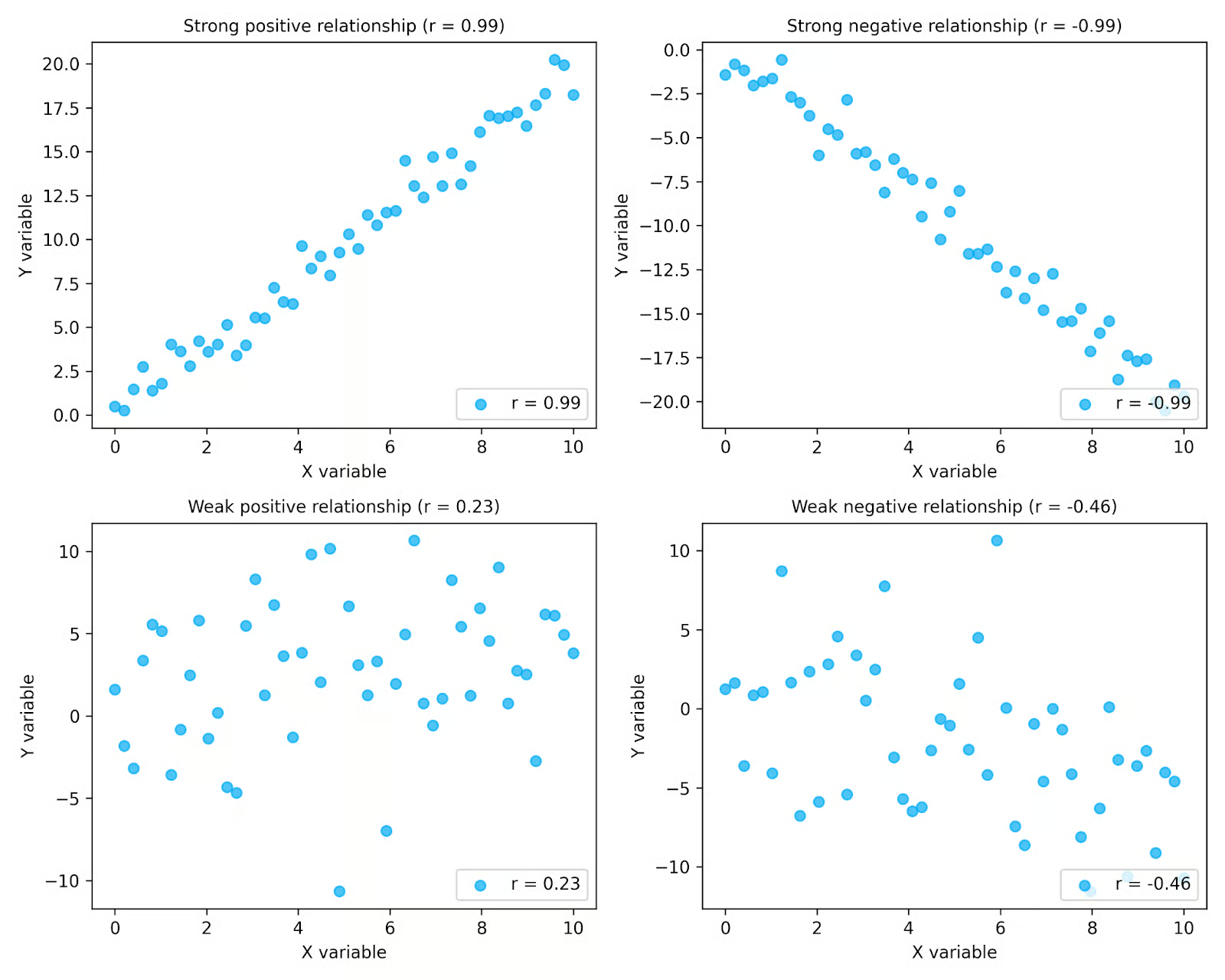
In den Plots oben erkennst du, wie Korrelation Richtung und Stärke einfängt. Oben starke Beziehungen mit klaren Punktmustern, unten schwächere mit mehr Streuung. Links positive Beziehungen, rechts negative. Die r-Werte in jedem Plot fassen diese Muster komprimiert zusammen.
Korrelation ist besonders in der explorativen Datenanalyse nützlich, wenn Beziehungen zwischen Variablen untersucht werden. Durch Visualisierungen erkennst du Muster leichter und kannst prüfen, ob ein Maß wie der Pearson-Wert zu deinen Daten passt.
Wichtig ist auch: Korrelation beschreibt beobachtete Zusammenhänge in Daten, nicht die Mechanismen dahinter. Selbst bei starker Korrelation bedeutet das nicht, dass eine Variable die andere verursacht. Korrelation fasst nur Muster zusammen. Merke dir den Klassiker: „Korrelation ist keine Kausalität“.
Der Pearson-Korrelationskoeffizient misst formal Stärke und Richtung eines linearen Zusammenhangs zwischen zwei stetigen Variablen. Er zeigt, wie eng die Punkte in einem Streudiagramm einem Geradenmuster folgen.
Der Wert des Pearson-Korrelationskoeffizienten liegt immer zwischen −1 und +1.
|
Wert von r |
Interpretation |
|
+1 |
Perfekter positiver linearer Zusammenhang |
|
0 |
Kein linearer Zusammenhang |
|
−1 |
Perfekter negativer linearer Zusammenhang |
Diese Werte quantifizieren die Muster aus dem vorherigen Abschnitt. Werte näher an +1 oder −1 zeigen einen stärkeren linearen Zusammenhang, Werte näher an 0 einen schwächeren. Das Vorzeichen zeigt, ob die Beziehung positiv oder negativ ist.
Wesentlich ist: Der Pearson-Wert misst nur lineare Beziehungen. Folgen zwei Variablen einem nichtlinearen Muster, kann r nahe 0 liegen, obwohl sie klar zusammenhängen. Anders gesagt: r = 0 bedeutet nicht zwingend, dass kein Zusammenhang existiert; es bedeutet, dass kein linearer Zusammenhang besteht.
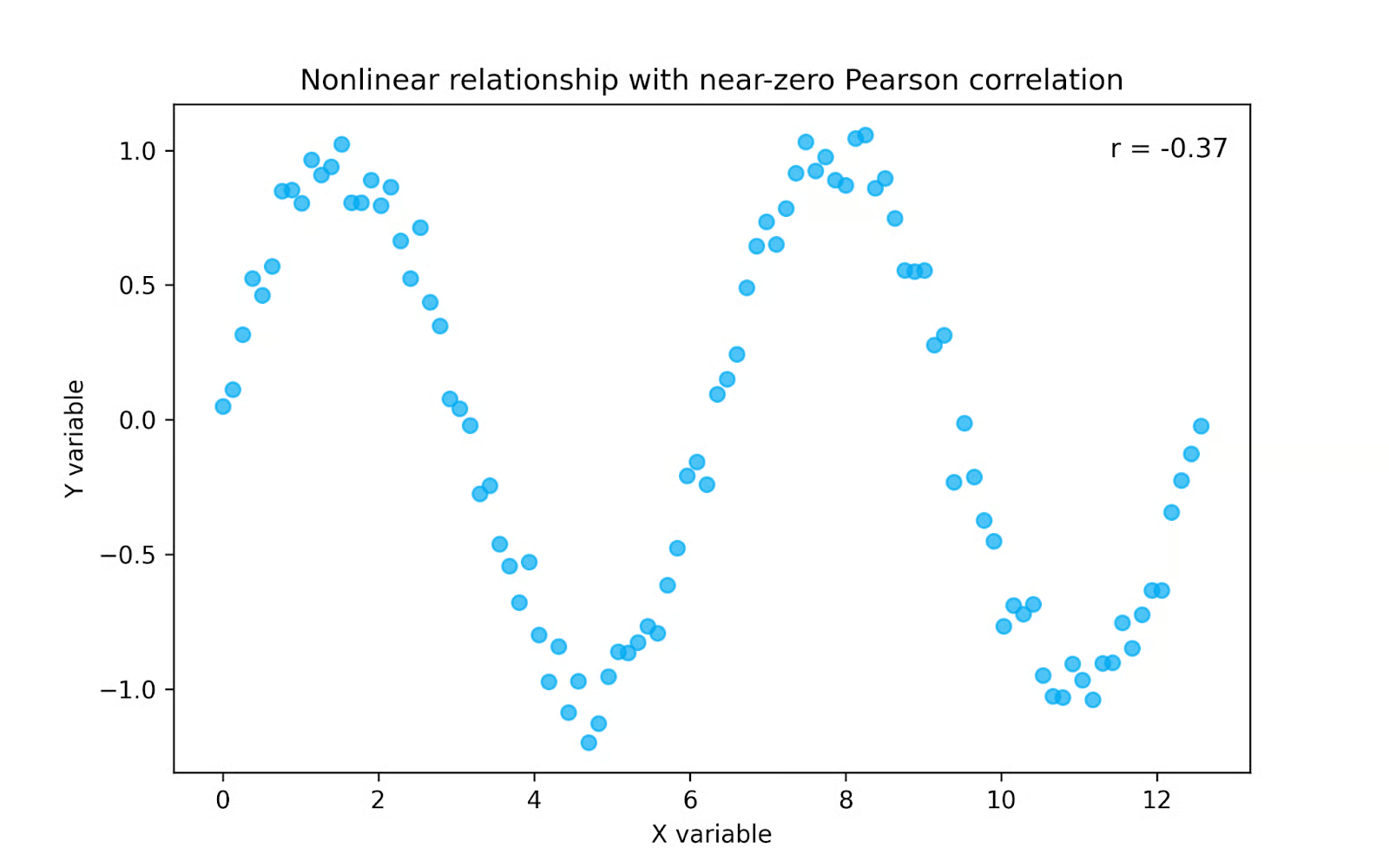
Im Plot oben ist ein klares Muster erkennbar, aber keine Gerade. Da der Pearson-Wert nur lineare Beziehungen misst, liegt r nahe 0, obwohl die Variablen stark zusammenhängen. In solchen Fällen ist ein rangbasiertes Maß wie die Spearman-Korrelation oft geeigneter, da sie monotone, nicht zwingend lineare Muster erfasst.
Der Pearson-Korrelationskoeffizient vergleicht, wie zwei Variablen gemeinsam variieren, relativ zu ihrer individuellen Streuung. Häufig wird er so geschrieben:
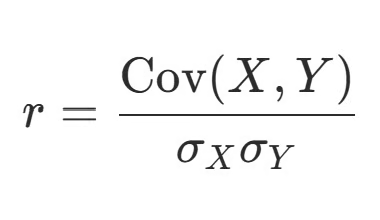
In diesem Ausdruck steht Cov(X, Y) für die Kovarianz der beiden Variablen, während σX und σY die Standardabweichungen bezeichnen. Die Kovarianz zeigt, ob Variablen tendenziell gemeinsam steigen oder fallen, ihre Größe hängt jedoch von den Einheiten ab. Durch das Teilen durch die Standardabweichungen wird das Ergebnis standardisiert und der Pearson-Wert liegt stets zwischen −1 und +1. Eine umfassendere Einführung zu Korrelation und Kovarianz findest du in unserem Tutorial.
Die Pearson-Korrelation ist im Kern die standardisierte Kovarianz. Während die Kovarianz zeigt, ob Variablen in die gleiche oder entgegengesetzte Richtung gehen, skaliert die Korrelation diese Information so, dass die Stärke des Zusammenhangs über verschiedene Datensätze vergleichbar wird.
Wenn du das je per Hand berechnen musstest (danke, Statistik-Kurs!), erkennst du vermutlich diese Form der Formel wieder, die die Schritte expliziter macht:
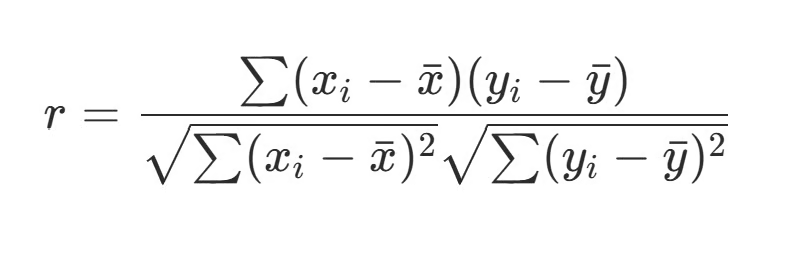
Hier wird jede Beobachtung mit dem Mittelwert ihrer Variable verglichen. Die Terme (Xi − X̄) und (Yi − Ȳ) messen die Abweichung jedes Werts vom Durchschnitt. Das Produkt dieser Abweichungen zeigt, ob sich die Variablen in jeder Beobachtung in die gleiche Richtung bewegen. Sind beide Abweichungen positiv oder beide negativ, ist ihr Produkt positiv und stützt eine positive Korrelation. Haben sie unterschiedliche Vorzeichen, ist das Produkt negativ und stützt eine negative Korrelation.
Die Logik dahinter ist einfach:
So liefert der Pearson-Korrelationskoeffizient ein standardisiertes Maß dafür, wie stark zwei Variablen linear zusammenhängen – unabhängig von ihren ursprünglichen Einheiten oder Skalen.
Gehen wir gemeinsam ein kurzes Beispiel durch. Angenommen, wir untersuchen den Zusammenhang zwischen Lernstunden und Prüfungsergebnissen einer Studierendengruppe. Unten ein kleiner Datensatz mit fünf Personen.
|
Student |
Geleistete Stunden (X) |
Prüfungsergebnis (Y) |
|
Luther |
5 |
72 |
|
Alexandra |
2 |
70 |
|
Javier |
3 |
63 |
|
Jamie |
1 |
58 |
|
Auburn |
4 |
73 |
Der erste Schritt ist alle Daten zu visualisieren. Also los.
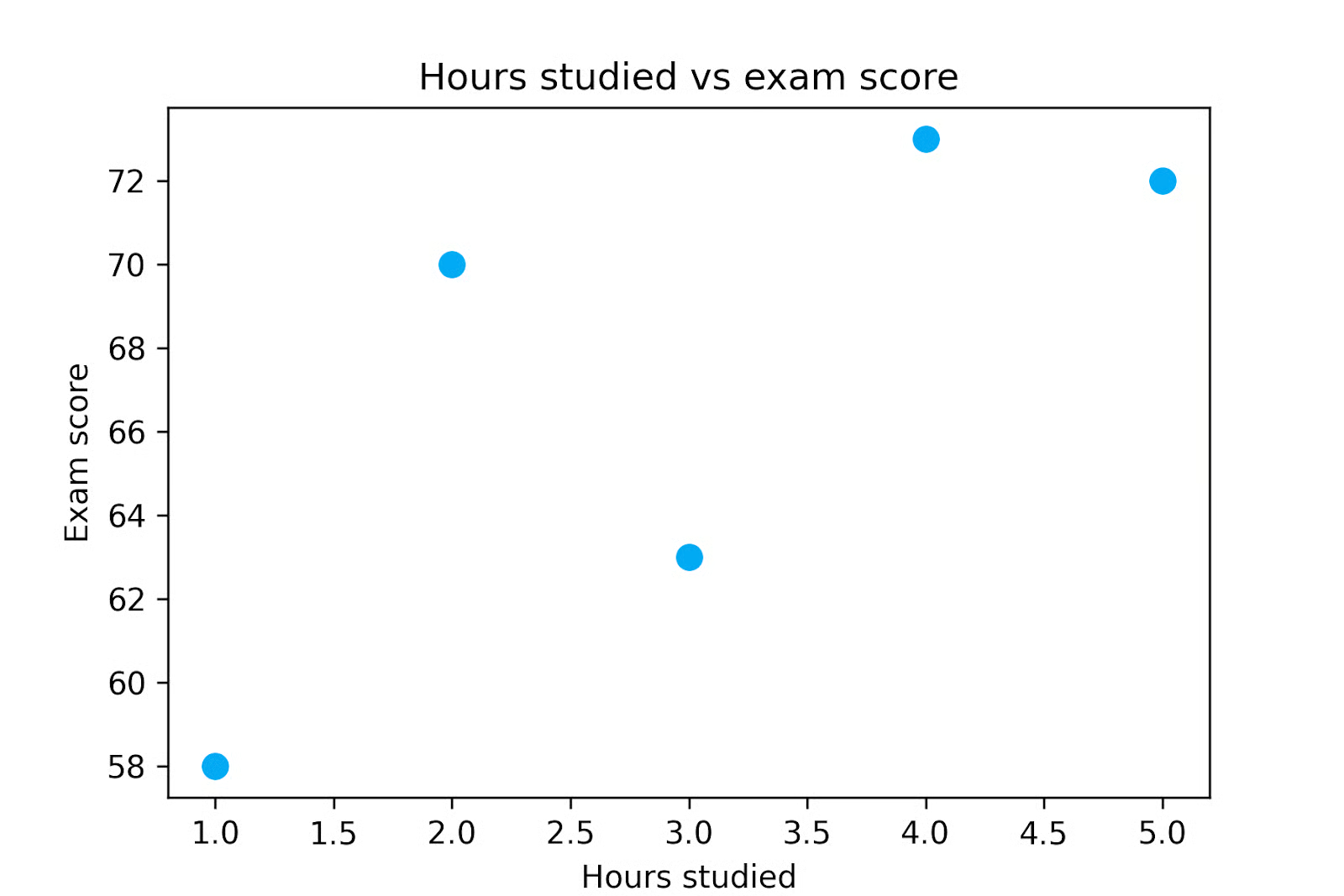
Die Darstellung zeigt: Mit zunehmender Lernzeit steigen tendenziell die Ergebnisse. Diesen Zusammenhang wollen wir quantifizieren und berechnen dafür den Pearson-Korrelationskoeffizienten.
Zuerst berechnen wir die Mittelwerte beider Variablen. In diesem Beispiel liegen die durchschnittlichen Lernstunden bei 3, der durchschnittliche Prüfungswert bei 67,2.
Als Nächstes bestimmen wir die Abweichungen jeder Beobachtung vom jeweiligen Mittelwert. Diese Werte heißen Abweichungen vom Mittel.
Dann multiplizieren wir die Abweichungen, um zu zeigen, wie die Variablen je Beobachtung gemeinsam variieren. Haben beide Abweichungen dasselbe Vorzeichen, ist ihr Produkt positiv und stärkt eine positive Korrelation. Haben die Abweichungen unterschiedliche Vorzeichen, ist das Produkt negativ und stärkt eine negative Korrelation.
|
X |
Y |
X − X̄ |
Y − Ȳ |
(X − X̄)(Y − Ȳ) |
|
1 |
58 |
-2 |
-9.2 |
18.4 |
|
2 |
70 |
-1 |
2.8 |
-2.8 |
|
3 |
63 |
0 |
-4.2 |
0 |
|
4 |
73 |
1 |
5.8 |
5.8 |
|
5 |
72 |
2 |
4.8 |
9.6 |
Summieren wir die Produkte in der letzten Spalte, erhalten wir 31 – das ist der Zähler unserer Pearson-Berechnung.
Als Nächstes bestimmen wir die Streuung beider Variablen über ihre Standardabweichungen. Dazu quadrieren wir die Abweichungen in Spalte 3 und 4 und summieren sie.
Für X:

Für Y:

Dann ziehen wir aus jeder Summe die Quadratwurzel:
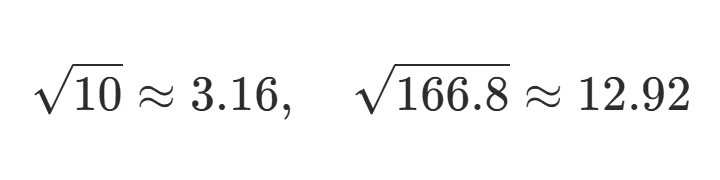
Zum Schluss teilen wir den Zähler durch das Produkt der Standardabweichungen:
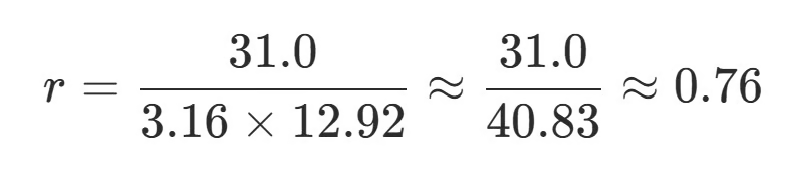
Dieser letzte Schritt liefert den Pearson-Korrelationskoeffizienten, hier etwa 0,76 – ein starker positiver linearer Zusammenhang. Wir können daraus schließen, dass Lernstunden stark und positiv mit den Testergebnissen korrelieren.
Wir können jedoch nicht schließen, dass die Lernstunden die Ergebnisse verursacht haben. Dafür bräuchte es weitere Analysen oder ein Experiment.
Wie das einfache Beispiel zeigt, ist die händische Berechnung selten praktikabel.
Zum Glück bieten gängige Statistiktools eingebaute Funktionen. Das Verständnis der Mechanik hilft für die Intuition, im Alltag wird der Koeffizient jedoch automatisch berechnet. Werfen wir kurz einen Blick auf Excel, Python und R.
In Excel lässt sich der Pearson-Wert bequem mit der CORREL()-Funktion berechnen. Diese Funktion nimmt zwei Wertebereiche als Eingabe und liefert deren Korrelationskoeffizienten.
=CORREL(A1:A10, B1:B10)Die Funktion berechnet Pearsons r direkt aus den markierten Bereichen – ideal, um Beziehungen in Tabellen schnell zu erkunden.
In Python wird der Pearson-Wert häufig mit pandas oder SciPy berechnet. Die Methode corr() in pandas liefert Korrelationen zwischen Spalten eines DataFrames:
import pandas as pd

pearson_df['hours_studied'].corr(pearson_df['exam_score'])
Alternativ gibt die Funktion pearsonr() aus SciPy sowohl den Korrelationskoeffizienten als auch einen p-Wert für einen Hypothesentest zurück:
from scipy.stats import pearsonr

pearsonr(pearson_df['hours_studied'], pearson_df['exam_score'])
Wenn du neu in der Python-basierten Datenanalyse bist, erfährst du in unserem pandas-Tutorial mehr zur Arbeit mit tabellarischen Datensätzen.
In R berechnest du den Pearson-Wert mit der Funktion cor():
cor(x, y)Standardmäßig berechnet sie die Pearson-Korrelation; andere Methoden kannst du optional angeben.
Alle drei Tools machen die Berechnung sehr einfach. Daher erstellen Analysten oft eine Korrelationsmatrix, die paarweise Korrelationen mehrerer Variablen gleichzeitig zeigt. So lassen sich Muster identifizieren, die in späteren Analyseschritten genauer untersucht werden sollten.
Es ist das eine, r auszurechnen – aber wie interpretierst du ihn? Denke daran: r beschreibt Richtung und Stärke eines linearen Zusammenhangs zwischen zwei Variablen.
Das Vorzeichen zeigt die Richtung an. Ein positiver Wert bedeutet, die Variablen steigen tendenziell gemeinsam; ein negativer Wert bedeutet, die eine sinkt, wenn die andere steigt.
Der Betrag von r beschreibt die Stärke des linearen Zusammenhangs: Werte näher an 1 sind stärker als solche nahe 0. Je nach Fachgebiet gelten unterschiedliche Schwellen für „stark“. In streng kontrollierten Experimenten (z. B. Physik, Ingenieurwesen) nähern sich starke Korrelationen oft 1. In komplexen biologischen oder sozialen Systemen (z. B. Medizin, Public Health, Ökonomie, Psychologie) können Korrelationen von 0,1 bis 0,4 dennoch bedeutsam sein – besonders bei schwer messbaren Variablen oder wenn Effekte sich skalenweit aufsummieren. Deshalb erfordert die Interpretation von r immer Fachkontext und Urteil.
Beachte außerdem: Die Pearson-Korrelation ist empfindlich gegenüber Ausreißern. Ein einzelner Extremwert kann r erheblich erhöhen oder senken. Darum sind Visualisierungen so wichtig. Streudiagramme zusammen mit Korrelationswerten helfen, einflussreiche Ausreißer zu erkennen.
Statistiksoftware liefert oft einen p-Wert zusammen mit r. Dieser testet, wie wahrscheinlich eine mindestens so starke Korrelation ist, wenn es in Wahrheit keinen Zusammenhang gibt. Ist sie durch Zufall unwahrscheinlich, gilt der Zusammenhang als statistisch signifikant.
Der p-Wert wird berechnet, indem r in eine t-Statistik überführt und mit der t-Verteilung verglichen wird. Das ähnelt dem t-Test nach Student, nur dass hier geprüft wird, ob die wahre Korrelation null ist.
Bei großen Datensätzen kann selbst ein kleiner r-Wert statistisch signifikant sein, auch wenn der Zusammenhang individuell schwach bleibt. In der öffentlichen Gesundheit kann ein schwacher Zusammenhang auf Bevölkerungsebene dennoch große Auswirkungen haben. Daher solltest du zwischen der Stärke der Korrelation (r) und ihrer statistischen Signifikanz (p-Wert) unterscheiden.
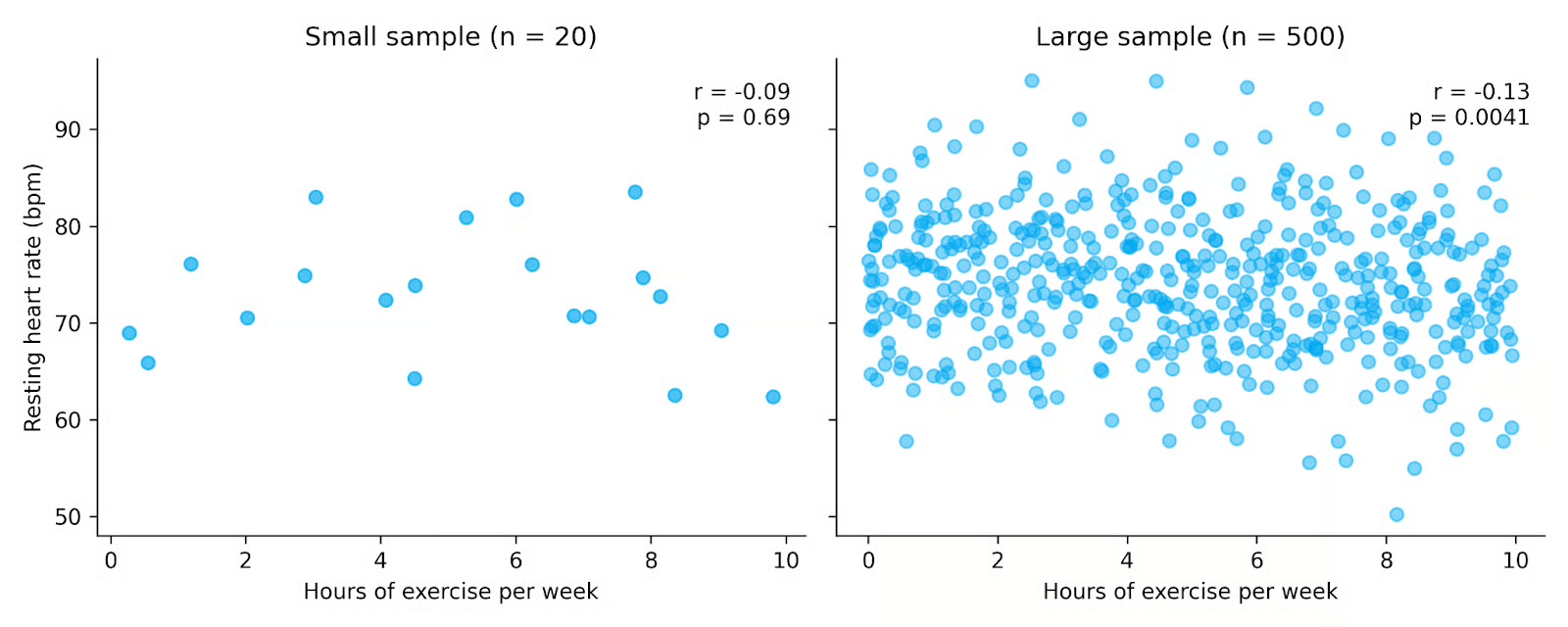
In den Plots oben zeigen beide Datensätze einen schwachen negativen Zusammenhang zwischen Bewegung und Ruhepuls. Der rechte Datensatz hat jedoch viel mehr Beobachtungen, wodurch der Zusammenhang statistisch signifikant wird, obwohl r klein bleibt. Das zeigt, wie größere Stichproben unsere Fähigkeit erhöhen, Beziehungen zu entdecken, und warum r und p-Wert gemeinsam betrachtet werden sollten.
Der Pearson-Korrelationskoeffizient ist verbreitet, weil er einfach zu berechnen und zu interpretieren ist. Wie viele statistische Verfahren funktioniert er am besten, wenn bestimmte Annahmen über die Daten halbwegs erfüllt sind.
Erstens setzt die Pearson-Korrelation einen linearen Zusammenhang zwischen zwei Variablen voraus. Verläuft der wahre Zusammenhang gekrümmt oder nichtlinear, kann r die Stärke unterschätzen oder sogar „kein Zusammenhang“ suggerieren.
Zweitens sollten die analysierten Variablen stetig sein. Pearson ist für kontinuierliche numerische Skalen konzipiert, etwa Körpergröße, Einkommen, Temperatur oder Prüfungsergebnisse. Bei ordinalen oder diskreten Daten sind oft die Spearman-Korrelation oder Kendalls Tau besser geeignet.
Außerdem sollten die Daten im Allgemeinen normalverteilt sein – besonders, wenn du Hypothesentests durchführst oder Konfidenzintervalle für r berechnest. Bei stark nicht-normalen Verteilungen beschreibt der geschätzte r-Wert zwar den Stichprobenzusammenhang, der p-Wert ist dann aber weniger verlässlich.
Pearson setzt auch Homoskedastizität voraus, d. h. die Streuung einer Variable ist über den Wertebereich der anderen relativ konstant. Praktisch heißt das: Die Punktwolke im Streudiagramm sollte über den Bereich hinweg ähnlich breit sein. Ändert sich die Streuung stark, kann r die Struktur der Beziehung unvollständig abbilden. Wie bei der Normalität gilt: Du kannst r trotzdem berechnen, aber inferenzstatistische Tests werden unzuverlässiger.
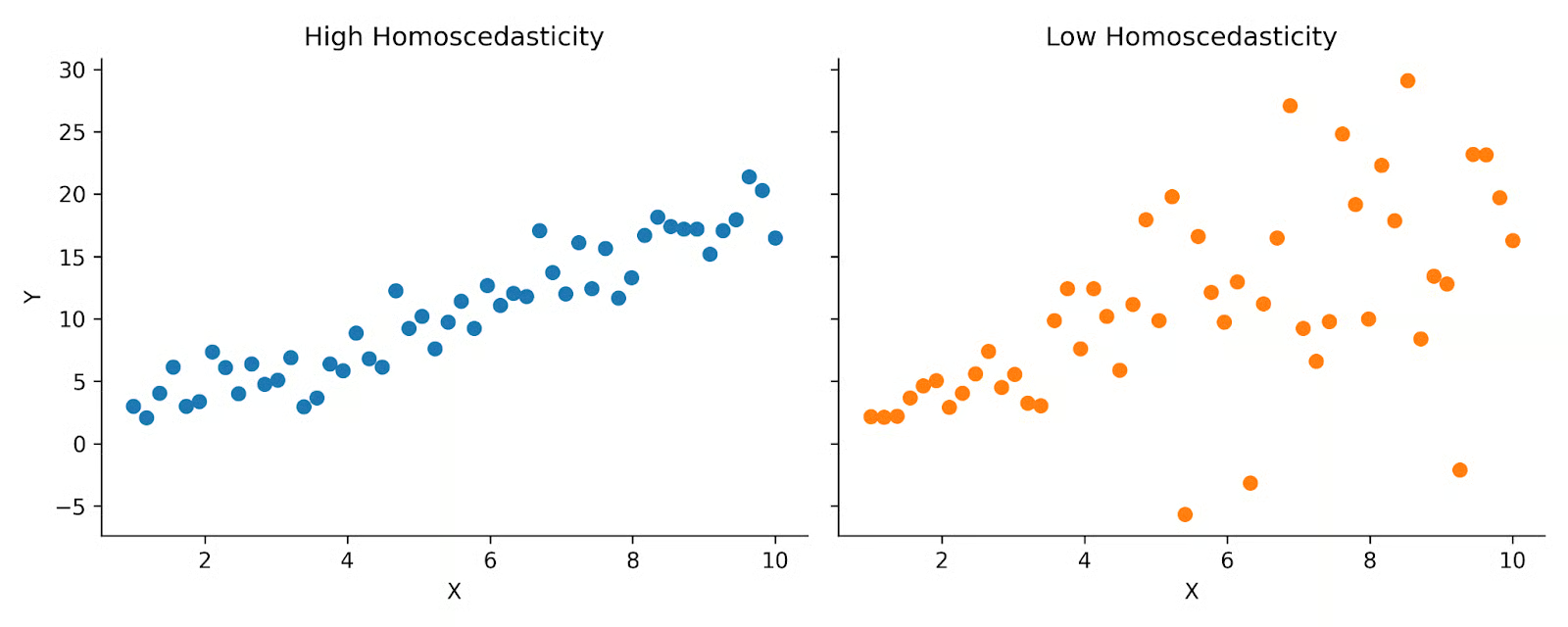
Oben siehst du Beispiele für hohe und niedrige Homoskedastizität. Links ist die Streuung über die Verteilung hinweg relativ gleichmäßig, rechts eher kegelförmig. Die Pearson-Korrelation nimmt an, dass deine Daten eher wie links aussehen.
Schließlich – bereits erwähnt – ist Pearson empfindlich gegenüber Ausreißern. Da der Koeffizient auf Mittelwerten und Standardabweichungen basiert, können Extremwerte das Ergebnis überproportional beeinflussen. Ein einzelner ungewöhnlicher Punkt kann die Korrelation deutlich verschieben.
Pearson- und Spearman-Korrelation klingen ähnlich und werden leicht verwechselt. Beide messen den Zusammenhang zwischen zwei Variablen, erfassen aber unterschiedliche Beziehungstypen und beruhen auf anderen Annahmen.
Der Pearson-Korrelationskoeffizient misst die Stärke eines linearen Zusammenhangs zwischen zwei stetigen Variablen. Die Spearman-Korrelation misst hingegen die Stärke eines monotonen Zusammenhangs – die Variablen bewegen sich in dieselbe Richtung, aber nicht zwingend mit konstanter Rate. Monoton kann linear oder nichtlinear sein, solange es stetig steigt oder fällt.
Die Spearman-Korrelation basiert auf den Rängen der Daten, nicht auf den Rohwerten. Durch die Umwandlung in Ränge reduziert sie den Einfluss von Ausreißern und erfordert keine Linearitätsannahme.
Pearson gilt als parametrisches Maß, da es Annahmen zur Verteilung macht. Spearman ist nichtparametrisch, benötigt diese Annahmen nicht und ist weniger von Normalität abhängig.
Sind die Annahmen für Pearson erfüllt, liefert es oft eine präzisere Schätzung des linearen Zusammenhangs als Spearman. Wenn die Daten diese Anforderungen nicht erfüllen, kann Spearman dennoch einen Zusammenhang zuverlässig aufdecken.
|
Korrelationskoeffizient |
Wann verwenden |
|
Pearson-Korrelation |
Linearer Zusammenhang; stetige Variablen; „gutartige“ Daten |
|
Spearman-Korrelation |
Monotoner Zusammenhang; Ausreißer vorhanden; ordinale oder gerankte Daten |
Die Kovarianz ist eng verwandt, unterscheidet sich aber in Skalierung und Interpretation.
Die Kovarianz misst, ob zwei Variablen tendenziell in die gleiche oder entgegengesetzte Richtung verlaufen. Steigen sie gemeinsam, ist die Kovarianz positiv. Steigt die eine und fällt die andere, ist sie negativ.
Die Größe der Kovarianz hängt jedoch von den Einheiten ab. Die Kovarianz von Größe in Zentimetern und Gewicht in Kilogramm unterscheidet sich numerisch von jener mit Zoll und Pfund. Dadurch ist Kovarianz schlecht zwischen Datensätzen vergleichbar.
Der Pearson-Korrelationskoeffizient löst das, indem die Kovarianz durch das Produkt der Standardabweichungen beider Variablen geteilt wird. Dadurch ist die Pearson-Korrelation einheitslos und liegt immer zwischen −1 und +1 – was die Interpretation deutlich erleichtert.
Kurz gesagt:
So verbreitet und eingängig der Pearson-Koeffizient ist, er hat wichtige Grenzen.
Am besten nutzt du die Pearson-Korrelation als Teil eines größeren explorativen und analytischen Workflows: Visualisiere deine Daten, prüfe die Annahmen und beachte immer den Kontext deiner Fragestellung.
Der Pearson-Korrelationskoeffizient ist ein grundlegendes statistisches Maß, das in vielen Disziplinen verwendet wird. Wenn du wissen willst, wie Korrelation in realen Workflows eingesetzt wird, wirf einen Blick auf unser Tutorial zur explorativen Datenanalyse in Python. Wenn du Korrelation praktisch erkunden willst, sieh dir unser pandas-Tutorial an und entdecke, wie Korrelationen in echten Datensätzen genutzt werden.
Lerne mit DataCamp
Kurs
Kurs
Üben und Lernpfad deinen Fortschritt.
Weiter Mit GoogleTutorial
Josef Waples
8 Min.
Tutorial
Allan Ouko
11 Min.
Tutorial
Laiba Siddiqui
6 Min.
Tutorial
DataCamp Team
5 Min.
Tutorial
Allan Ouko
7 Min.
Tutorial
Neetika Khandelwal
5 Min.