Track
Associate AI Engineer for Developers
29 hr
Grok Voice Transcribe 2.0 (grok-voice-transcribe-2.0) is SpaceXAI's speech-to-text model. The REST path transcribes a finished file, while the WebSocket path handles live audio.
SpaceXAI's Grok Voice Transcribe 2.0 announcement highlights phone calls, multiple speakers, credentials, and multilingual speech. For benchmark comparisons, see our Grok Voice Transcribe 2.0 overview.
The controlled Qivora Sync fixture stays fixed while the audio and API settings change. The call includes an invented product name, fillers, a language switch, spoken contact details, a pause during dictation, and a third speaker.
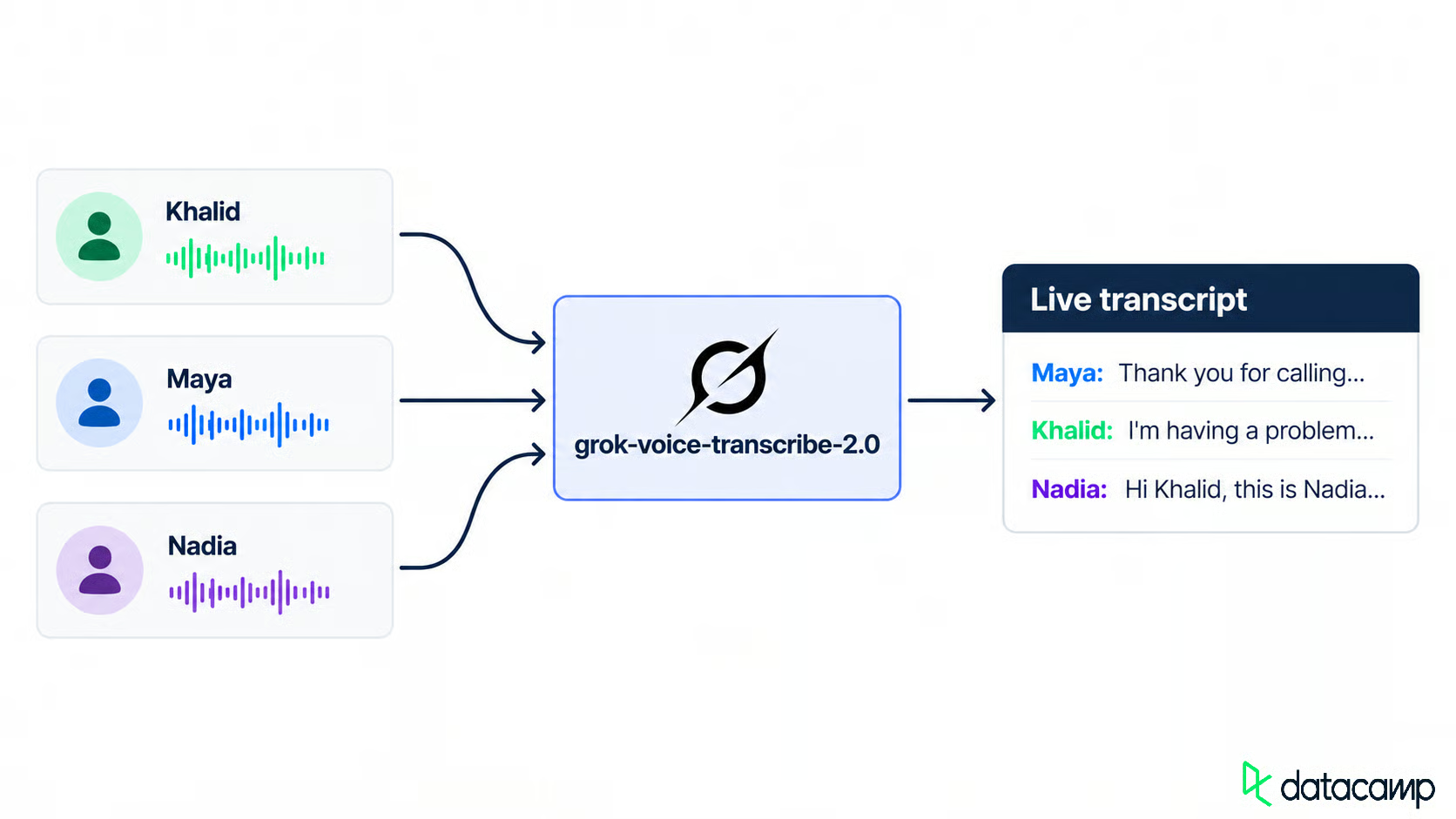
Three speakers become one live transcript. Image by Author.
The controlled fixture uses three distinct voices from the Grok Text to Speech API. Each language segment is synthesized separately and joined with ffmpeg so that the switch points stay fixed. The API also accepts language=auto; separate requests are an experiment design choice, not an API requirement.
Before the first request, define the expected text, speakers, product spelling, customer details, fillers, and pauses. Every setup then has the same target.
Install the dependencies before sending audio.
You need Python 3.10 or newer, an xAI API key, and ffmpeg for building the audio. The Python clients use requests, websockets, and python-dotenv.
The Speech to Text docs call 2.0 the default when you omit model, and grok-voice-transcribe-1.0 reached end of life on October 2, 2026. I would still pin the versioned ID.
Clone the repository, add your key to .env, and build the sample audio:
git clone https://github.com/KhalidAbdelaty/grok-voice-transcribe-2.0.git
cd grok-voice-transcribe-2.0
pip install -r requirements.txt
cp .env.example .env    # then paste your key into .env
python project/scripts/make_fixtures.py
The setup command creates the dialogue and the audio files used later. If you have your own recording, skip that command.
A .env written on Windows can leave a \r on the key, and requests rejects the header before anything reaches SpaceXAI. Strip the key before adding it to the authorization header.
A baseline is the model with nothing turned on, so every later change has something to compare against. The first request sends the file and a pinned model:
import os
import requests
from dotenv import load_dotenv

load_dotenv()
api_key = os.environ["XAI_API_KEY"].strip()

with open("support_call.wav", "rb") as audio_file:
    response = requests.post(
        "https://api.x.ai/v1/stt",
        headers={"Authorization": f"Bearer {api_key}"},
        data=[("model", "grok-voice-transcribe-2.0")],
        files={"file": ("support_call.wav", audio_file, "audio/wav")},
    )

response.raise_for_status()
result = response.json()
The response carries text, detected language, duration, and a timed words array. The REST reference shows per-word confidence, but it did not appear in the batch responses for this fixture. I would treat the field as optional and check each API response before using it. Put option fields before file; later fields may be ignored.
The baseline stripped fillers, kept the Arabic in Arabic script, and left the spoken digits separate. It consistently misspelled the invented product name.
A support transcript needs speaker labels, the correct product spelling, and usable customer details. Each setting is one more form field:
data = [
    ("model", "grok-voice-transcribe-2.0"),
    ("diarize", "true"),         # a speaker id on every word
    ("keyterm", "Qivora Sync"),  # repeat the field for more terms
    ("language", "en"),          # required by format
    ("format", "true"),          # inverse text normalization
    ("filler_words", "false"),   # the default; true keeps "uh" and "um"
]
Add one option at a time to the same audio. Start with speaker labels.
Speaker diarization gives words numeric speaker IDs, not names. Group consecutive words with the same ID to build turns:
def group_turns(words):
    turns = []
    for word in words:
        if turns and turns[-1]["speaker"] == word.get("speaker"):
            turns[-1]["words"].append(word["text"])
            turns[-1]["end"] = word["end"]
        else:
            turns.append({"speaker": word.get("speaker"), "start": word["start"],
                          "end": word["end"], "words": [word["text"]]})
    for turn in turns:
        turn["text"] = " ".join(turn.pop("words"))
    return turns
On clean audio, each known turn stayed with a consistent speaker ID. Mapping names by order of first appearance only works when the call order is already known; production systems need their own speaker mapping.
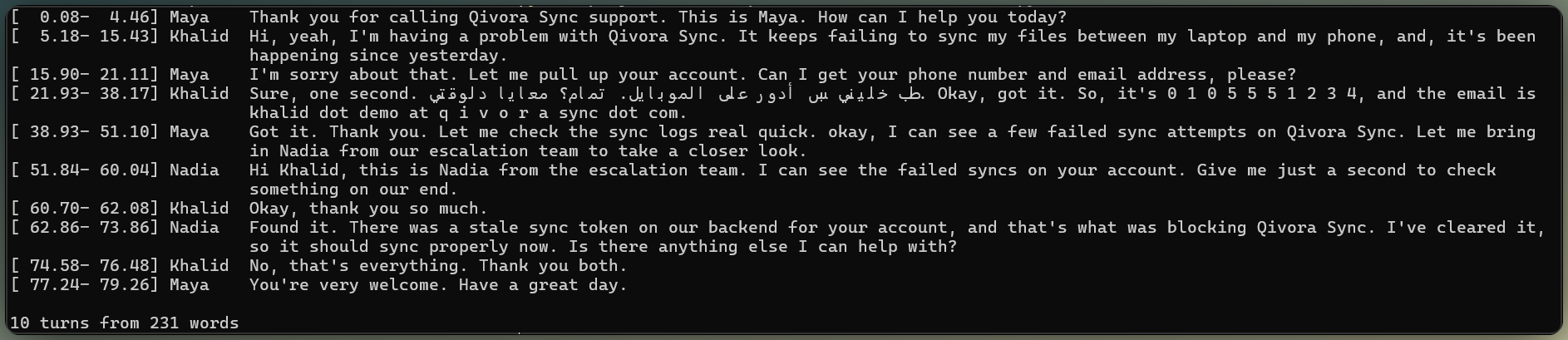
Clean audio keeps speaker labels consistent. Image by Author.
Keyterm biasing is a per-request hint, not training. Pass keyterm=Qivora Sync (up to 100 terms, 50 characters each), and the model leans toward that spelling when the audio supports it.
The keyterm corrected the baseline's product-name error without changing the surrounding transcript.
In a separate live-speaker check, strongly biased vocabulary pulled a faint echo toward the keyterm. That result does not mean that keyterms create false text on their own; it means that ambiguous audio still needs an echo check.
As the baseline showed, Khalid's Arabic stayed in Arabic script. The result was the same with automatic detection and with language=en, because language selects formatting rules rather than forcing an output language.
The baseline kept spoken digits separate. Inverse Text Normalization (ITN) turns those spoken forms into written ones. format=true switches it on and needs language, or the request fails with a 400.
The phone number became one continuous digit string. The email was only partly normalized: punctuation improved, but the spoken "at" and spelled domain still needed cleanup.
That uneven result is frustrating. ITN formats text; it does not validate contact data. I would validate both fields before storage.
ITN can also rewrite ordinary duration phrases as abbreviated quantities. In the formatted batch response for this fixture, only the top-level text was normalized; the words array kept the spoken form.
As the baseline showed, fillers are stripped from text and words by default. filler_words=true brought Khalid's "uh" and "um" back where expected. Keep them off for support notes and on for a verbatim QA record.
Batch output includes speakers, vocabulary, formatting, and filler-word control. Next, send the same audio as a live stream.
The streaming path uses query parameters rather than a setup message. Wait for transcript.created, send raw binary audio (no base64), and close with {"type": "audio.done"}. Our GPT Live Transcribe tutorial uses the same pattern with another model.
Start with the events, then connect the client.
Batch uses the documented format=true with language=en. The streaming docs say that language turns on ITN, but in a live probe, language=en alone did not change the transcript. The WebSocket query list does not include format, so this tutorial treats streaming ITN as behavior to verify rather than depend on.
Every transcription update is a transcript.partial event with two booleans. Interim text may still change. A chunk final (is_final=true) locks about 3 seconds of text while the turn stays open, and an utterance final (speech_final=true) closes the turn.
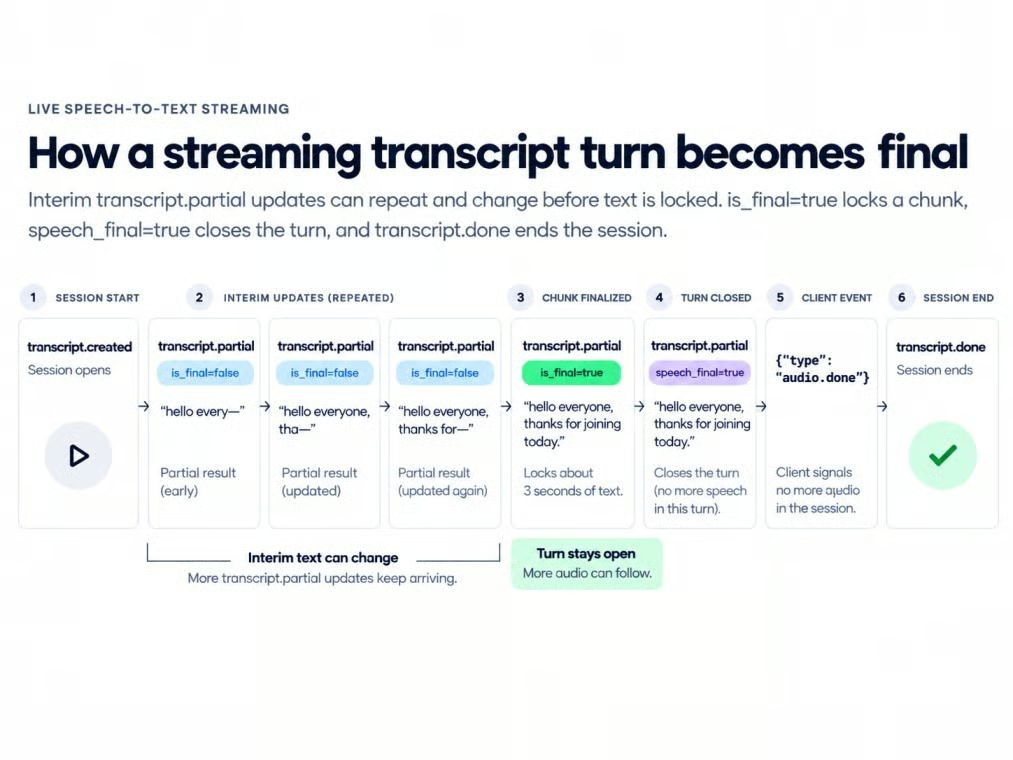
Streaming states move text toward finalization. Image by Author.
For streaming, resample the source to mono 16-bit PCM at 16 kHz first. The core client sends 100-millisecond chunks at a real-time pace while another task receives transcript events:
import asyncio, json, os, wave
import websockets
from dotenv import load_dotenv

load_dotenv()

url = ("wss://api.x.ai/v1/stt?model=grok-voice-transcribe-2.0"
       "&sample_rate=16000&encoding=pcm&interim_results=true&diarize=true")
headers = {"Authorization": f"Bearer {os.environ['XAI_API_KEY'].strip()}"}

async def stream_call(path):
    async with websockets.connect(url, additional_headers=headers) as ws:
        assert json.loads(await ws.recv())["type"] == "transcript.created"

        async def send():
            with wave.open(path, "rb") as wf:
                assert wf.getframerate() == 16000
                assert wf.getnchannels() == 1
                assert wf.getsampwidth() == 2
                while chunk := wf.readframes(1600):
                    await ws.send(chunk)
                    await asyncio.sleep(0.1)
            await ws.send(json.dumps({"type": "audio.done"}))

        async def receive():
            async for raw in ws:
                event = json.loads(raw)
                if event["type"] == "transcript.partial":
                    print(event["text"])
                elif event["type"] == "transcript.done":
                    break

        await asyncio.gather(send(), receive())
Interim text grew about every half-second. This is a local measurement, not official latency.
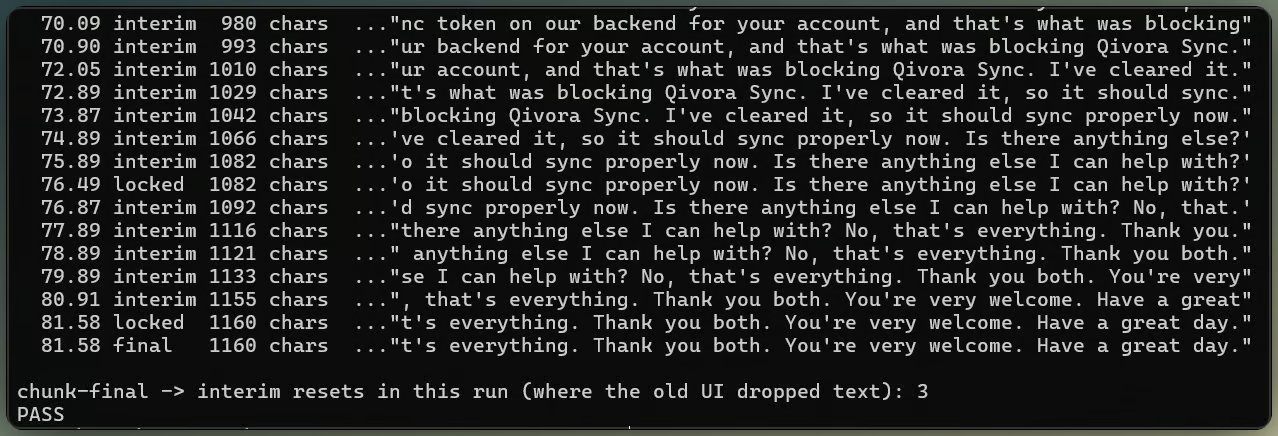
Partial captions settle into final transcript. Image by Author.
Chunk finals freeze text without closing the turn. Smart Turn controls when speech_final closes it.
Showing only the active event makes earlier words vanish after each chunk's final, because the next interim starts over from the incoming audio.
Keep every locked chunk, append the current interim, and let the utterance final replace both.
The text can grow without losing earlier chunks. With display state handled, turn boundaries are the remaining streaming problem.
Smart Turn evaluates each silence and estimates whether the speaker has finished. It exists for Khalid's number, "zero one zero, five five five, [pause], one two three four," where silence alone can't tell a thinking pause from the end.
The threshold isn't transcription confidence or the VAD threshold. It is the end-of-turn probability a silence must clear before speech_final fires; below it, the turn stays open. Two query parameters set it:
params += [
    ("smart_turn", "0.7"),           # end-of-turn probability needed to close
    ("smart_turn_timeout", "3000"),  # close anyway after 3 s of silence
]
The docs call 0.5 balanced, 0.7 conservative for number sequences, and 0.9 very conservative. In this fixture, pauses shorter than the default endpointing window did not produce a useful Smart Turn decision. That is an observed result, not a documented timing rule.
In the streaming test, stopping audio frames did not advance the observed silence timer. Continuing to send digital silence lets Smart Turn close the utterance.
Extending the pause during number dictation makes the behavior visible. Short pauses stay inside one turn, while a long pause splits it at every threshold when the confidence exceeds all three settings.
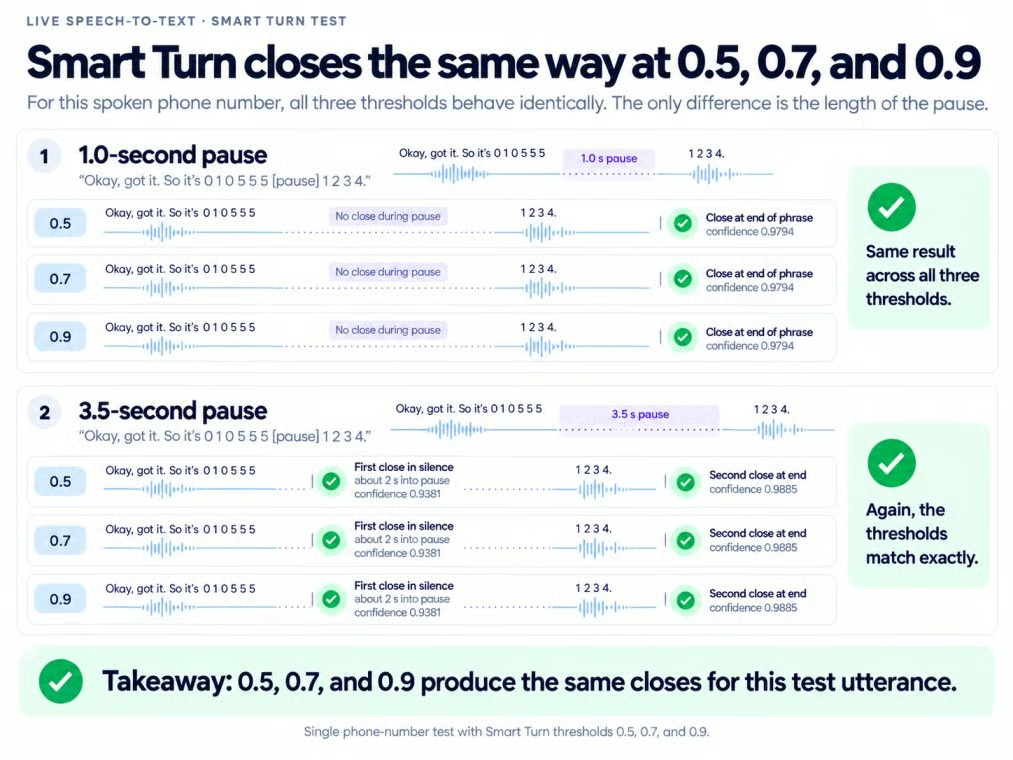
Long pauses can split number dictation. Image by Author.
Human callers are less predictable. A short digit sequence can look finished. Then the caller continues.
If Smart Turn closes during number dictation, wait briefly and merge a continuation before replying.
smart_turn_timeout closes a turn after a fixed silence, even when Smart Turn is unsure. On the fast three-speaker stream, Smart Turn grouped several known turns before a timeout forced the close.
If you already know where turns end, send {"type": "finalize"} at each boundary; otherwise, pair Smart Turn with a timeout.
Once turn boundaries are under control, the same caller has to survive an 8 kHz line.
Phone-quality audio here is 8 kHz G.711 mu-law, made from the same call:
ffmpeg -i support_call.wav -ar 8000 -ac 1 -f mulaw support_call_8k.rawRaw telephony audio has no container, so set audio_format=mulaw and sample_rate=8000 in the batch form, or encoding=mulaw&sample_rate=8000 on the socket. Check text and speaker labels separately.
The earlier keyterm, formatting, and language-switch findings changed little at 8 kHz.
Speaker labels became less reliable. The phone version introduced an extra speaker ID and assigned a closing turn to the wrong person. Counting segments alone hides both mistakes.
The flaky version band-limits the call to 300-3400 Hz, encodes it as 8 kHz mu-law, and drops each 20-millisecond packet with a probability of 0.03. A fixed random seed of 7 keeps the same gaps on every replay.
That packet loss did not change the English transcript much in this sample, and the spoken contact details stayed in order. This result applies only to this sample.
Phone simulation narrows audio, dropping packets. Image by Author.
Voice activity detection (VAD) decides whether audio is speech at all. The docs suggest lowering vad_threshold for quiet phone speech, at the risk of stray text from noise.
Lowering vad_threshold changed nothing on clean phone audio because there was no quiet speech to recover. The null result supports one rule: lower the threshold only when phone speech goes missing.
Use a fresh batch form without diarize:
data = [
    ("model", "grok-voice-transcribe-2.0"),
    ("multichannel", "true"),
]
The API detects the channel count from a WAV or other container. For raw multichannel audio, add ("channels", "3"); WebSocket multichannel input also requires an explicit channel count.
Send the form with the multichannel file through the REST request shown earlier, then read result["channels"]. Each item contains an index, transcript text, and timed words. In the controlled three-channel fixture, each channel contained only its assigned speaker. Streaming uses the same split and adds channel_index to its events.
I would use separate legs whenever the phone system provides them. Unlike diarization in the phone-audio section, a known split does not infer speakers.
The complete client exposes one group of settings, then builds the REST form or WebSocket URL separately. Shared settings cover diarization, keyterms, filler words, audio encoding, and turn handling; formatting follows the transport-specific rules covered earlier.
Apply the final settings to a phone-quality recording, then check product spelling, language switches, contact details, and speaker labels separately. In the controlled fixture, the text checks passed while one speaker label still required review. Save the settings and speaker mapping with each transcript so later comparisons use the same setup.
The support-transcription tutorial ends with that final check. The repository also contains a separate voice-agent extension with generated replies, spoken output, interruptions, and echo handling.
Transcribe keeps the same role in that demo: it produces text. A language model writes the replies, and Grok TTS speaks them.
Learn AI With DataCamp!
Track
Track
Course
blog
Tom Farnschläder
9 min
Tutorial
Khalid Abdelaty
15 min
Tutorial
Khalid Abdelaty
11 min
Tutorial
Khalid Abdelaty
15 min
Tutorial
François Aubry
8 min
Tutorial
Khalid Abdelaty
15 min