Uploading a finished audio file to a transcription endpoint is the easy version of this problem. You wait for the whole file, then get one transcript back. Nobody is staring at a screen while the model works. Live captioning is a different job: audio keeps arriving while you are still deciding what to do with what you have, and the text has to update while the speaker is still talking.
That is the gap gpt-live-transcribe fills. OpenAI released it on July 28, 2026 alongside a batch counterpart, gpt-transcribe. In this tutorial I build a Python captioning client around it and run three tests: a basic streaming client, a comparison of the context hints it accepts, and a benchmark of its five delay settings. I tested with clean English, technical vocabulary, and Egyptian Arabic-English code-switching, since that is closer to a real meeting than one clean narrator.
By the end you will have a working captioning app, a sense of which context settings actually help, and a delay setting you can defend instead of guessing at.
For an overview of one of the model's biggest competitors, read our Grok Voice Transcribe 2.0 guide.
What Is GPT Live Transcribe?
gpt-live-transcribe is a streaming speech-to-text model for applications that need transcript text while audio is still arriving. It takes audio in and returns text out, nothing else, tuned by four fields: delay for latency, prompt for free-form context, keywords for literal terms, and languages for expected input languages. On OpenAI's Context Aware ASR benchmark, free-form context raised semantic accuracy from 38.5 percent to 44.6 percent, which is why Test 2 exists.
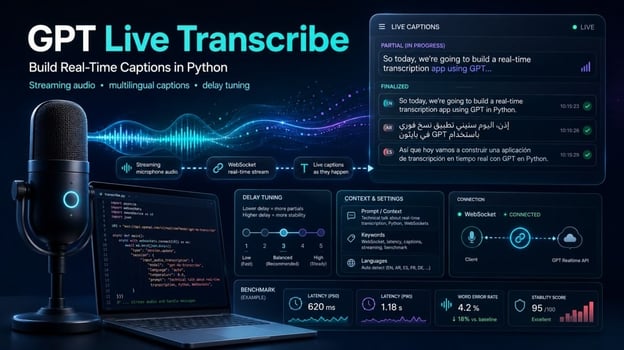
The model runs inside the Realtime API, not as a separate endpoint, and it is unrelated to GPT-Live, OpenAI's voice system, whatever the names suggest. You open a transcription session, configure it, and the server streams events back over the connection you send audio on. That leaves one question to settle first: which of the two transcription models you actually need.
GPT Live Transcribe vs. GPT Transcribe
OpenAI ships two recommended transcription models, and they are not interchangeable. gpt-live-transcribe is for continuously arriving audio, a microphone, a phone call, a media stream, where you need partial text before the speaker finishes. gpt-transcribe is for completed recordings, or a Realtime session where you deliberately wait for a committed turn. The docs call that second case a specialized workflow, not a way to get live deltas.
One difference trips people up: gpt-transcribe returns a languages array with the detected input language, gpt-live-transcribe does not. If your logic branches on detected language, you are reaching for the wrong model, no matter how good its captions look in a demo. Pricing splits along the same line, roughly four to one in the batch model's favor, which I come back to later.
What gpt-live-transcribe doesn't return
I would rather tell you this now than after you have built half an app around it. There are no word-level timestamps, no speaker labels, no confidence scores, and no diarization. If you need subtitle timing, notes that say who spoke, or a confidence threshold, OpenAI's guide points to gpt-4o-transcribe-diarize or whisper-1 instead.
Setting Up GPT Live Transcribe in Python
Every script in this tutorial lives in github.com/KhalidAbdelaty/gpt-live-transcribe, so start by cloning it. You need Python 3.10 or newer and an API key with Realtime access. The scripts themselves rest on four packages: websockets for the connection, sounddevice for microphone capture, numpy for the buffer conversion, and python-dotenv for loading the key. The requirements file adds a few more for the charts and the browser demo.
git clone https://github.com/KhalidAbdelaty/gpt-live-transcribe.git
cd gpt-live-transcribe
pip install -r requirements.txt
On macOS, sounddevice needs PortAudio at the OS level (brew install portaudio); on Linux it is apt-get install portaudio19-dev. Skip that line if you are on Windows. I hit the macOS one myself, and the fix really is that single install.
The audio itself has to arrive as 16-bit PCM at 24 kHz, mono, little-endian, base64-encoded. Send an MP3 or a stereo WAV and you get garbled output or a closed connection, never a message telling you the format was wrong. That one can eat an afternoon. So the next question is which connection carries the audio.
Choosing WebSocket vs. WebRTC
OpenAI's guidance is plain: WebSocket for server-to-server applications, WebRTC for browser and mobile clients. This tutorial builds a Python backend reading a local microphone, so WebSocket is the right choice, and a standard API key works since it never leaves your server.
Understanding the session and event flow
A session starts with a session.update event that sets type: "transcription" and picks gpt-live-transcribe as the model. Everything else in the payload describes the audio you are about to send. Here is the minimum configuration, from the Realtime transcription guide:
session_config = {
    "type": "session.update",
    "session": {
        "type": "transcription",
        "audio": {
            "input": {
                "format": {"type": "audio/pcm", "rate": 24000},
                "transcription": {"model": "gpt-live-transcribe"},
                "turn_detection": None,
            }
        },
    },
}
turn_detection: None disables automatic voice activity detection, so nothing finalizes until you explicitly commit. Three client events then do the work: input_audio_buffer.append sends a base64 audio chunk, input_audio_buffer.commit ends a turn, and the server answers with conversation.item.input_audio_transcription.delta (partial text) and conversation.item.input_audio_transcription.completed (final text). I connect to wss://api.openai.com/v1/realtime?intent=transcription, a pattern from OpenAI's cookbook; the guide does not document that query string, so drop it if it ever stops working.
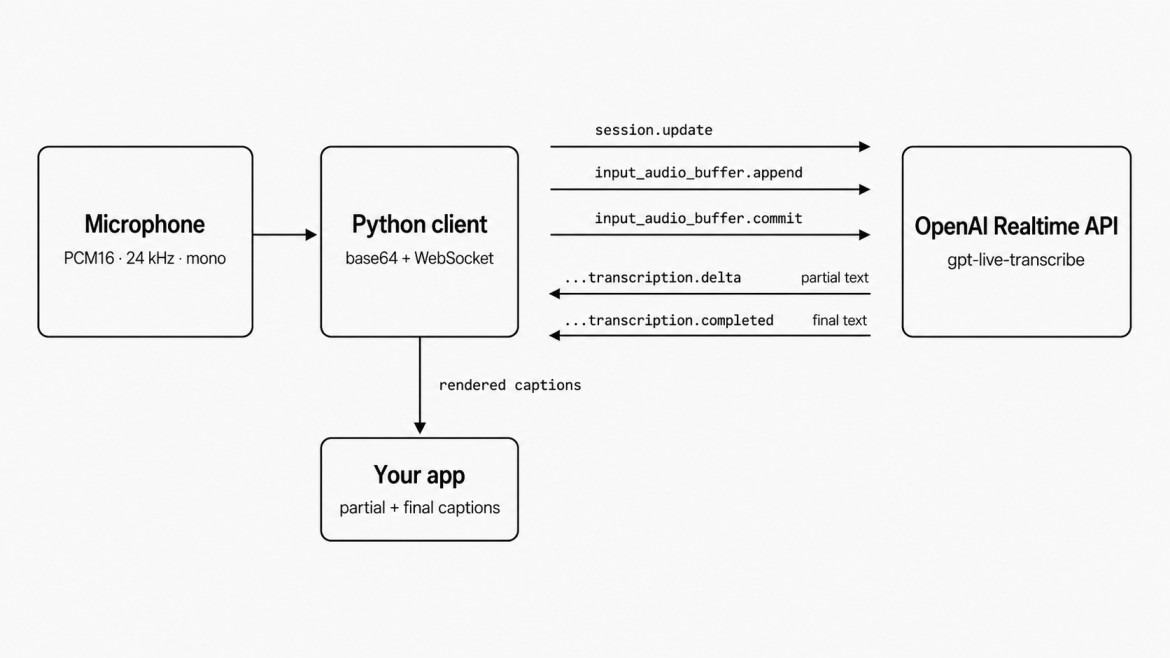
Realtime transcription session event flow diagram. Image by Author.
Building a Basic Live Transcription Client
Test 1 is the smallest version that works: capture microphone audio, stream it, print partial and final text as it arrives. No context, no keywords, nothing tuned, so the event flow stays visible. The first problem is getting audio off the microphone thread without stalling it.
Streaming microphone audio
sounddevice runs its callback on its own thread with a few milliseconds to return before the driver drops frames, so it cannot wait on a network call. Its only job is converting the float32 buffer to PCM16 and dropping it onto an asyncio.Queue through loop.call_soon_threadsafe, while a separate coroutine drains that queue and sends each chunk.
def callback(indata, frames, time_info, status):
    pcm16 = (indata[:, 0] * 32767).astype(np.int16).tobytes()
    loop.call_soon_threadsafe(queue.put_nowait, pcm16)

stream = sd.InputStream(samplerate=24000, channels=1, dtype="float32",
                         blocksize=2400, callback=callback)
A 100-millisecond chunk (2,400 samples at 24 kHz) is a reasonable starting point. Go smaller and you add per-message overhead, go much larger and captions feel laggy. There is no documented correct number, so treat it as a dial.
Handling partial and final transcripts
Deltas are cheap and frequent. Each one carries a piece of text tied to an item_id. Append it to the partial text you already have for that item, and the caption grows word by word on screen:
if event["type"] == "conversation.item.input_audio_transcription.delta":
    item_id = event["item_id"]
    partials[item_id] = partials.get(item_id, "") + event["delta"]
    print(f"\r[partial] {partials[item_id]}", end="")
A completed event replaces that partial with the finalized transcript for the same item. Treat completed as the source of truth and deltas as a preview, not something to concatenate yourself.
Managing transcript state with item_id
Here is the detail that will break your UI if you skip it: OpenAI's guide states that ordering between completion events from different turns is not guaranteed. A completed event for an earlier turn can arrive after one for a later turn, so code assuming the newest completed belongs to the newest turn will occasionally jump backward or duplicate a line. Key everything by item_id instead, which is what my TranscriptState class does.
Building it caught two bugs, both about which dictionary the code checked. Appending item_id to the order list only in the delta handler left full_transcript() empty for any receiver processing just completed events. Using the partials dictionary to decide whether an item was new was worse: apply_completed() clears that entry, so a late delta looked brand new, went onto the order list a second time, and printed the finished turn twice. Track item_id in both handlers, and check the order list instead.

Live partial captions finalizing into transcript. Image by Author.
Against clean English, text appeared within a second or two and matched what I said, punctuation included. Through a laptop microphone with no context set, though, a word the model was unsure of occasionally came back in another script entirely. languages is the field for that, which is what Test 2 goes after.
Improving Accuracy with Context and Keywords
The model accepts three kinds of context, worth being precise about before testing them. prompt is free-form text describing the setting, keywords are literal terms the audio might contain, and languages lists expected input languages as ISO 639-1 codes like en or ar. None of them force an output. A keyword that was never spoken will not appear just because you listed it, and the only way to learn what these fields really do is to change one at a time.
Testing prompt, keywords, and language hints
I ran the same clip through five configurations, three passes each. Two rules keep a comparison like this honest: only one context field changes between runs, and every configuration runs more than once, because the model is not deterministic on identical audio.
RUNS = {
    "no_context": TranscriptionConfig(delay="low"),
    "prompt_only": TranscriptionConfig(delay="low", prompt=PROMPT),
    "keywords_only": TranscriptionConfig(delay="low", keywords=KEYWORDS),
    "languages_only": TranscriptionConfig(delay="low", languages=["en"]),
    "prompt_and_keywords": TranscriptionConfig(
        delay="low", prompt=PROMPT, keywords=KEYWORDS,
    ),
}
My first version set languages on the combined run only, which broke the first rule: two fields changed at once, so any difference there could have come from either. One formatting rule also cost me a rejected session update: a keyword containing <, >, a carriage return, or a line feed rejects the whole update, not just that keyword. TranscriptionConfig.validate_keywords() catches that before it builds the payload.
What context fixed and what it didn't
Keywords helped on the kind of audio you would expect. Every run transcribed the account number as spoken words, since that is what the audio contains. The question was whether the model grouped those words into an identifier or spelled the letters out as "A C forty-two."
Across fifteen runs the split was sharp. Nothing without keywords ever grouped it: no_context, prompt_only, and languages_only returned "A C forty-two" on all nine of their passes. Runs with keywords grouped it on five of six, mostly as the fully formatted "AC-42". So keywords moved the result and prompt alone never did, matching OpenAI's framing of keywords as the field for literal terms the model might misparse. Keywords alone still missed once, so treat it as a hint that shifts the odds heavily rather than a rule the model follows.
That sits awkwardly beside the benchmark figure I opened with, where free-form context lifted semantic accuracy by six points. The two tests measure different things: OpenAI scored meaning across a broad set of audio, while I watched one identifier in one clip. A prompt can be doing real work on the sentence and still leave the narrow detail you happen to be checking untouched. The only sign of that here is that prompt and keywords together grouped it on every pass while keywords alone missed one, a difference of a single run.
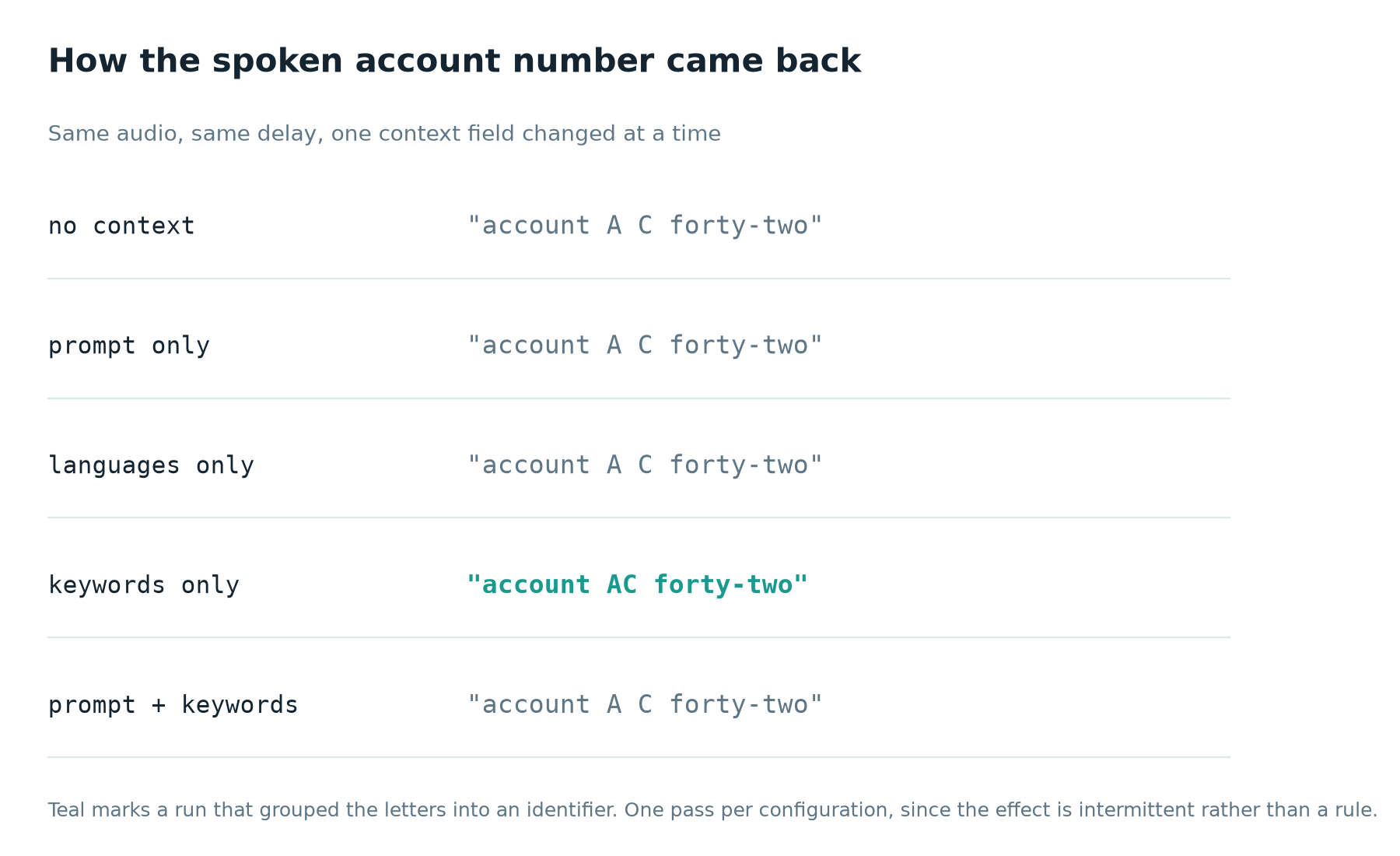
Only keywords grouped the spoken identifier. Image by Author.
Language hints helped more clearly, and on a problem I did not expect. Without a hint, runs on the code-switching clip kept hearing the opening Arabic filler word, roughly "tayyib," as the English "But," and fused the two writing systems into one broken word. They also spelled "billing statement" out phonetically in Arabic script on some passes and left it in Latin on others. Adding languages: ["ar", "en"] removed the broken word on every pass. That is one clip, though, and a sentence that switches language halfway through is the easiest place for a hint to show up.
Benchmarking the Five Delay Levels
delay takes five values: minimal, low, medium, high, and xhigh. Lower settings can produce partial text sooner. Higher settings give the model more audio context before it commits to text, which can improve accuracy on harder audio. OpenAI is explicit that exact timing varies by configuration and should be benchmarked with representative audio, so that is what Test 3 does.
Running the benchmark
test3_delay_benchmark.py streams the same WAV file through all five levels, several runs each, logging the time from stream start to the first delta and to the final transcript. Keeping the audio, context fields, and commit strategy identical is what makes the comparison mean anything.
async def benchmark_once(delay: str, wav_path: str) -> dict:
config = TranscriptionConfig(delay=delay)
return {
"delay": delay,
"time_to_first_delta_s": first_delta_at - start,
"time_to_final_s": final_at - start,
"delta_event_count": delta_count,
}
What the results showed
These figures are not universal. Mine came from three runs per level on one clip, one network, one afternoon. Median time to the first partial ran from 0.70 seconds at minimal to 2.91 seconds at xhigh, climbing in even steps through low (1.19s), medium (1.39s), and high (2.09s). The three runs at each level landed within about a fifth of a second of each other, so the ordering is stable even if the numbers are mine and not yours.
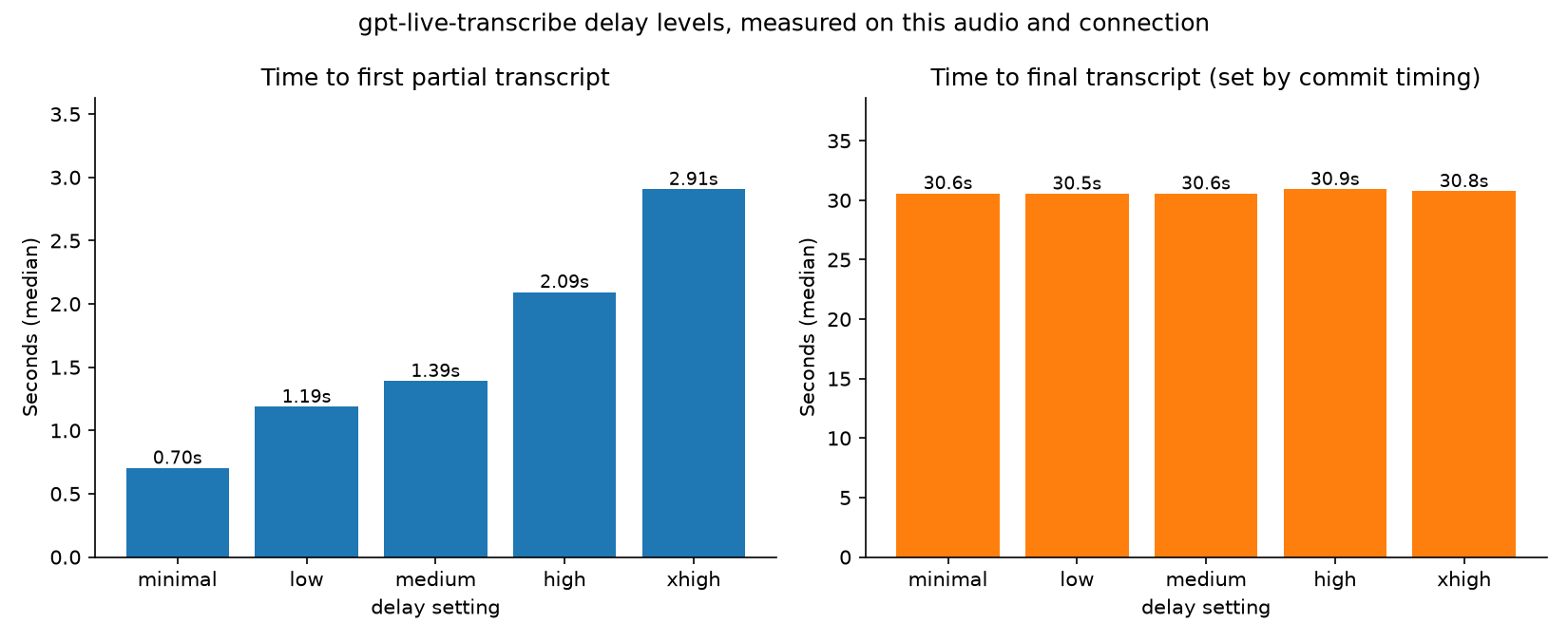
Delay levels trade speed for accuracy. Image by Author.
What I could not confirm was the usual assumption that higher delay means fewer revisions. Delta counts landed between 84 and 86 on every level, close enough to identical that no trend is visible. Time to final stayed within half a second of 30.6 seconds everywhere too, but that reflects my commit timing, not the model. That is why the chart splits the two measurements into panels: on one axis, a two-second spread disappears under bars ten times taller.
Choosing a delay for your use case
For live captions someone reads while a person speaks, start at low. A two-second wait before any text appears feels broken in a way that a caption corrected a moment later does not. For meeting notes nobody reads until later, high or xhigh costs almost nothing. For voice commands, lean toward medium, since a wrong word in a two-word command matters more than usual.
Handling Turn Detection and Audio Commits
Every test so far used turn_detection: null and a manual commit. The Realtime API offers voice activity detection as an alternative, so I wired it up against gpt-live-transcribe instead of assuming it would work. I almost cut this section when the test failed. Then it turned out the failure was the finding.
Manual commits vs. voice activity detection
server_vad chunks audio on periods of silence, configurable through threshold, prefix_padding_ms, and silence_duration_ms. semantic_vad uses a classifier that estimates whether the speaker sounds finished, with an eagerness setting controlling how quickly it decides:
"turn_detection": {"type": "semantic_vad", "eagerness": "auto"}
That is how both modes are documented for the Realtime API in general. Sent to a gpt-live-transcribe session, that exact payload comes back rejected:
{
  "type": "error",
  "error": {
    "type": "invalid_request_error",
    "code": "invalid_value",
    "message": "Turn detection is not supported for this transcription model.",
    "param": "session.audio.input.turn_detection"
  }
}
server_vad produced the identical error. As of August 4, 2026, manual commit is the only turn-detection mode gpt-live-transcribe accepts, even though the transcription guide still tells you to configure voice activity detection so the server commits turns for you. Retest before building around it, since OpenAI could turn VAD on for this model later without telling anyone.
Choosing a turn strategy
Push-to-talk is the easy case, since the press and release already mark the boundaries. Everything else leaves the client deciding when a turn ended, and my first two attempts both got it wrong.
Attempt one guarded the commit with if not mic_queue.empty(), which reads sensibly and never fires: the coroutine draining that queue empties it as fast as the microphone fills it. Partial captions still streamed, which is what made it convincing, but nothing ever finalized. Attempt two committed every four seconds as long as audio had been appended. Against a real microphone that produced this:
[final]   This is a customer support  (item_id=item_E8bCJcvjO9L1KU2zckqOr)
[final]   Abort call about the premium plan on account A  (item_id=item_E8bCNSu1dmYK380JOr1ro)
[final]     (item_id=item_E8bCVgxGSjXTasbrTWE3U)
Two failures at once. The timer cut the sentence mid-word, and the model read a fragment that starts nowhere as "Abort." Then it committed while I was not talking and returned an empty transcript, since a microphone streams chunks whether or not anyone is speaking.
Both come from the same missing information: audio energy. SpeechGate in mic_stream.py tracks the RMS amplitude of each chunk and commits once the speaker has said something and then gone quiet, with a cap so continuous talking still ends somewhere. My first version compared that amplitude against a fixed number, which worked on one machine and was wrong by a factor of five on the next, so it now estimates the room instead and counts anything several times louder as speech. A turn ending on almost no audio, a cough or a door, goes to input_audio_buffer.clear rather than a commit, since asking the model what a door said is how you get an invented word.
Building the Complete Live Captioning App
app.py pulls every piece of this tutorial into one terminal application: microphone capture, live partial captions, a transcript history keyed by item_id, and CLI flags for every field the session accepts.
python app.py --delay low --keywords "AC-42,premium plan" --languages en
Name only the languages you are actually speaking. That same command with en,ar on English speech returned the word "delta" transliterated into Arabic script, which is Test 2's finding running the other way.
--turn-detection defaults to manual, and --silence-hold and --max-turn tune the gate from the previous section. The VAD modes remain as flags in case the API starts accepting them; pass either and the app prints the server's rejection instead of hanging silently.

Complete captioning app running with settings. Image by Author.
On exit it writes a plain-text transcript and a JSON file with the configuration used, a locally measured time-to-first-delta, and each finalized turn with its item_id. I added that export after losing a good test run to a closed terminal. The timestamps in it are client-side, so do not mistake your own instrumentation for an OpenAI figure.
All three tests also run in a browser. demo_app.py is a Streamlit version with one tab per experiment, kept as a demo rather than the main teaching path, since the terminal scripts show the raw events more directly.
streamlit run demo_app.py










Uploading a finished audio file to a transcription endpoint is the easy version of this problem. You wait for the whole file, then get one transcript back. Nobody is staring at a screen while the model works. Live captioning is a different job: audio keeps arriving while you are still deciding what to do with what you have, and the text has to update while the speaker is still talking.
That is the gap
gpt-live-transcribefills. OpenAI released it on July 28, 2026 alongside a batch counterpart,gpt-transcribe. In this tutorial I build a Python captioning client around it and run three tests: a basic streaming client, a comparison of the context hints it accepts, and a benchmark of its five delay settings. I tested with clean English, technical vocabulary, and Egyptian Arabic-English code-switching, since that is closer to a real meeting than one clean narrator.By the end you will have a working captioning app, a sense of which context settings actually help, and a delay setting you can defend instead of guessing at.
For an overview of one of the model's biggest competitors, read our Grok Voice Transcribe 2.0 guide.
What Is GPT Live Transcribe?
gpt-live-transcribeis a streaming speech-to-text model for applications that need transcript text while audio is still arriving. It takes audio in and returns text out, nothing else, tuned by four fields:delayfor latency,promptfor free-form context,keywordsfor literal terms, andlanguagesfor expected input languages. On OpenAI's Context Aware ASR benchmark, free-form context raised semantic accuracy from 38.5 percent to 44.6 percent, which is why Test 2 exists.The model runs inside the Realtime API, not as a separate endpoint, and it is unrelated to GPT-Live, OpenAI's voice system, whatever the names suggest. You open a transcription session, configure it, and the server streams events back over the connection you send audio on. That leaves one question to settle first: which of the two transcription models you actually need.
GPT Live Transcribe vs. GPT Transcribe
OpenAI ships two recommended transcription models, and they are not interchangeable.
gpt-live-transcribeis for continuously arriving audio, a microphone, a phone call, a media stream, where you need partial text before the speaker finishes.gpt-transcribeis for completed recordings, or a Realtime session where you deliberately wait for a committed turn. The docs call that second case a specialized workflow, not a way to get live deltas.One difference trips people up:
gpt-transcribereturns alanguagesarray with the detected input language,gpt-live-transcribedoes not. If your logic branches on detected language, you are reaching for the wrong model, no matter how good its captions look in a demo. Pricing splits along the same line, roughly four to one in the batch model's favor, which I come back to later.What gpt-live-transcribe doesn't return
I would rather tell you this now than after you have built half an app around it. There are no word-level timestamps, no speaker labels, no confidence scores, and no diarization. If you need subtitle timing, notes that say who spoke, or a confidence threshold, OpenAI's guide points to
gpt-4o-transcribe-diarizeorwhisper-1instead.Setting Up GPT Live Transcribe in Python
Every script in this tutorial lives in github.com/KhalidAbdelaty/gpt-live-transcribe, so start by cloning it. You need Python 3.10 or newer and an API key with Realtime access. The scripts themselves rest on four packages:
websocketsfor the connection,sounddevicefor microphone capture,numpyfor the buffer conversion, andpython-dotenvfor loading the key. The requirements file adds a few more for the charts and the browser demo.On macOS,
sounddeviceneeds PortAudio at the OS level (brew install portaudio); on Linux it isapt-get install portaudio19-dev. Skip that line if you are on Windows. I hit the macOS one myself, and the fix really is that single install.The audio itself has to arrive as 16-bit PCM at 24 kHz, mono, little-endian, base64-encoded. Send an MP3 or a stereo WAV and you get garbled output or a closed connection, never a message telling you the format was wrong. That one can eat an afternoon. So the next question is which connection carries the audio.
Choosing WebSocket vs. WebRTC
OpenAI's guidance is plain: WebSocket for server-to-server applications, WebRTC for browser and mobile clients. This tutorial builds a Python backend reading a local microphone, so WebSocket is the right choice, and a standard API key works since it never leaves your server.
Understanding the session and event flow
A session starts with a
session.updateevent that setstype: "transcription"and picksgpt-live-transcribeas the model. Everything else in the payload describes the audio you are about to send. Here is the minimum configuration, from the Realtime transcription guide:turn_detection: Nonedisables automatic voice activity detection, so nothing finalizes until you explicitly commit. Three client events then do the work:input_audio_buffer.appendsends a base64 audio chunk,input_audio_buffer.commitends a turn, and the server answers withconversation.item.input_audio_transcription.delta(partial text) andconversation.item.input_audio_transcription.completed(final text). I connect towss://api.openai.com/v1/realtime?intent=transcription, a pattern from OpenAI's cookbook; the guide does not document that query string, so drop it if it ever stops working.Realtime transcription session event flow diagram. Image by Author.
Building a Basic Live Transcription Client
Test 1 is the smallest version that works: capture microphone audio, stream it, print partial and final text as it arrives. No context, no keywords, nothing tuned, so the event flow stays visible. The first problem is getting audio off the microphone thread without stalling it.
Streaming microphone audio
sounddeviceruns its callback on its own thread with a few milliseconds to return before the driver drops frames, so it cannot wait on a network call. Its only job is converting the float32 buffer to PCM16 and dropping it onto anasyncio.Queuethroughloop.call_soon_threadsafe, while a separate coroutine drains that queue and sends each chunk.A 100-millisecond chunk (2,400 samples at 24 kHz) is a reasonable starting point. Go smaller and you add per-message overhead, go much larger and captions feel laggy. There is no documented correct number, so treat it as a dial.
Handling partial and final transcripts
Deltas are cheap and frequent. Each one carries a piece of text tied to an
item_id. Append it to the partial text you already have for that item, and the caption grows word by word on screen:A
completedevent replaces that partial with the finalized transcript for the same item. Treatcompletedas the source of truth and deltas as a preview, not something to concatenate yourself.Managing transcript state with item_id
Here is the detail that will break your UI if you skip it: OpenAI's guide states that ordering between completion events from different turns is not guaranteed. A
completedevent for an earlier turn can arrive after one for a later turn, so code assuming the newestcompletedbelongs to the newest turn will occasionally jump backward or duplicate a line. Key everything byitem_idinstead, which is what myTranscriptStateclass does.Building it caught two bugs, both about which dictionary the code checked. Appending
item_idto the order list only in the delta handler leftfull_transcript()empty for any receiver processing justcompletedevents. Using the partials dictionary to decide whether an item was new was worse:apply_completed()clears that entry, so a late delta looked brand new, went onto the order list a second time, and printed the finished turn twice. Trackitem_idin both handlers, and check the order list instead.Live partial captions finalizing into transcript. Image by Author.
Against clean English, text appeared within a second or two and matched what I said, punctuation included. Through a laptop microphone with no context set, though, a word the model was unsure of occasionally came back in another script entirely.
languagesis the field for that, which is what Test 2 goes after.Improving Accuracy with Context and Keywords
The model accepts three kinds of context, worth being precise about before testing them.
promptis free-form text describing the setting,keywordsare literal terms the audio might contain, andlanguageslists expected input languages as ISO 639-1 codes likeenorar. None of them force an output. A keyword that was never spoken will not appear just because you listed it, and the only way to learn what these fields really do is to change one at a time.Testing prompt, keywords, and language hints
I ran the same clip through five configurations, three passes each. Two rules keep a comparison like this honest: only one context field changes between runs, and every configuration runs more than once, because the model is not deterministic on identical audio.
My first version set
languageson the combined run only, which broke the first rule: two fields changed at once, so any difference there could have come from either. One formatting rule also cost me a rejected session update: a keyword containing<,>, a carriage return, or a line feed rejects the whole update, not just that keyword.TranscriptionConfig.validate_keywords()catches that before it builds the payload.What context fixed and what it didn't
Keywords helped on the kind of audio you would expect. Every run transcribed the account number as spoken words, since that is what the audio contains. The question was whether the model grouped those words into an identifier or spelled the letters out as "A C forty-two."
Across fifteen runs the split was sharp. Nothing without
keywordsever grouped it:no_context,prompt_only, andlanguages_onlyreturned "A C forty-two" on all nine of their passes. Runs withkeywordsgrouped it on five of six, mostly as the fully formatted "AC-42". Sokeywordsmoved the result andpromptalone never did, matching OpenAI's framing ofkeywordsas the field for literal terms the model might misparse. Keywords alone still missed once, so treat it as a hint that shifts the odds heavily rather than a rule the model follows.That sits awkwardly beside the benchmark figure I opened with, where free-form context lifted semantic accuracy by six points. The two tests measure different things: OpenAI scored meaning across a broad set of audio, while I watched one identifier in one clip. A
promptcan be doing real work on the sentence and still leave the narrow detail you happen to be checking untouched. The only sign of that here is thatpromptandkeywordstogether grouped it on every pass whilekeywordsalone missed one, a difference of a single run.Only keywords grouped the spoken identifier. Image by Author.
Language hints helped more clearly, and on a problem I did not expect. Without a hint, runs on the code-switching clip kept hearing the opening Arabic filler word, roughly "tayyib," as the English "But," and fused the two writing systems into one broken word. They also spelled "billing statement" out phonetically in Arabic script on some passes and left it in Latin on others. Adding
languages: ["ar", "en"]removed the broken word on every pass. That is one clip, though, and a sentence that switches language halfway through is the easiest place for a hint to show up.Benchmarking the Five Delay Levels
delaytakes five values:minimal,low,medium,high, andxhigh. Lower settings can produce partial text sooner. Higher settings give the model more audio context before it commits to text, which can improve accuracy on harder audio. OpenAI is explicit that exact timing varies by configuration and should be benchmarked with representative audio, so that is what Test 3 does.Running the benchmark
test3_delay_benchmark.pystreams the same WAV file through all five levels, several runs each, logging the time from stream start to the first delta and to the final transcript. Keeping the audio, context fields, and commit strategy identical is what makes the comparison mean anything.What the results showed
These figures are not universal. Mine came from three runs per level on one clip, one network, one afternoon. Median time to the first partial ran from 0.70 seconds at
minimalto 2.91 seconds atxhigh, climbing in even steps throughlow(1.19s),medium(1.39s), andhigh(2.09s). The three runs at each level landed within about a fifth of a second of each other, so the ordering is stable even if the numbers are mine and not yours.Delay levels trade speed for accuracy. Image by Author.
What I could not confirm was the usual assumption that higher delay means fewer revisions. Delta counts landed between 84 and 86 on every level, close enough to identical that no trend is visible. Time to final stayed within half a second of 30.6 seconds everywhere too, but that reflects my commit timing, not the model. That is why the chart splits the two measurements into panels: on one axis, a two-second spread disappears under bars ten times taller.
Choosing a delay for your use case
For live captions someone reads while a person speaks, start at
low. A two-second wait before any text appears feels broken in a way that a caption corrected a moment later does not. For meeting notes nobody reads until later,highorxhighcosts almost nothing. For voice commands, lean towardmedium, since a wrong word in a two-word command matters more than usual.Handling Turn Detection and Audio Commits
Every test so far used
turn_detection: nulland a manual commit. The Realtime API offers voice activity detection as an alternative, so I wired it up againstgpt-live-transcribeinstead of assuming it would work. I almost cut this section when the test failed. Then it turned out the failure was the finding.Manual commits vs. voice activity detection
server_vadchunks audio on periods of silence, configurable throughthreshold,prefix_padding_ms, andsilence_duration_ms.semantic_vaduses a classifier that estimates whether the speaker sounds finished, with aneagernesssetting controlling how quickly it decides:That is how both modes are documented for the Realtime API in general. Sent to a
gpt-live-transcribesession, that exact payload comes back rejected:server_vadproduced the identical error. As of August 4, 2026, manual commit is the only turn-detection modegpt-live-transcribeaccepts, even though the transcription guide still tells you to configure voice activity detection so the server commits turns for you. Retest before building around it, since OpenAI could turn VAD on for this model later without telling anyone.Choosing a turn strategy
Push-to-talk is the easy case, since the press and release already mark the boundaries. Everything else leaves the client deciding when a turn ended, and my first two attempts both got it wrong.
Attempt one guarded the commit with
if not mic_queue.empty(), which reads sensibly and never fires: the coroutine draining that queue empties it as fast as the microphone fills it. Partial captions still streamed, which is what made it convincing, but nothing ever finalized. Attempt two committed every four seconds as long as audio had been appended. Against a real microphone that produced this:Two failures at once. The timer cut the sentence mid-word, and the model read a fragment that starts nowhere as "Abort." Then it committed while I was not talking and returned an empty transcript, since a microphone streams chunks whether or not anyone is speaking.
Both come from the same missing information: audio energy.
SpeechGateinmic_stream.pytracks the RMS amplitude of each chunk and commits once the speaker has said something and then gone quiet, with a cap so continuous talking still ends somewhere. My first version compared that amplitude against a fixed number, which worked on one machine and was wrong by a factor of five on the next, so it now estimates the room instead and counts anything several times louder as speech. A turn ending on almost no audio, a cough or a door, goes toinput_audio_buffer.clearrather than a commit, since asking the model what a door said is how you get an invented word.Building the Complete Live Captioning App
app.pypulls every piece of this tutorial into one terminal application: microphone capture, live partial captions, a transcript history keyed byitem_id, and CLI flags for every field the session accepts.Name only the languages you are actually speaking. That same command with
en,aron English speech returned the word "delta" transliterated into Arabic script, which is Test 2's finding running the other way.--turn-detectiondefaults tomanual, and--silence-holdand--max-turntune the gate from the previous section. The VAD modes remain as flags in case the API starts accepting them; pass either and the app prints the server's rejection instead of hanging silently.Complete captioning app running with settings. Image by Author.
On exit it writes a plain-text transcript and a JSON file with the configuration used, a locally measured time-to-first-delta, and each finalized turn with its
item_id. I added that export after losing a good test run to a closed terminal. The timestamps in it are client-side, so do not mistake your own instrumentation for an OpenAI figure.All three tests also run in a browser.
demo_app.pyis a Streamlit version with one tab per experiment, kept as a demo rather than the main teaching path, since the terminal scripts show the raw events more directly.